

Cobra virus is a new variant of Crysis ransomware
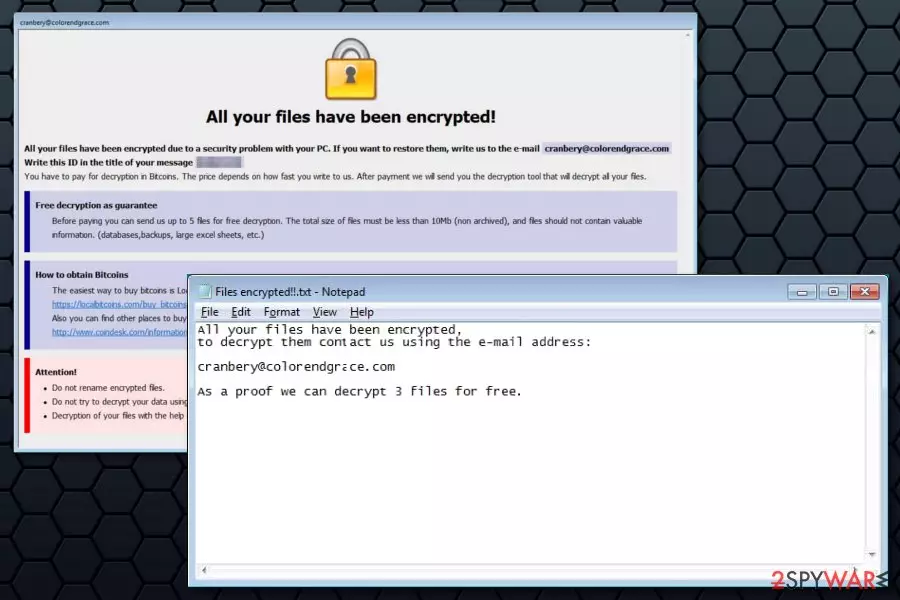
Cobra ransomware is a new file-encrypting virus from the Crysis/Dharma ransomware family that was discovered in November 2017. The crypto-malware appends id-[id].[email].cobra file extension to the targeted files and delivers two ransom notes – info.hta and Files encrypted!!.txt.
Crysis ransomware family is known for launching RDP attacks.[1] However, it’s still unknown how Cobra virus spreads. However, it’s clear that once it finds the way to the system, it starts data encryption not only on the local device but continues spreading via mapped network drives and network shares. Thus, it might cause huge damage, considering the fact that it’s undecryptable.
The virus makes various files inaccessible by appending .cobra file extension. Once it's done, Cobra deletes Shadow Volume Copies that might help to restore files using third-party tools. Then it opens a ransom note in info.hta file as soon as a victim turns on the computer.
This file shows traditional Crysis ransom note. The message says that victims have to send an email to cranbery@colorendgrace.com with a unique ID number. Additionally, victims can send up to 5 files for free decryption that are not bigger than 10 Mb and does not contain “valuable information.”
After Cobra malware attack, victims should also find Files encrypted!!.txt file on the desktop. The second ransom note gives a slightly different information:
All your files have been encrypted,
to decrypt them contact us using the e-mail address:cranbery@colorendgrace.com
As a proof we can decrypt 3 files for free.
It seems that crooks cannot decide if they want to be generous and decrypt 5 or 3 files for free. However, it doesn’t matter. These files might be the only ones you might manage to get back. Hackers are not reliable, so you should not follow their rules and remove Cobra ransomware immediately.
Ransomware might make numerous system changes and affect legit processes. For this reason, you should not try to delete malware-related components manually. You should opt for the automatic Cobra removal using FortectIntego or another malware removal program.

Ransomware distribution methods and precaution tips
As it was mentioned before, specific Cobra distribution ways are unknown. The Crysis ransomware family is spreading via RDP attacks. Therefore, the latest variant is expected to follow the same distribution method. However, security experts from Les Virus[2] warn that criminals might change or test new distribution strategies, such as:
- malicious spam emails that trick into opening infected attachment;
- malware-laden ads that might be displayed even on legit websites;
- illegal downloads or software updates available on unauthorized third-party sites or pop-ups.
Users are advised to stay away from spam and unknown emails and especially their attachments. Open included documents only if you know the sender and the provided issue is real.
Additionally, you should stay away from suspicious or too-good-to-be-true ads that offer great shopping deals or warn about outdated software. If you need installing a new program or its update, you always have to choose official publisher’s sites. Finally, you should keep all your programs and operating system updated.[3]
Removal of the Cobra ransomware virus
The crypto-malware makes critical changes to Windows OS. For this reason, you should opt for the automatic Cobra removal in order to eliminate malicious components without damaging the system. Thus, you should obtain reputable malware removal software, such as FortectIntego or MalwarebytesMalwarebytes, and run a full system scan.
Malware is likely to block attempts to install, update or run security software. Thus, to remove Cobra ransomware, you should reboot the PC to Safe Mode with Networking to disable the virus. The instructions provided below.
Did this guide help?
Be the first to comment