

Curumim virus is a Portuguese variant of an infamous Hidden Tear ransomware
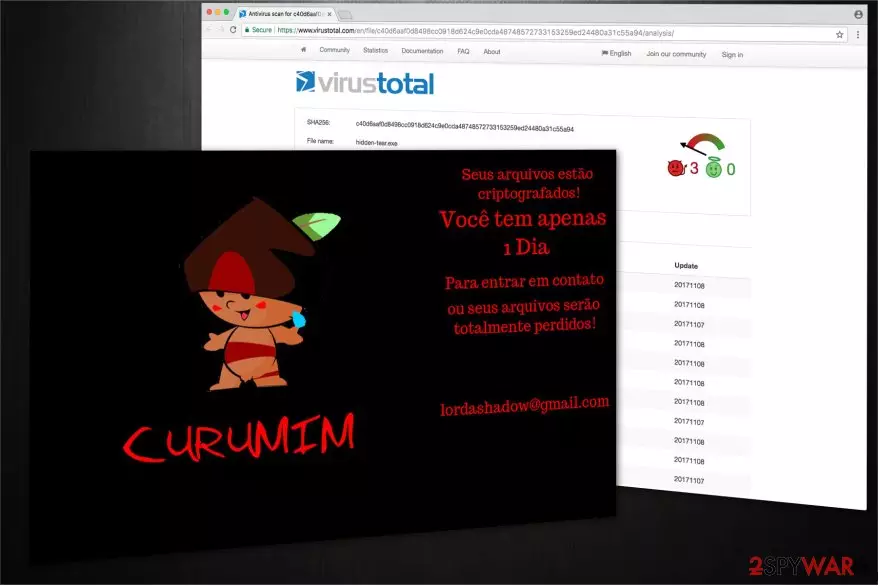
After the successful encryption, the computer user receives a ransom note that insists on contacting the attackers via lordashadow@gmail.com e-mail address to recover the data containing a .curumim file extension[1].
According to LosVirus.es[2] analysis, this malware can encode databases, video and audio files, pdf documents, archives and other files. The translated version of the Curumim virus ransom note states the following:
Your files are encrypted!
You only have 1 day
To get in touch or your files will be totally lost!
lordashadow@gmail.com
The amount of a demanded payment is yet unknown. However, victims are still not advised to trust the criminals. Usually, the perpetrators manipulate their power and increase the amount of the ransom after the transaction. You should not hesitate and remove Curumim ransomware immediately.

Be aware that alternative decryption tools that are widely offered online might be developed to swindle money from gullible people. Therefore, do not try to purchase useless decryptors and focus on the Curumim removal instead.
You should employ a powerful security software to get rid of the malware. Additionally, we want to warn you not to try to uninstall the ransomware by yourself since it may lead to a permanent computer damage. Alternatively, you should pick FortectIntego, MalwarebytesMalwarebytes or any other antivirus system of your choice to perform a safe termination of the malware.
Besides, you should remember that elimination process of Curumim ransomware does not help regain access to the corrupted data. However, we recommend you to restore your files using backup copies stored in the cloud or alternative techniques that are presented at the end of this article.
Malspam campaigns and fake system updates are the main distribution methods used to spread the ransomware
While there are many distribution methods employed by cybercriminals, sending spam emails with a malicious attachment[3], remains the most significant one. Victims receive a genuine-looking letter from a well-known company or even governmental institution. Once they open the file attached to the e-mail message, an executable file of the malware is dropped on the computer and ransomware infiltrates on the system.
Another similarly dangerous method used is to deliver a fake system update offer that looks legitimate to the user. Many gullible people believe that it is an official upgrade and download an executable of the ransomware. Experts note that the most common fake pop-ups are Adobe and Windows OS updates. Make sure to stay away from them if you want to protect your system from invasion.
Learn how to get rid of Curumim file-encrypting virus
The fastest way to remove Curumim virus is to employ a powerful security software. It is also the safest way since the antivirus system will detect and eliminate other infections that might be delivered by the malware.
Be aware that the ransomware might block you from installing a security software. Thus, you should reboot your computer to Safe Mode and run a full system scan.
If you want to do it the hard way — start a manual Curumim removal by following the guide provided below. We advise you to avoid skipping steps since it may lead to further issues related to your computer.
Did this guide help?
Be the first to comment