

“All Access To This Device Has Been Revoked” scam reminds you to clean your computer
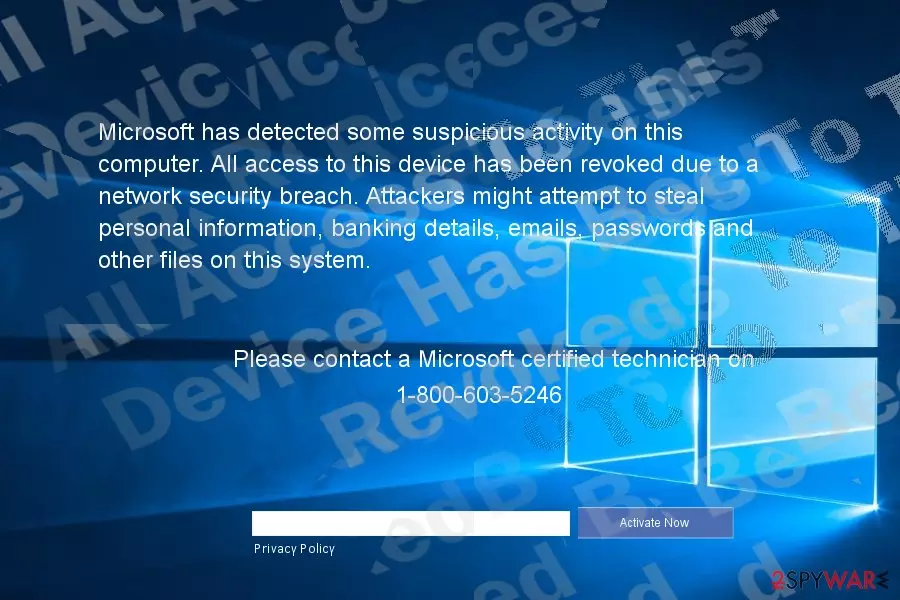
“All Access To This Device Has Been Revoked” virus is Windows-based tech support scam[1] which locks your computer and instructs to dial 1-800-603-5246. Unlike recent browser-based dozens of scams which temporarily hijack your browser and scare with System Critical alert notifications, this scam locks out users from their Windows accounts. In overall, such tech scams are not uncommon.
There are multiple samples of this malware which offer services of supposed Microsoft specialists and try to persuade you into paying money for a false activation of the operating system. Alternatively, they terrify you with counterfeited claims about the detected illegal activity.
This scam works the same way. It locks your Windows user account screen and notifies that “Microsoft has detected some suspicious activity on this computer. All access to this device has been revoked due to a network security breach.”
The developers of this scam might be praised for sufficient written English. Previously fake messages often contained grammar mistakes giving out the deceptive origin. On the other hand, native English speakers may also realize that the content of the message seems quite “non-local.”[2]
Other features which help identify this message as a scam are the phone number and links to Team Viewer, Supremo, and a few other remote access software. Bear in mind that Microsoft never displays such message nor it locks your computer even if Windows activation key expires.
The phone number is the main indicator suggesting that it purely a tech support scam sample. Instead, you should remove “All Access To This Device Has Been Revoked” scam. FortectIntego or MalwarebytesMalwarebytes accelerates the elimination process. Before that, you will need to unlock your computer. MalwareHunterTeam, who discovered this scam also found out the unlock code – 8716098676542789.
Pay attention to what you install
PC-based tech support scams function via .exe files. However, they need the environment and the trigger to get executed. In short, you most likely downloaded the executable file of this malware along with a free tool.
Most likely, it was a free application or more notorious tool: keygen, crack or another software cracking utility. Installing the main program also triggered “All Access To This Device Has Been Revoked” hijack.
In the first case, in order to avoid such PC-malware, pay attention to the installation wizard. Choose “Advanced” installation mode and check each mode for any potentially unwanted add-ons. Deselect them and only then install the main software. Let us move on “All Access To This Device Has Been Revoked” removal section.
Delete “All Access To This Device Has Been Revoked” virus
Enter the above-indicated code to unlock the computer. After that, launch the security application to remove “All Access To This Device Has Been Revoked” virus. You might also scan the computer in Safe Mode. Below instructions show how to do that. Such malware may be distributed not only in English but Chinese[3], Swedish and Spanish domains. “After All Access To This Device Has Been Revoked” removal, reboot the device and repeat the scan.
Did this guide help?
Be the first to comment