

Rastakhiz ransomware – a virus that locks all personal files and demands a ransom
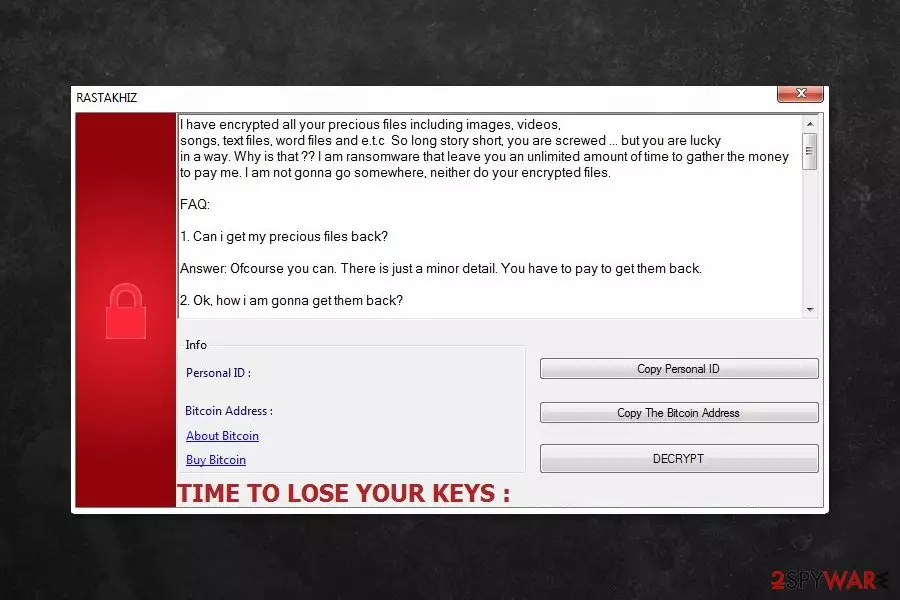
Rastakhiz is a HiddenTear[1] based malware that is designed to encrypt files on the targeted computer. Ransomware appends .RASTAKHIZ file extension in order to make files inaccessible. Following this destructive behavior, the virus delivers a poorly written and impolite ransom note.
The ransom note tells that users are “screwed” because the ransomware encrypts their images, videos, songs, text files, and other data. Victims are asked to transfer the ransom of 250 USD to the provided Bitcoin wallet address until the given time expires.
| name | Rastakhiz |
|---|---|
| Type | Ransomware, cryptovirus, file-locker |
| Symptoms of infection | Personal files are encrypted and renamed; ransom note appears |
| Ransom amount | $250 |
| Criminal contact details | gsah5029@gmail.com, andalihacker8001@gmail.com |
| Distribution | Fake Flash Player updates, file-sharing platforms, spam emails |
| Elimination | Instead of paying the criminals, remove the ransomware and use alternative data recovery options |
| System health | Use the FortectIntego PC repair tool to fix all system irregularities that the infection might have caused |
The ransom note provides detailed instructions on how to pay the ransom and claims that developers are the only ones who can help to get back access to the encrypted files, and users should trust them:
“Don’t worry about decryption. We will decrypt your files surely because nobody will trust us if we cheat users.”
Victims are also asked to provide their unique ID number and email address in order to receive the decryption key. According to the researchers, the authors of the ransomware will respond within 6-8 hours via gsah5029@gmail.com or andalihacker8001@gmail.com email addresses. However, it’s doubtful that Google won’t notice such strange activities and won't suspend these accounts.
However, no matter what criminals promise, you should not believe them.[2] No one can assure if they keep their word or have a working decryption software. Thus, it’s better to remove Rastakhiz from the device to avoid money loss and make sure that your computer is safe to use again.
Additionally, some of the files might be restored with HiddenTear decryptor or other third-party software. However, if you have backups, you should not worry about criminals’ demands. You should opt for the removal immediately.
Keep in mind that crypto-viruses are complicated cyber threats. They might affect legit system processes and install numerous malicious components. Thus, you should use SpyHunterCombo Cleaner, MalwarebytesMalwarebytes, or another legit malware removal tool to eliminate all malware-related files safely.
Once you eliminate .RASTAKHIZ file virus from your device, you must use the time-proven FortectIntego software to repair corrupted system files, fix broken DLLs, and remove all traces of the infection. This tool will also delete all tracking cookies that might endanger your privacy.

Avoid file-encrypting viruses by taking precautionary measures
Rastakhiz, as well as many other crypto-viruses, spread via malicious spam emails, bogus downloads, fake updates, or malicious ads. Malware researchers from Bedynet[3] report that any antivirus, anti-malware, anti-spyware, or another sophisticated security program cannot fully protect a device from malware. Thus, users should protect themselves by following these tips:
- Do not open suspicious or spam emails. If you open it, do not click on any content, such as links, buttons, or attachments, because they might install malware on the PC.
- Before opening email attachments or other content, always check the information about the sender and the issue.
- Download software from the publishers of developer’s websites only.
- Stay away from torrents, P2P networks, file-sharing sites, and similar free sources because they often include malicious content that looks like safe programs or cracks.
- Do not download illegal content, including programs, music, movies, etc.
- Update software from the official sources and ignore pop-up alerts that might appear on various websites. They are always malicious.
- Make backups and update them regularly.
Detailed instructions to remove Rastakhiz virus
If you are thinking about manual Rastakhiz removal, you should get rid of this idea right now. It’s a complicated and risky activity because you might damage the system or keep some malware-related entries on the device.
To remove the ransomware safely and entirely, you have to use a reputable anti-malware program and run a full system scan. We recommend using SpyHunterCombo Cleaner and MalwarebytesMalwarebytes, but you can choose your preferred tool as well. However, if you cannot install a security program, follow the guide below.
When you remove Rastakhiz ransomware, don't forget to perform system diagnostics to ensure that all virus traces are gone and to ensure that your computer runs smoothly. We strongly recommend entrusting this task to the patented FortectIntego software.
Did this guide help?
Be the first to comment