

Cryp70n1c blackmails users to pay the ransom for the encoded files
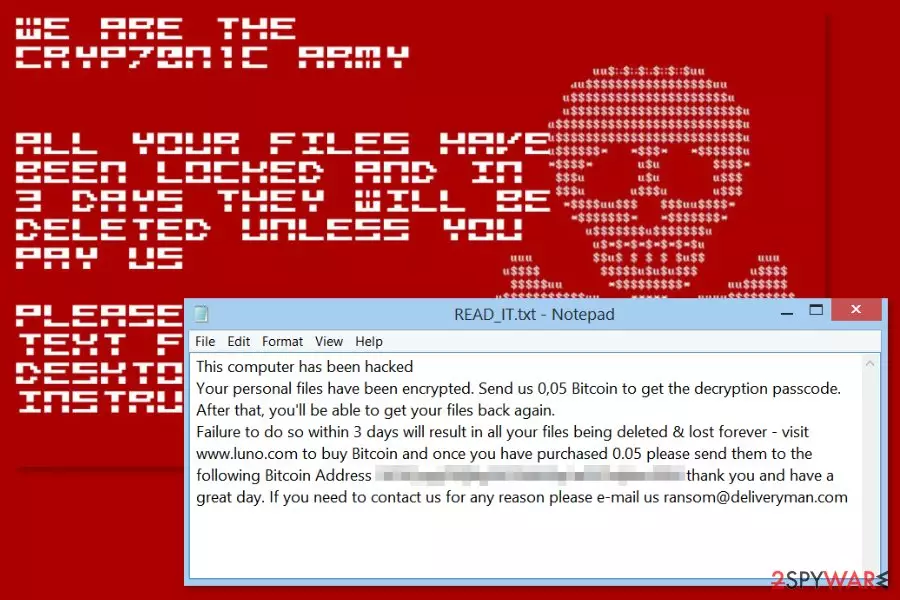
Cryp70n1c (also known as Cryp70n1c Army) is a HiddenTear-based[1] ransomware virus that spreads as a fake PDF cracker. Once installed, it starts data encryption procedure. It uses AES cryptography and appends .cryp70n1c file extension for targeted data. Then it provides shady decryption offer in READ_IT.txt file placed on the desktop.
When a user downloads a malicious program, it creates a new folder with ransomware-related files: C:\Users\Clinton\Desktop\CRYPTONIC HACKING TOOLS\hidden tear online with server\hidden-tear-master\hidden-tear\hidden-tear\obj\x86\Debug\hidden-tear.pdb. Then Cryp70n1c virus starts data encryption procedure and locks all popular file extension with a sophisticated cipher.
Furthermore, authors of the Cryp70n1c ransomware informs about a hacked computer in the ransom note. They ask to send 0.05 Bitcoins to the provided address and send an email to ransom@deliveryman.com. Victims have to follow the orders within 3 days time; otherwise, encrypted files will be deleted. However, security experts do not recommend trying to recover lost files in such way.
Following data encryption, Cryp70n1c Army ransomware changes affected computer’s desktop picture with a skull image that resembles the one used by Petya ransomware. However, these cyber threats are not related. The new wallpaper includes a short, threatening message as well:
We are the Cryptonic Army
All data files have been locked and in 3 days they will be deleted unless you pay us
Please find the text file on your desktop for instructions
Instead of following criminals’ instructions, you should remove Cryp70n1c from the device as soon as possible. The malicious program makes the system vulnerable and might open a backdoor to other cyber threats. Additionally, the infiltration of ransomware prevents from using the computer normally due to system slowdowns, crashing programs, and similar errors.
Thus, you should dedicate some time for Cryp70n1c removal. For that you, you will have to reboot the computer to Safe Mode with Networking and use reputable malware removal tools, such as FortectIntego.
Hackers offer to join Army Cryptonic
Cyber criminals not only targets computer users and wants to swindle their money, but create a whole hackers community. They have a website where they suggest joining their team and “take control back” by fighting government and business.
The website reveals that behind Cryp70n1c project stands three hackers who claim to be responsible for “Julius Malema hack,[2] several database dumps as well as defacing 3 government websites”. However, their website is poorly made, and security experts have strong doubts about their capabilities and potential success.

Ransomware spreads as a cracker for PDF
The malicious program spreads as a PDF-Cracker-v2.0.1 file. It pretends to be a cracker for PDF program. Therefore, users who are looking for an illegal way to get software license for free or use suspicious file-sharing networks can be tricked into installing crypto-malware.
However, security experts from No Virus[3] suggest being careful with free downloads, as well as, keeping away from unknown emails and their attachments, software update pop-ups, suspicious ads, and browsing through high-risk websites to minimize the possibility of ransomware attack.
Removal of the Cryp70n1c Army
Cryp70n1c removal should be your priority. The malicious program not only damages the files but negatively impacts the system. Unfortunately, virus removal won’t help to restore files, but once it’s done, you will be able to use backups or try alternative recovery methods.
In order to remove Cryp70n1c, you have to restart the computer to Safe Mode with Networking (instructions below) and run a full system scan with FortectIntego, MalwarebytesMalwarebytes or another professional malware removal program.
Did this guide help?
Be the first to comment