

Kissanime virus is malware that can be unintentionally downloaded from anime-streaming site

Kissanime virus is a term used to describe a set of infections that are associated with an anime (Japanese animation) streaming site. While the original site has been shut down due to copyright infringement, many mirrors using .ru or .ca extensions, for example, appeared on the internet, showing malicious ads and prompting downloads of potentially unwanted programs.
Once infected, the malware starts displaying a variety of ads and redirects users to technical support scam, phishing, or spoofing sites. Additionally, it also might lead to further malware infections, as drive-by downloads exploit vulnerabilities in the system to inject malicious payloads without user intervention.
Due to its deceptive nature, virus removal will require you to download and install security software. In some cases, accessing Safe Mode with Networking might be necessary. In some cases, users might see ads because they've accepted push notifications by accident, in which case they need to alter browser settings to resolve the persistent Kissanime ads.
| Name | Kissanime virus |
| Type | Malware |
| Infiltration | Users can get infected with the virus by clicking on links or even browsing the site |
| Risks | Sensitive data exposure, money loss, identity theft, further malware infections |
| Symptoms | Intrusive ads and redirects, computer slowdown, unexpected dialog boxes, automatic downloads, etc. |
| Removal | Streaming sites can be extremely dangerous, so we recommend using anti-virus software in order to find out the root infection |
| Recovery | To fix virus damage and quickly recover from the infection, use FortectIntego |
Numerous infected users
Infecting your computer with a virus when visiting any of the Kissanime domains is quite high. Multiple users on Reddit and other sources complained about its deceptive functionality, such as:[1]
It opens a new tab that tells me to add their add-on to my browsers, opens loads of dialogue boxes and starts a download without my permission, which has been detected by Avast to be a virus. Seriously, I dont mind adds as long as it aint breaking my computer, so sort your stuff out kissanime staff! The site as it is now is not safe to use.
Besides, the website is often associated with the illegal distribution of series and movies, and, just like torrents, such sites are considered to be hazardous. In some cases, simply clicking on an empty space on the site (not even the hyperlink) might prompt a drive-by download,[2] and the virus would be installed automatically, without user intervention.

Pop-ups, flashing windows, and redirects to Kissmanga domain: you are infected with adware
If your computer is experiencing continual redirects to the Kissanime website and your Google Chrome, Safari, Mozilla Firefox, Internet Explorer, or another browser is filled with intrusive advertisements, it is highly likely that adware or other malware is involved. This type of virus relates to a potentially unwanted program that is usually installed together with freeware or shareware.
Adware collects information that identifies your interests, such as clicked ads, browsing the history, geolocation, etc.[3] Nevertheless, the infection might also be associated with the illegal gathering of personally identifiable data. The aggregated information can be used for various malicious purposes, such as sold to cybercriminals, used for marketing purposes, or targeted advertisements.[4]
Likewise, you are attracted to click on them repeatedly and help generate pay-per-click revenue for its developers. Note that this tendency to open ads can be dangerous and damage your computer.
Therefore, you should remove the virus right after you encounter a bogus pop-up. It is convenient to use FortectIntego since automatic elimination saves your time and ensures that the procedure is appropriately held. Additionally, you should clean additional extensions from your browsers afterward.
Even though the official Kiss Anime page is not a virus, you might get confused. Therefore, we have prepared detailed instructions which will guide you through Kissanime removal and help you identify the malicious program on your computer.

Do not download or stream illegal videos, or you might get infected with malware
Many people might be attracted to download software from peer-to-peer networks illegally since they are free[5]. However, they do not evaluate the possibility that hackers might disguise bogus programs with an innocent look. Thus, naive computer users usually infiltrate unwanted or even dangerous software when they download deceptive applications.
They might look like PDF converters, system optimization tools, or other “handy” programs. However, they are designed to trick you into downloading them without hesitation and infusing the PUP or malware together. Therefore, we recommend you install software only from verified developers and use direct download links if possible.
Additionally, note that adware might hide inside the installers of regular applications as well. This distribution technique is called bundling and allows the developers of potentially unwanted programs to spread their products without the user's consent.
Bundling is based on the reckless behavior of inexperienced computer users. The contrivers do not disclose information about the adware during the installation procedure with Quick or Recommended settings. Therefore, those who aim to rush through the process will manually infiltrate the PUP on their systems.
If you want to protect your computer, choose only Advanced or Custom settings and carefully follow the steps. You should be able to detect and un-mark pre-selected checkmarks, which allows installing the bundled program. Likewise, uncheck it right away.
Reasons why you should steer away from Kissanime and similar illegal streaming platforms
There are many reasons why you should avoid streaming from websites that host copyrighted material without permission. These include but are not limited to the following:
- Legal Consequences. Streaming copyrighted material illegally can lead to serious legal penalties, including fines, damages, and potentially even jail time.
- Virus and Malware Risk. Such unauthorized sites often contain harmful software which can put your device and personal information at risk.
- Supporting the Industry. By using legal streaming services, you're supporting the creators and the entire industry that brings you the content you enjoy, ensuring more can be created in the future.
- Quality Issues. Unauthorized streaming sites often deliver poor video and audio quality, diminishing the viewing experience.
- Potential for Identity Theft. Some unauthorized streaming websites may ask for personal information, which can lead to identity theft if shared.
- Ad Intrusiveness. Illegal streaming websites typically generate revenue through intrusive and potentially harmful advertisements, which can disrupt your streaming experience.
- Ethical Concerns. Using unauthorized streaming services is essentially obtaining a product for free that others have worked hard to create and distribute. This could be considered an unethical practice.
Get rid of computer nasties
Kissanime virus removal highly depends on its type, as there are a variety of infections that could represent it. For example, trojans, cryptojackers, backdoors, rootkits, and similar dangerous threats should always be terminated using reputable security software, as manual elimination for regular users would be too complicated. Besides, anti-virus will make sure that all the components of the virus, as well as other infections, are terminated.
While we recommend performing a system scan using security tools regardless, you can remove adware from your computer manually as well. You should enter the full list of the installed programs and then look for anything suspicious: toolbars, video converters, download managers, system optimizers, and similar useless software.
Experts[6] recommend resetting each installed browser, including Internet Explorer, MS Edge, Mozilla Firefox, Google Chrome, etc. This should be done in case adware changes web browser settings – simply follow the guidelines below.
Finally, if you are seeing push notifications from Kissanime or similar untrustworthy websites and can't seem to get rid of them, the guidelines below will explain how to do that easily.
Uninstall from Windows
Uninstall from Windows 10/8:
- Type Control Panel into the Windows search box and open the result.
- Under Programs, select Uninstall a program.


Uninstall from Windows 7/XP:
- Click on Windows Start > Control Panel (Windows XP users should click on Add/Remove Programs).
- In Control Panel, select Programs > Uninstall a program.


Remove the unwanted program:
- In the Programs and Features window, look for any recently installed suspicious entries, select them, and click Uninstall.
- If User Account Control appears, click Yes to confirm, then complete the removal.


Delete from macOS
Remove the unwanted application:
- From the menu bar, select Go > Applications.
- In the Applications folder, look for any suspicious entries, then drag them to Trash (or right-click and pick Move to Trash).


Delete leftover files and folders:
- Select Go > Go to Folder.
- Enter /Library/Application Support and remove any suspicious folders related to the unwanted program.
- Repeat the same check in the /Library/LaunchAgents and /Library/LaunchDaemons folders, deleting any suspicious entries.

- Finally, empty the Trash to permanently remove the leftovers.

Remove from Microsoft Edge
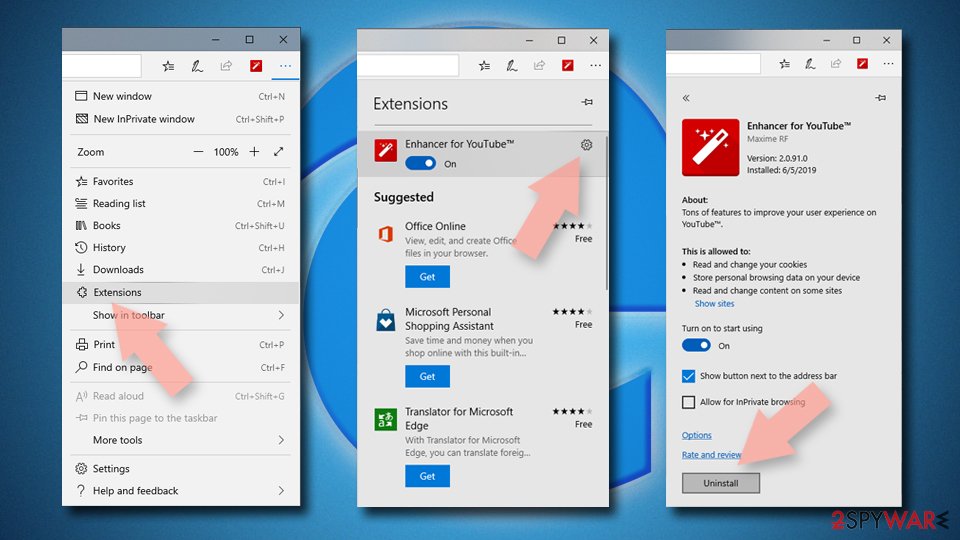
Delete unwanted extensions from MS Edge:
- Select Menu (three horizontal dots at the top-right of the browser window) and pick Extensions.
- From the list, pick the extension and click on the Gear icon.
- Click Remove.

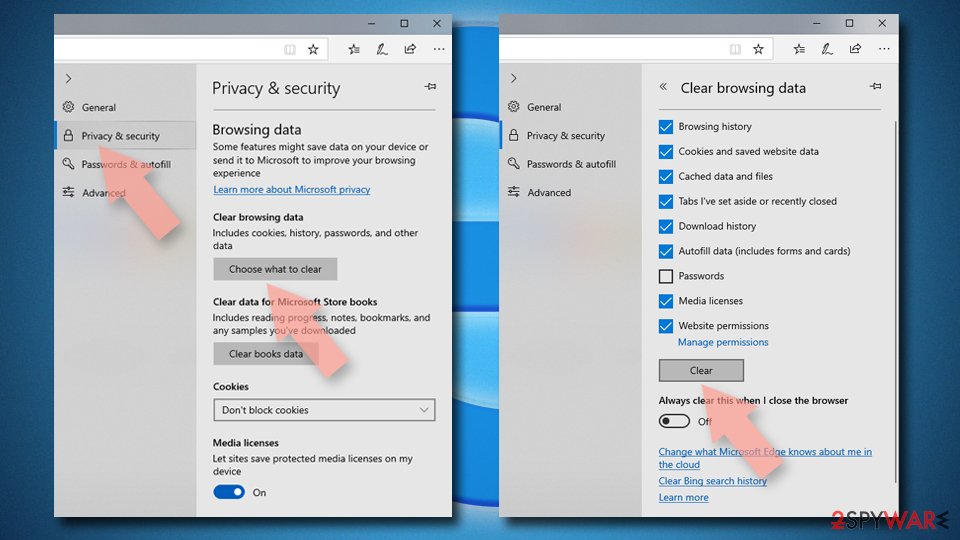
Clear cookies and other browser data:
- Click on the Menu (three horizontal dots at the top-right of the browser window) and select Settings > Privacy, search, and services..
- Under Clear browsing data, pick Choose what to clear.
- Select Cookies and other site data and Cached images and files. (apart from passwords, although you might want to include Media licenses as well, if applicable) and click on Clear.

Restore new tab and homepage settings:
- Click the menu icon and choose Settings.
- Then find On startup section.
- Click Remove next to any suspicious startup page.
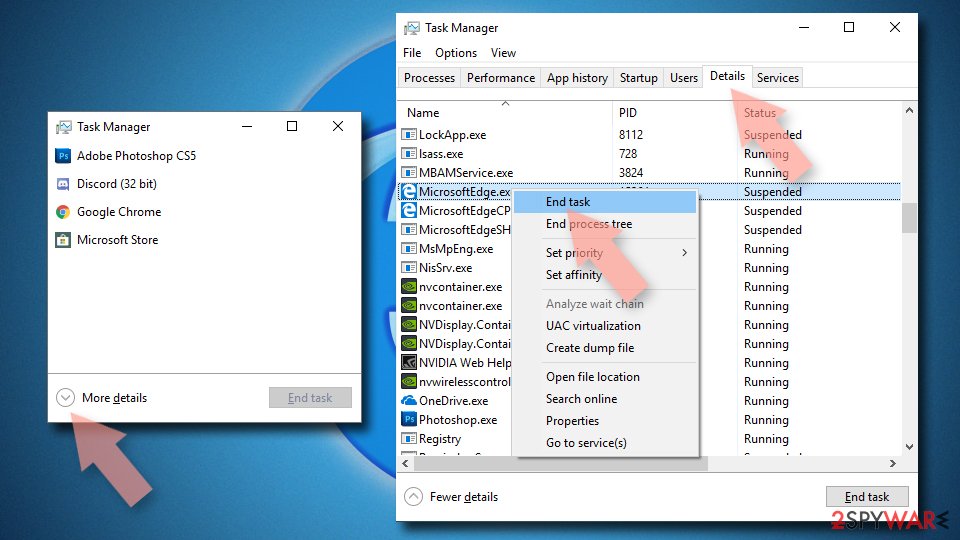
Reset MS Edge if the above steps did not work:
- Press on Ctrl + Shift + Esc to open Task Manager.
- Click on More details arrow at the bottom of the window.
- Select Details tab.
- Now scroll down and locate every entry with Microsoft Edge name in it. Right-click on each of them and select End Task to stop MS Edge from running.

Instructions for Chromium-based Edge
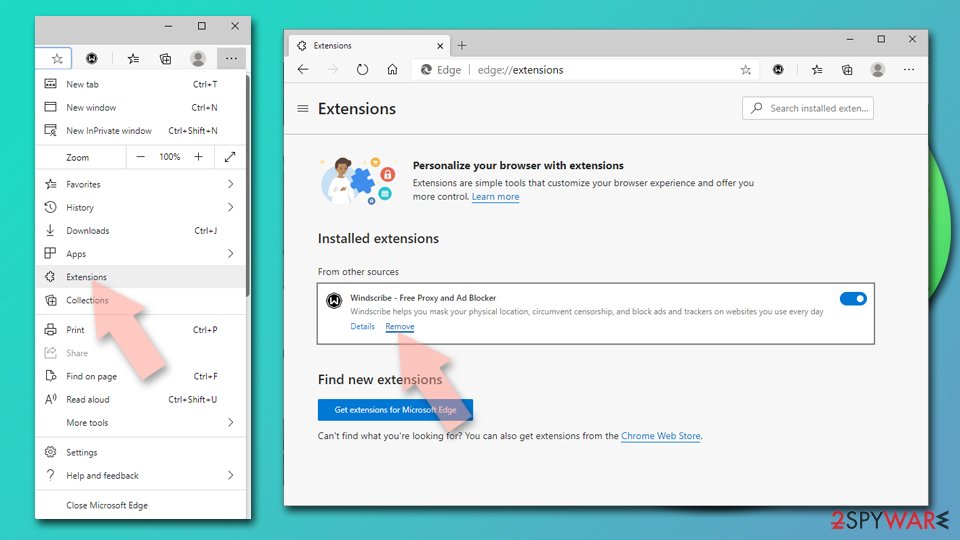
Delete extensions from MS Edge (Chromium):
- Open Edge and click select Settings > Extensions.
- Delete unwanted extensions by clicking Remove.

Clear cache and site data:
- Click on Menu and go to Settings.
- Select Privacy, search and services.
- Under Clear browsing data, pick Choose what to clear.
- Under Time range, pick All time.
- Select Clear now.


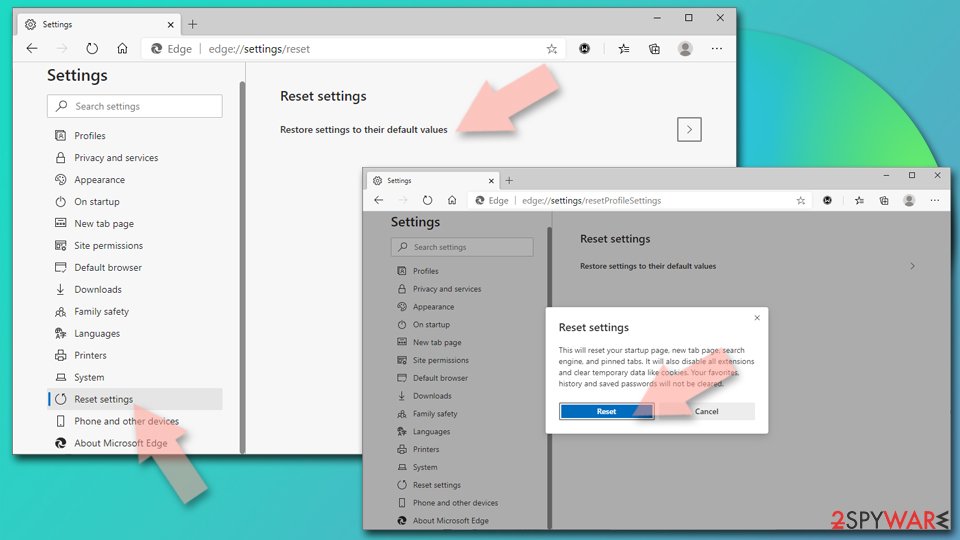
Reset Chromium-based MS Edge:
- Click on Menu and select Settings.
- On the left side, pick Reset settings.
- Select Restore settings to their default values.
- Confirm with Reset.
- This will disable extensions and reset startup pages but will not delete bookmarks, saved passwords, or browsing history.

Remove from Mozilla Firefox (FF)
Remove dangerous extensions:
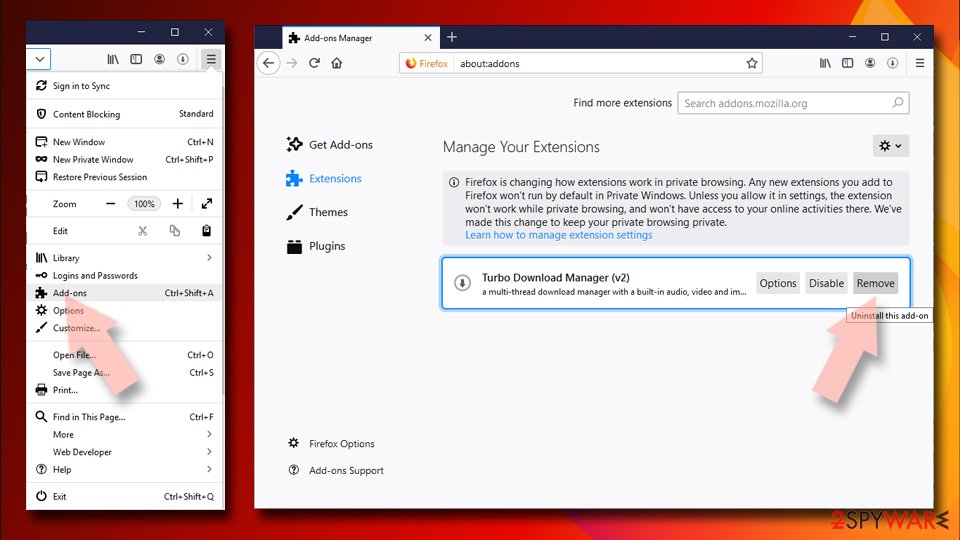
- Open Mozilla Firefox browser and click on the Menu (three horizontal lines at the top-right of the window).
- Select Add-ons.
- In here, select the unwanted extension and click Remove.

Reset the homepage:
- Click three horizontal lines at the top right corner to open the menu.
- Choose Settings.
- Under Home, set your preferred homepage and new tab settings.
Clear cookies and site data:
- Click Menu and pick Settings.
- Go to Privacy & Security section.
- Scroll down to locate Cookies and Site Data.
- Click on Clear Data...
- Select Cookies and Site Data and Temporary cached files and pages, then click Clear.


Reset Mozilla Firefox
If clearing the browser as explained above did not help, reset Mozilla Firefox:
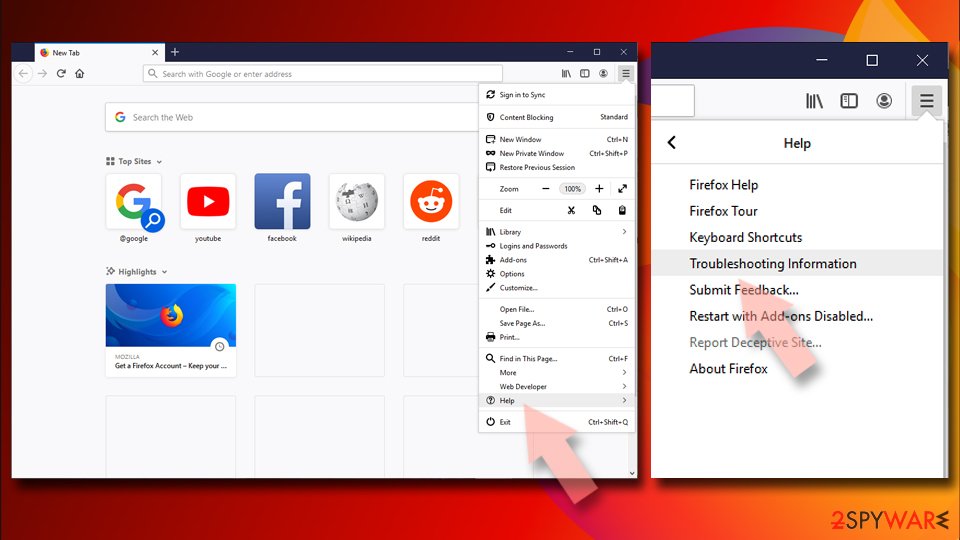
- Open Mozilla Firefox browser and click the Menu.
- Go to Help and then choose Troubleshooting Information.
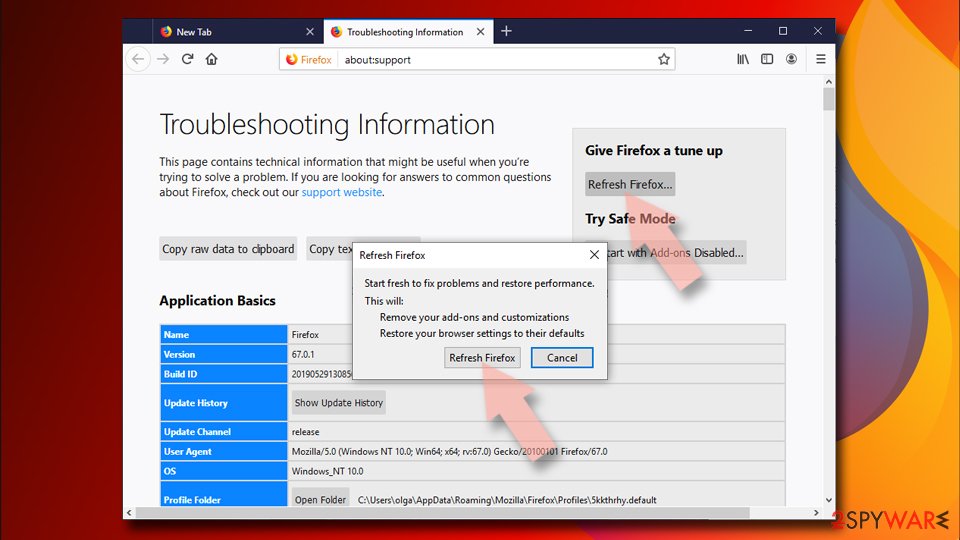
- Under Give Firefox a tune up section, click on Refresh Firefox...
- Once the pop-up shows up, confirm the action by pressing on Refresh Firefox.


Remove from Google Chrome
Delete malicious extensions from Google Chrome:
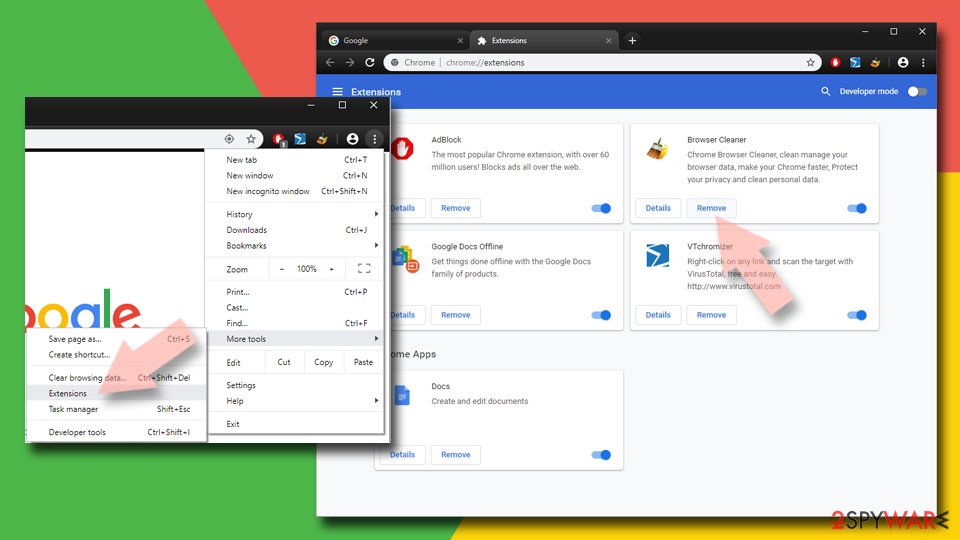
- Open Google Chrome, click on the Menu (three vertical dots at the top-right corner) and select More tools > Extensions.
- In the newly opened window, you will see all the installed extensions. Uninstall all suspicious extensions related to the unwanted program by clicking Remove.

Clear cache and web data from Chrome:
- Click on Menu and pick Settings.
- Under Privacy and security, select Clear browsing data.
- Select Browsing history, Cookies and other site data, as well as Cached images and files.
- Click Clear data.


Change your homepage:
- Click menu and choose Settings.
- Look for a suspicious site in the On startup section.
- Click on Open a specific or set of pages and click on three dots to find the Remove option.
Reset Google Chrome:
If the previous methods did not help you, reset Google Chrome to eliminate all the unwanted components:
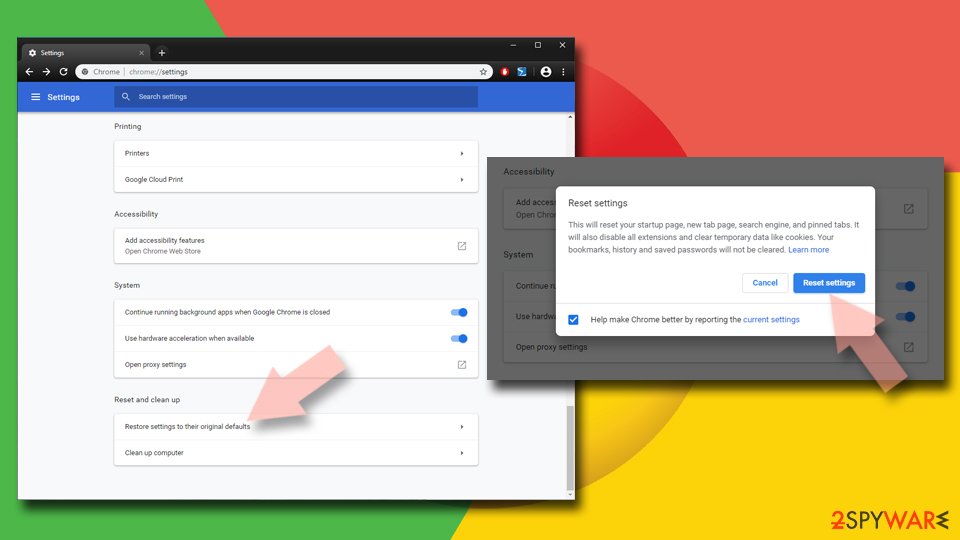
- Click on Menu and select Settings.
- In the Settings, scroll down and click Advanced.
- Scroll down and locate Reset and clean up section.
- Now click Restore settings to their original defaults.
- Confirm with Reset settings.

Delete from Safari
Remove dangerous extensions:
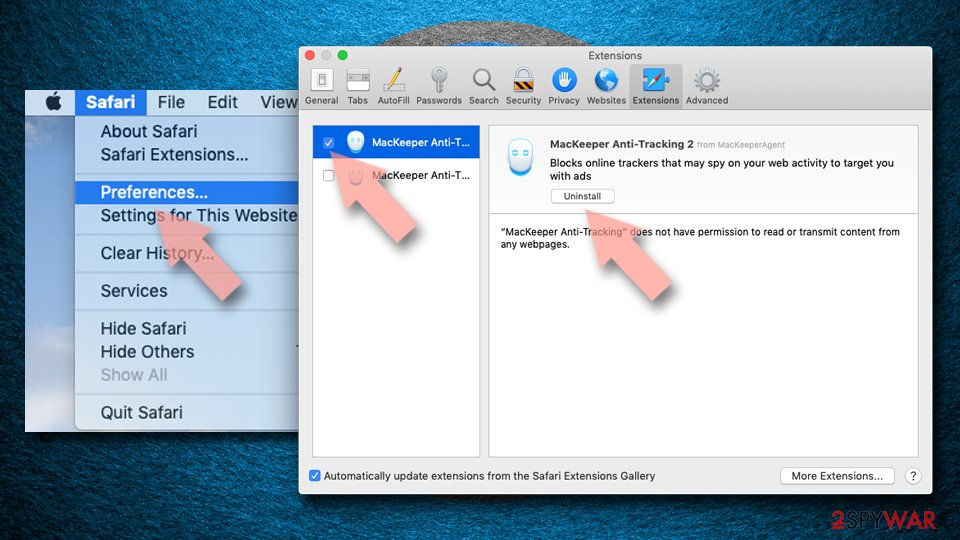
- Open Safari, click Safari in the menu at the top-left of the screen, and select Preferences.
- Go to the Extensions tab, look for any suspicious entries, and click Uninstall to remove them.

Clear history and website data:
- Click Safari in the menu and pick Clear History.
- Set Clear to all history and confirm with Clear History.


Reset Safari:
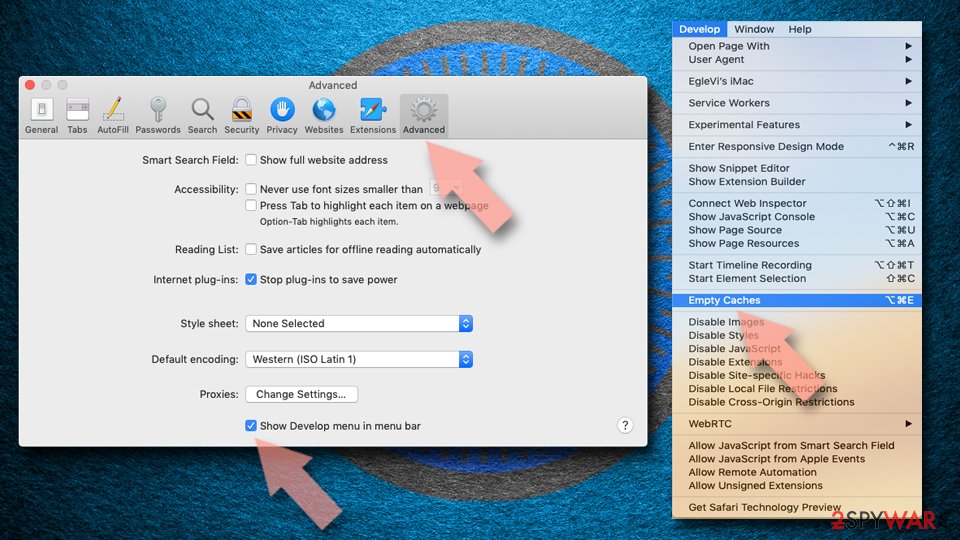
- Click Safari in the menu and select Preferences > Advanced.
- Enable Show Develop menu in menu bar.
- From the menu bar, click Develop and select Empty Caches.

Did this guide help?
Be the first to comment