

New Mobef-Salam ransomware targets people located particularly in Italy
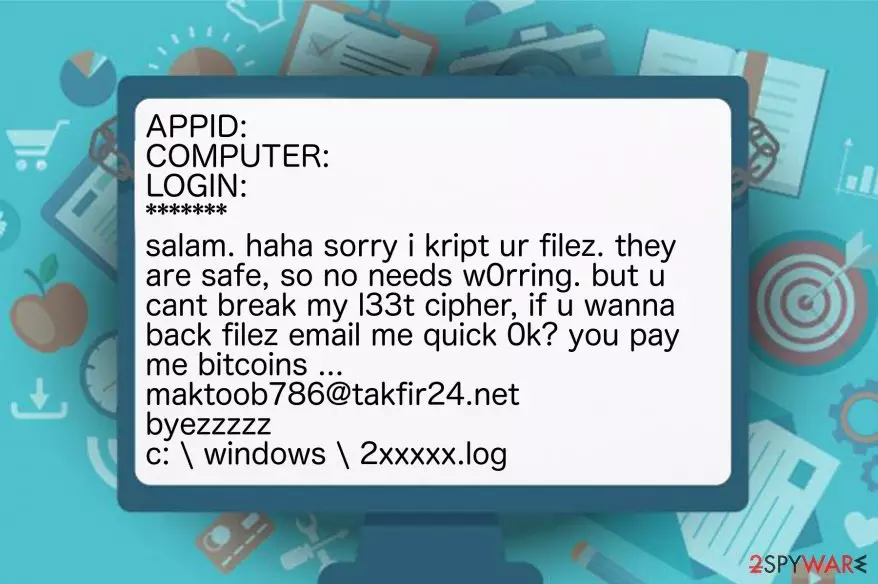
Mobef-Salam virus is a dangerous ransomware-type infection which is designed to encode valuable information on the computer with the help of sophisticated algorithms. After data encryption, victims are unable to access their files and provided with the ransom-demanding message named as READ.4YOU. It indicates maktoob786@takfir24.net email address and says that the ransom should be paid in Bitcoins[1].
After Mobef-Salam analysis, experts warn that it mainly targets people from Italy. However, others must also be cautious since this is a new version of Mobef ransomware. It is evident that criminals are upgrading their malicious programs to blackmail more people and increase their illegal profits.
The main difference between Mobef Salam virus and its precursor is the ransom note. Here is the fraction of it:
APPID: XXX
COMPUTER: XXX
LOGIN: XXX
*******
salam. haha sorry i kript ur filez. they are safe, so no needs w0rring. but u cant break my l33t cipher, if u wanna back filez email me quick 0k? you pay me bitcoins …
maktoob786@takfir24.net
byezzzzz
c: \ windows \ 2xxxxx.log
It is evident that the criminals behind the ransomware are not reliable — the ransom note contains grammar mistakes, and there are no guarantees that you will receive Mobef-Salam decryptor after making the payment[2]. Also, hackers do not indicate a particular amount of the ransom. Likewise, it might change as time passes or even increase without reasonable explanation.
For this reason, we strongly encourage you to never rely on the crooks and remove Mobef-Salam as soon as you notice its presence. Note that regular computer users are not advised to perform the elimination on their own since ransomware-type infections are highly dangerous and might damage the computer permanently.
You can get a professional antivirus like FortectIntego to perform Mobef-Salam removal for you. Additionally, check the instructions at the end of this article which will help you to get rid of this cyber threat safely.

Ransomware infiltration techniques
The most important thing to remember if you want to protect your computer from ransomware is to monitor your online activity with extreme care. Criminals take advantage of reckless people who click on and download content without introspection at first. Likewise, ransomware is most commonly distributed via spam emails.
Hackers design letters which look innocent and legitimate. Note that they might even impersonate well-known companies like Microsoft or Apple and trick you into clicking on the malicious attachment. Unfortunately, as soon as you open the file or click on the infected link, the bogus script starts infiltrating ransomware on your computer.
Thus, NoVirus.uk[3] team advises regular PC users to be attentive during their browsing sessions or managing their email boxes. If you receive a letter from an unknown person, or company you have do not remember dealing with, do NOT open it. Simply delete the email and install a robust antivirus to scan your computer.
The safest method to uninstall Mobef-Salam virus
As we have already mentioned, manual Mobef-Salam removal is not an option. Be aware that developers of ransomware-type cyber threats try to protect their malicious programs from easy elimination. For this reason, they might design them to impersonate legitimate computer processes and lure you into terminating them. As a result, there is a high risk that you may damage your system irreversibly.
Although, you can safely remove Mobef-Salam with the help of a professional anti-malware software. Even though there are many choices which might be suitable for ransomware elimination, we strongly suggest using FortectIntego. It is not only easy to use but also robust enough to protect your computer from such cyber threats in the future. Additionally, SpyHunterCombo Cleaner and MalwarebytesMalwarebytes are also great choices.
You can find a guide showing how to get rid of Mobef-Salam ransomware at the end of this article. The only thing to remember is to follow it strictly in order to avoid any further damage or unsuccessful virus elimination. You will find decryption steps there as well.
Did this guide help?
Be the first to comment