

Nozelesn ransomware – is data locking malware that uses fake DHL emails for propagation
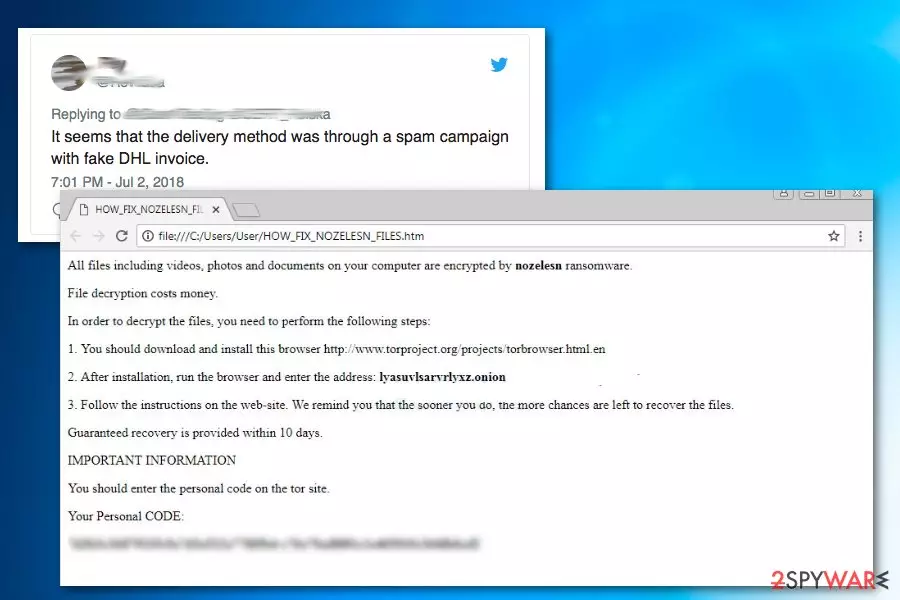
Nozelesn ransomware is a file locker that is used for money-extortion[1] purposes. It was first noticed in early July 2018, demanding users to pay a specified amount in BTC for the encrypted data that is locked by .nozelesn file extension. The ransom note HOW_FIX_NOZELESN_FILES.htm explains victims that they need to visit the TOR payment portal lyasuvlsarvrlyxz.onion in order to retrieve further instructions.
The computing disaster starts when users open a contaminated email attachment that comes inside a spoofed email address from DHL. Upon release, ransomware targeted Polish users, although now researchers are spotting virus activity around the world. Besides regular users, malware attacked a multitude of companies, infecting networks and encrypting files on them and asking for as much as $27,000 for the decryption key.
| Name | Nozelesn |
|---|---|
| Type | Ransomware |
| Targeted country | Poland |
| Extension | .nozelesn file extension |
| Cipher used | AES |
| Ransom amount | Varies |
| Ransom note | HOW_FIX_NOZELESN_FILES.htm |
| Main dangers | Data encrypting can lead to permanent data or money loss. |
| Distribution | Malicious email attachments |
| Elimination | You should use SpyHunterCombo Cleaner for ransomware removal |
The message from the virus authors has more specific information about what happened to the victim's PC, as well as how to recover files that are locked. Cybercrooks are asking users to download TOR browser and log in to the payment server (“Nozelesn decryption cabinet”) lyasuvlsarvrlyxz.onion using a unique personal code to receive further instructions.
Once logged in, ransomware victims need to face the hard truth, namely that they need to pay a specified amount in Bitcoin. Hackers guarantee that the decryptor will be sent back within ten days. However, you should not listen to cyber crooks and remove the virus instead, and then proceed with alternative data recovery methods.
The initial ransomware that users are exposed to states the following:
All files including videos, photos and documents on your computer are encrypted by nozelesn ransomware.
File decryption costs money.
In order to decrypt the files, you need to perform the following steps:
1. you should download and install this browser hxxp://www.torproject.org/projects/torbrowser.html.en
2. After installation, run the browser and enter the address: lyasuvlsarvrlyxz.onion
3. Follow the instruction on the web-site. We remind you that the sooner you do, the more chances are left to recover the files.
Guaranteed recovery is provided within 10 days.
IMPORTANT INFORMATION
You should enter the personal code on the tor site.
As you can see in the ransom message quote, cybercriminals suggest you follow their instructions and pay the ransom as soon as possible so you can get back access to your files. However, cybersecurity researchers[2] do not recommend doing that. You need to focus on malware removal and only then try to recover your data.

It is typical for ransomware-type virus developers to use common names, company logos, or other information to make users open the malicious attachments inside phishing emails. This ransomware is no exception. Security experts from CERT_Polska confirmed[3] that the delivery of malware is executed via phishing emails allegedly coming from Polish DHL:
It seems that the delivery method was through a spam campaign with fake DHL invoice.
Thus, be vigilant if you still have not injected your PC with dangerous malware. However, if your files get locked, do not panic. You should get rid of the ransomware by scanning your system using security software first (we recommend FortectIntego or SpyHunterCombo Cleaner) and then checking options for file recovery.
At the moment, it is believed that ransomware is deleting Shadow Volume Copies of affected files by using the command “vssadmin.exe delete shadows /all /Quiet.” However, we cannot confirm that and, if your files are encrypted by this virus, definitely try the ShadowExplorer application that may be able to recover your data.
Insecure emails with big names used for spreading this virus
Virus developers tend to use various widely-known company names to make their spam emails more convincing. Such emails often appear legitimate only because of the names, logos, and similar content included in them. After seeing the name of FedEx, Amazon, eBay, or other companies, people don't even think about risks and download attachments that are injected with a malicious code of ransomware.

If you want to stay safe and prevent ransomware infection on your computer, make sure you double-check every email message to avoid malware and all the dangers associated with it. To find spam among safe emails, make sure you check:
- The sender. Typically, sender's addresses should depict the company he or she is trying to represent, so make sure you check it;
- The content. Email can be warned about bogus deliveries, invoices, money transactions, and similar information from companies that you have never used or even heard of (unfortunately, crooks tend to use the most popular firm names, and more often than not, users are actually involved). Discard such message immediately;
- Attachments. Word or Excel documents can be filled with macro viruses. If the document is asking to enable macros, put it into the Trash box;
The final tip would be to download and install reputable security software and keep it up to date. Comprehensive anti-malware can prevent most of the viruses from entering, even if you fail to notice the deceit in updates, attachments, etc.
Remove ransomware using professional tools
To remove ransomware, you should use reliable anti-malware tools. They can ensure the proper elimination of the virus. To scan your system correctly and remove all malicious components, make sure you update the software to its latest version. When dealing with this ransomware, we highly recommend using MalwarebytesMalwarebytes or SpyHunterCombo Cleaner. These programs will also ensure full protection against similar viruses in the future.
Manual Nozelesn ransomware removal is not recommended as you are dealing with cryptovirus. Follow the guide below the article if the virus is blocking the scanner to prevent its removal. Next, move to the data recovery section. As we have mentioned, ransomware will try to delete Shadow Volume Copies of encrypted data. However, we still recommend trying ShadowExplorer as one of the options to recover encoded files.
Did this guide help?
Be the first to comment