

DDE ransomware – a dangerous virus that adds .encrypted extension to locked files
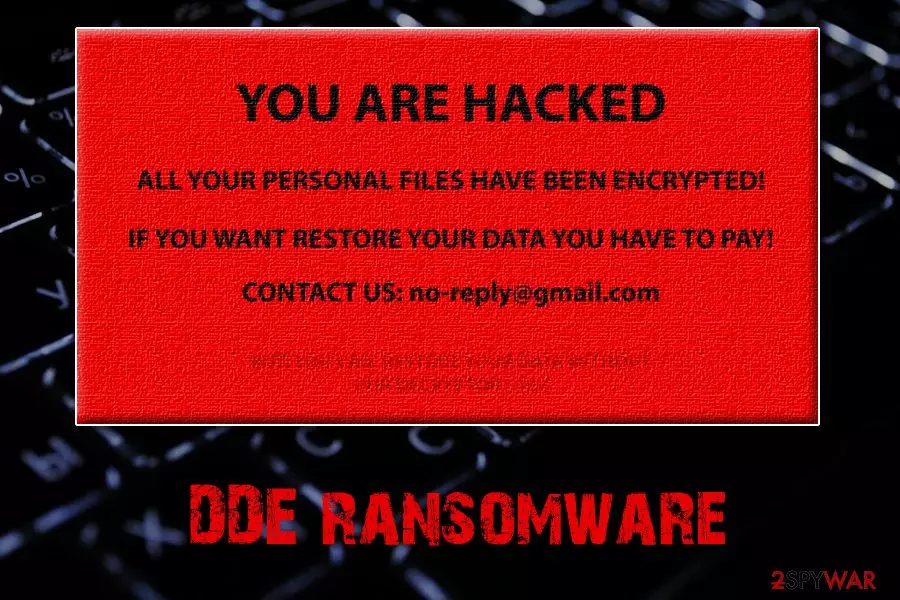
DDE ransomware is a newly discovered cryptovirus that enters machines via macro-enabled malicious MS office documents. Researchers believe that the virus comes from Crypt888 ransomware family. DDE virus locks up all personal files using AES encryption algorithm and then appends the .encrypted extension. As soon as malware's payload is distributed, it runs a main executable dde_ransomware.exe. Additionally, the wallpaper is removed and replaced with a red one which contains a ransom note. Victims are urged to contact cybercrooks via no-reply@gmail.com and pay ransom for data release. Hackers also add a twist by stating that decryption is also possible without the personal key.
| Summary | |
| Name | DDE |
| Type | Ransomware |
| Main executable | dde_ransomware.exe |
| Related to | Crypt888 ransomware |
| File extension | .encrypted |
| Cipher used | AES |
| Purpose | Money extortion |
| Distribution | Macro-enabled MS office files, malicious websites |
| Detection and elimination | Use FortectIntego or MalwarebytesMalwarebytes |
DDE ransomware also displays a pop-up window with the name “HACKER” that shows the following text:
Your important files are encrypted.
If you need them, You can find my KEY to decrypt.
GOOD LUCK!
The ransom message is quite baffling, as it is not clear what crooks are talking about. The only way to recover encoded files is by using a unique key which is usually kept on a remote server by criminals. Nevertheless, it seems like DDE ransomware was made as a joke, as the email address “no-reply@gmail.com” does not exist and has nothing to do with Google.
If you found such message on your screen, you are in bad luck, as it seems like the only reliable way to retrieve access to files is by recovering them from a backup. However, before you proceed with data recovery, you should take care of DDE ransomware removal promptly. We suggest using powerful anti-malware software, such as FortectIntego or MalwarebytesMalwarebytes.
DDE ransomware makes a series of changes to the targeted machine. As soon as it enters, it boots an executable file which is run in the background, modifies Windows Registry to retain persistence and downloads malicious apps using Background Intelligent Transfer Service used by Windows. Finally, malware deletes Shadow Volume Copies.
DDE virus then scans the computer and looks for personal files, including:
- Images
- Pictures
- MS Office and OpenOffice documents
- Video
- Audio
- Databases
- Archives, etc.
As soon as encryption is complete, users lose access to all personal data. The only way to decrypt files is by using backups. Additionally, third-party software may be able to help – please see instructions below.
Security experts recommend you to remove DDE ransomware using reliable anti-malware software. However, you should never attempt to get rid of the virus manually, as you could damage your machine even more.

Pay attention when opening emails from unknown sources – they can hide ransomware inside
Ransomware-type viruses are not a new threat and have been around for over ten years. Unfortunately, it seems like it is not a long enough time for users to learn the very basics of internet security and virtual safety. When asked about cybersecurity, users often do not practice safe browsing and click on various links.
To avoid ransomware infection, please follow these simple tips:
- Install anti-malware software and keep it up to date;
- Always patch the operating system as soon as updates are out;
- Do not open suspicious emails (most of them land in the Spam folder) or its attachments;
- Backup all your files and keep it on a remote device such as a USB stick or a cloud account (OneDrive, iCloud, Dropbox, etc.);
- Do not download cracked software;
- Set all your software to update itself automatically – it is less likely to click on fake update pop-up;
- Scan every executable using security software before opening it;
- Avoid websites of questionable content, such as porn, file-sharing, gambling and other sites.
Eliminate DDE ransomware and then attempt to recover your data
The first step after the infection is to remove DDE ransomware from your computer. In some cases, such a task might require some time. Nevertheless, we suggest never to try to remove DDE ransomware manually, as only IT professionals should attempt such a procedure. Besides, you can damage your computer even more if you start tampering with system files.
Thus, simply download and install anti-malware software. We recommend using FortectIntego or MalwarebytesMalwarebytes for DDE virus elimination. However, you can always pick application you prefer more, just make sure it is legitimate. In case the malware is blocking security software, you should enter Safe Mode with Networking as explained below.
Did this guide help?
Be the first to comment