

Cryptes ransomware – a file-locking parasite that locks your personal data and demands Bitcoins for ransom
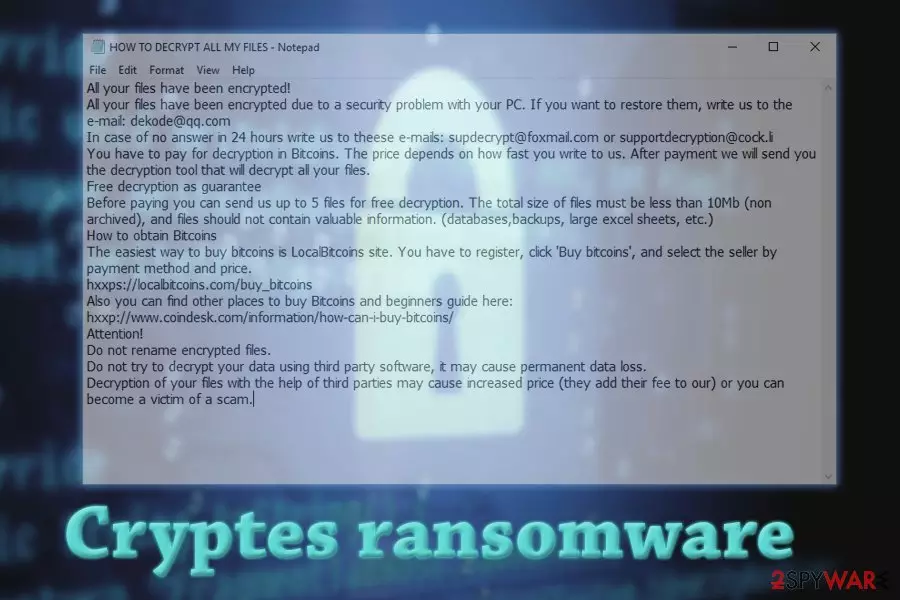
Cryptes ransomware is a file locking virus that first showed up at the end of July 25th, 2018. As it is a variant of DCRTR ransomware, it uses a combination of AES, SHA,[1] RSA military-grade coding algorithms to encrypt all personal files on a targeted Windows computer.
All non-system data is renamed by appending the .cryptes extension. As soon as the encryption process is finished, HOW TO DECRYPT ALL MY FILES.txt ransom note is downloaded to the victims' computers and placed into each of the affected folders. Users can view the file and see that hackers demand an unknown amount of Bitcoin to be paid for data release. To find out the price and receive further instructions, users need to contact the ransomware authors via dekode@qq.com.
| SUMMARY | |
| Name | Cryptes |
| Type | Ransomware |
| Encryption algorithm | AES, SHA, RSA |
| Extension | .cryptes |
| Distribution | Spam emails, unprotected RDP, malicious websites, etc. |
| Symptoms | Unusable personal files that seem to be renamed; ransom note is found on the desktop and in affected folders |
| Elimination | Use automatic removal method by employing trustworthy anti-malware software recommended below |
| System health | Repair virus caused damage by using the all-in-one FortectIntego PC repair tool |
Cryptes ransomware typically infiltrates user machines when they are not careful enough when surfing the internet or opening emails from unknown sources. Hackers often use phishing emails and high-risk websites (such as file-sharing, torrents) to make sure that the virus gets distributed. Thus, if you do not take high risks, you will never have to worry about ransomware removal.
As soon as the malicious payload is executed, the malware modifies the system's settings and starts a scan. It looks for the data to encrypt, and skips the system, executables, and few other files. Hackers do not want to destroy your computer, and they just want to extort money. That is why the virus skips system files – the machine needs to operate correctly.
However, every personal file (.jpg, .doc, .dat, .img. .pdf, etc.) is systematically locked and .cryptes extension is added. From that point, users cannot access their files anymore. Note that the data is not corrupted in any way, it simply requires a decryption key, which is stored on a Command and Control server that only malware authors have access to.
Users are informed of what happened in a ransom note HOW TO DECRYPT ALL MY FILES.txt which becomes available for victims to view. It is unknown what amount the ransomware authors want, but they most certainly want Bitcoins – a digital currency.
This way, they can stay anonymous during the transaction, as a personal bank account is easily traceable. Although Bitcoin wallets are more pseudonymous rather than anonymous, cyber crooks manage to bypass traceability by using various tools, such as VPNs and proxies.[2]
Here's the fragment from the ransom note:
All your files have been encrypted!
All your files have been encrypted due to a security problem with your PC. If you want to restore them, write us to the e-mail: dekode@qq.com
In case of no answer in 24 hours write us to theese e-mails: supdecrypt@foxmail.com or supportdecryption@cock.li
You have to pay for decryption in Bitcoins. The price depends on how fast you write to us. After payment we will send you the decryption tool that will decrypt all your files.
Free decryption as guarantee
As “proof” cybercriminals promise to decrypt five files (up to 10MB) for free. Ironically, they even warn victims of being scammed by other parties.

However, it is unwise to contact crooks, as these people can not be trusted. Just think about it – if they managed to lock up your files to gain illegal profit, what obligates them to take your money and never reply? Besides, if you do contact them and receive the necessary decryptor, you are highly likely to be a target in future attacks.
Therefore, do not give in to hackers' menace and remove Cryptes ransomware from your computer. To ensure proper elimination, use SpyHunterCombo Cleaner or MalwarebytesMalwarebytes. Only then you can proceed with the file recovery procedure (note that the official decryptor for this ransomware variant does not exist yet, but you can get your data back from backups or by using third-party software).
Once the ransomware is properly removed, you need to check for any system irregularities that it might have caused. If you're not an IT specialist, then we recommend you use the FortectIntego system diagnostics tool that repairs all system-related issues automatically.
Ransomware can hide in malicious email attachments
People usually do not pay attention to dangers until unfortunate events happen to them. That is precisely how it works with malware as well. Users are careless and tend to avoid anti-malware software due to costs or pure laziness. However, keep in mind that once files are encrypted by ransomware, the chance of getting them back is quite low, unless the official decryption tool is released (in some cases it might take researchers years to develop one).
To avoid such a scenario, make sure you follow these simple rules:
- Spam emails are the most prominent malware distribution method. Therefore, think twice before viewing every email that comes your way. If needed, scan the attachment with anti-malware software and always mouseover hyperlinks that might be present inside;
- Employ reputable security tools. These applications are necessary for every computer user that uses the internet. Anti-virus program's database is continually updated, so malware can be blocked before it enters the machine;
- Avoid malicious websites. Users can sure be redirected to suspicious websites, but they should never click on links or pop-ups that appear there. Additionally downloading executables (keygens, cracks) or cracked software on dubious file-sharing sites can lead to ransomware infection;
- Back up your files. If you have that step complete, you do not need to worry about anything. However, make sure that you do not connect your external device to the infected computer, as all backup data will be encrypted as well.
Detailed instructions to remove Cryptes ransomware
Ransomware removal should not be executed manually, as experts[3] note. This procedure is complicated and should only be practiced by trained IT professionals. If you proceed with it, you might damage your system files beyond repair. Therefore, leave the job to anti-malware software instead. Before performing the scan, make sure that the latest virus database is being used.
In some cases, the malware might block the correct operation of the security suite. In such a case, enter Safe mode with networking as explained below. As soon as you remove Cryptes virus, you can proceed with file recovery – you can find instructions below. Nevertheless, if you do not possess a backup, the chance of retrieving data is quite low.
Did this guide help?
Be the first to comment