

Shrug2 ransomware is a file-encrypting virus that that pretends to be from the same family as WannaCry
| Name | Shrug2 |
|---|---|
| Type | Ransomware |
| Previous version | Shrug |
| File extension | .SHRUG2 appendix |
| Encryption method | AES |
| Ransom amount | $70 in Bitcoin |
| Ransom note | ShrugDecryptor |
| Distribution | Spam email attachments |
| Elimination | Download and use FortectIntego for Shrug2 ransomware removal |
Shrug2 ransomware is a malicious crypto-virus that infects your system silently and starts its malicious processes in the background. As the first step, ransomware modifies old or adds new registry keys to make sure that its script is launched everytime your infected device reboots.
Additionally, Shrug2 virus scans the system and selects which photos, videos, documents or databases to encrypt with a sophisticated AES encryption algorithm. When this file locking is done, the virus places .SHRUG2 file extension. As a result, you can clearly see which files are modified by the threat.
This silent intruder has been spreading for some time. As a result, Shrug2 can be detected by numerous anti-virus and anti-malware tools as:
- Artemis!04112AEC4740
- TR/Ransom.rhagu
- Generic.Ransom.Hiddentear.A.B8BBD7A8
- TR/Hiddenrear.agdsy
- Trojan.Ransom.Shrug
- Ransom.Genasom!8.293 (CLOUD)
- TROJ_GEN.R002H09GC18
- malicious_confidence_70% (D)
- malware (ai score=97)
- Win32/Trojan.Hoax.4a4[2]
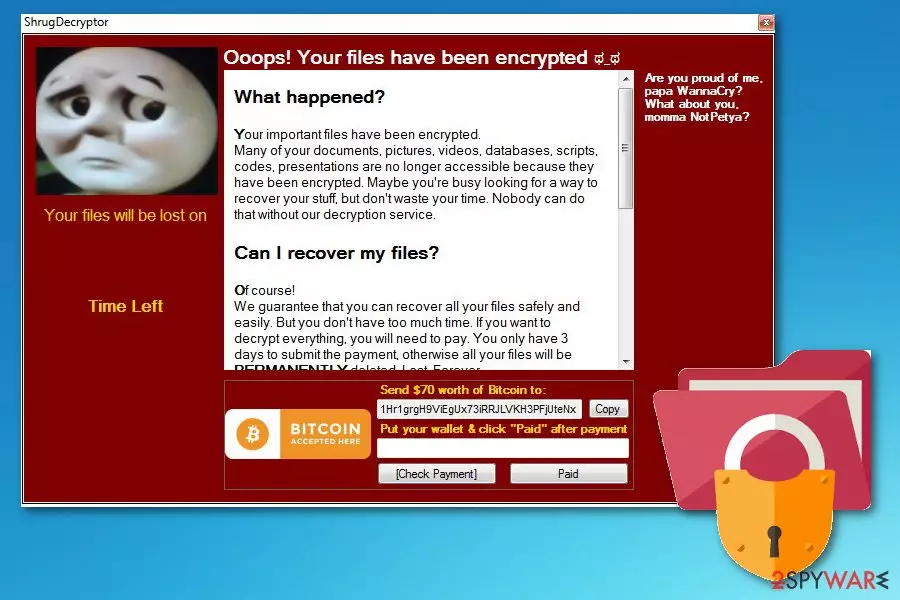
When this virus is done with the encryption process, it displays a program window on the screen that looks like a decryption service. The ransom note states that you have 3 days to pay $70 in Bitcoin to a provided wallet. The window is called ShrugDecryptor and contains the following message:
'Ooops! Your files have been encrypted
Are you proud of me,
papa WannaCry?
momma NotPetya?What happened?
Your important files have been encrypted. Many of your documents, pictures, videos, databases, scripts, codes, presentations are no longer accessible because they have been encrypted. Maybe you're busy looking for a way to recover your stuff but don't waste your time. Nobody can do that without our decryption service.
Can I recover my files?
Of course! We guarantee that you can recover all your files safely and quickly. But you don't have too much time. If you want to decrypt everything, you will need to pay. You only have 3 days to submit the payment otherwise all your files will be PERMANENTLY deleted. Lost. Forever.
Payment is accepted in Bitcoin only.
Send $70 worth of Bitcoin to:
1Hr1grgH9ViEgUx73iRRJVKH3PFjUtenx'
The first sentences of the ransom note are typically mimicking WannaCry and Petya cyber threats. However, at the moment securoty experts do not find any relation between these cyber threats. If you got infected, you need to remove Shrug2 ransomware as soon as possible. It is important because this ransomware can access various places in the system and modify it according to its developer's commands.
As we have mentioned, this cyber threat is using C&C server configuration helping people behind the virus store your data or control various parts of the device without you knowing that. This additional feature of the ransomware makes it even more dangerous. To prevent the worst case scenario, focus on Shrug2 ransomware removal and get rid of this threat. Use FortectIntego or other anti-malware tools to scan your device and eliminate all issues hailing from the infection.

Malicious files are typically distributed via infected emails
Malware developers aim to distribute the virus payload widely, so they pretend to send emails from companies like DHL, PayPal or Amazon. Since people often use these services, victims unknowingly open these safe-looking emails and download malicious files.
Researchers[3] advise you to pay more attention because the minute you download and open the infected file on your computer this malicious ransomware script is planted on the system. These invoices or receipts can look safe but always check for typos and grammar mistakes on the email. This can be an indicator that the email is not legitimate.
Get rid of Shrug2 ransomware and all related issues by following our tips
The first thing you should know if you want to remove Shrug2 ransomware is that all additional changes made by this threat can be related to other programs and their malfunction in the future. You need to use professional anti-malware tools to get rid of all the fraudulent files and damaged caused by them. Tools like FortectIntego, SpyHunterCombo Cleaner or MalwarebytesMalwarebytes can fully scan your device and detect this malware.
Shrug2 ransomware removal is crucial if you want to get back to a safe computer's usage. We do not recommend replacing your affected files or restoring them by using our recovery instructions until you get rid of the malware because ransomware keeps encrypting everything in its way. So use anti-malware, delete ransomware virus, clean your system thoroughly, double-check and then recover your data.
Did this guide help?
Be the first to comment