

F1220@tuta.io – a ransom-demanding virus which offers free decryption of three files
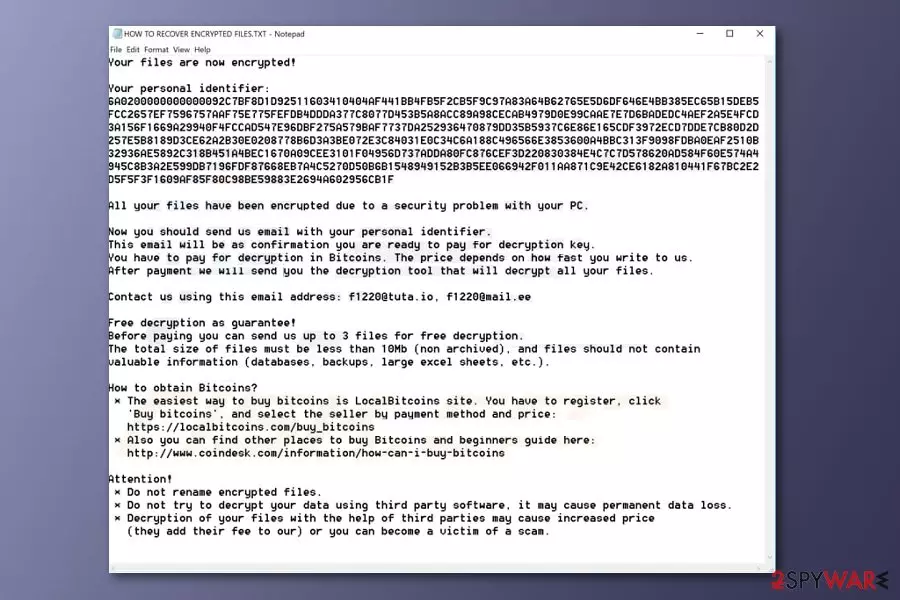
F1220@tuta.io is a dangerous file locking virus which appears to be a new variant of the Scarab ransomware family. This threat also spreads via phishing messages and modifies the Windows Registry[1] to start its damaging activity. F1220@tuta.io virus encrypts files by using unique algorithms such as AES or RSA and renames the locked document by adding random characters. Moreover, this cyber threat produces a ransom-demanding message named HOW TO RECOVER ENCRYPTED FILES.TXT which urges for Bitcoin in exchange for the unlocking tool and offers free decryption of three small files. Furthermore, the note provides f1220@tuta.io and f1220@mail.ee email addresses which are the way to contact the criminals.
| Name | F1220@tuta.io |
|---|---|
| Related to | Scarab ransomware |
| Category | Ransomware |
| Extension | Renames the encrypted file by using random characters |
| Ransom message | HOW TO RECOVER ENCRYPTED FILES.TXT |
| Ransom | No particular price is given, however, the crook urges for Bitcoin cryptocurrency |
| Email addresses | f1220@tuta.io and f1220@mail.ee |
| Encryption code | RSA/AES |
| Offers | Criminals offer three files for free decryption |
| Distribution | Phishing emails are the most common ransomware spreading source |
| Damage fixing | Fix the damage done by this ransomware by installing FortectIntego |
Once installed, F1220@tuta.io ransomware[2] uses unique ciphers to lock up important documents. Such codes differ each time when the virus infects a different user. This is the main reason why decryption keys are almost impossible to discover even for highly-experienced tech experts. Nevertheless, all keys are stored on remote servers which makes them unreachable for other people, except the criminals themselves.
The F1220@tuta.io ransom message looks like this:
Your files are now encrypted!
Your personal identifier: –
All your files have been encrypted due to a security problem with your PC.Now you should send us email with your personal identifier.
This email will be as confirmation you are ready to pay for decryption key.
You have to pay for decryption in Bitcoins. The price depends on how fast you write to us.
After payment we will send you the decryption tool that will decrypt all your files.Contact us using this email address: f1220@tuta.io, f1220@mail.ee
Free decryption as guarantee!
Before paying you can send us up to 3 files for free decryption.
The total size of files must be less than 10Mb (non archived), and files should not contain
valuable information (databases, backups, large excel sheets, etc.).How to obtain Bitcoins?
* The easiest way to buy bitcoins is LocalBitcoins site. You have to register, click
'Buy bitcoins', and select the seller by payment method and price:
https://localbitcoins.com/buy_bitcoins
* Also you can find other places to buy Bitcoins and beginners guide here:
http://www.coindesk.com/information/how-can-i-buy-bitcoinsAttention!
* Do not rename encrypted files.
* Do not try to decrypt your data using third party software, it may cause permanent data loss.
* Decryption of your files with the help of third parties may cause increased price
(they add their fee to our) or you can become a victim of a scam.
Crooks who spread viruses such as F1220@tuta.io ransomware may not always provide particular details about the ransom price. However, in almost all cases, criminals demand cryptocurrency such as Bitcoin, Ethereum, Monero, and others, only. Such cryptocurrency transfers give strong guarantees that the entire transfering process will remain safe and untrackable.
If you overcome this ransomware infection, you need to remove F1220@tuta.io virus from your computer system instantly. After you do that, you can fix the damage done by this cyber threat by using FortectIntego or any other similar anti-malware tool if you are likely too. Make sure you do not perform the data recovery method before you eliminate the infection. Get rid of the virus first and then check out our suggested third-party software for file restoring.
Another reason to complete the F1220@tuta.io removal is that some ransomware-related viruses have an ability to open paths for other malware forms to spread easily. In some cases, you can get your computer system infected even with a Trojan[3]. If such thing happens, the elimination process will become even more difficult to perform. So, please be aware of such possible consequences and terminate the infection ASAP.

Take precautionary measures against ransomware infections
According to malware experts[4], ransomware has one main distribution source – spam emails. Cybercriminals often drop dubious messages to numerous random users. Such emails come with harmful attachments, which once opened, launch the virus-related content straightly to the victim's computer system. So, if you ever overcome a suspicious-looking email from a questionable sender – better eliminate it permanently for your own safety.
Moreover, you should avoid visiting third-party websites, for example, P2P networks. These pages can include damaging content which might be a hidden virus. For automatical computer protection, we advise investing in a reliable antivirus program. Computer security software is necessary for every user as it keeps the computer system protected all the time if updated regularly.
Terminate F1220@tuta.io ransomware
If you want to remove F1220@tuta.io virus from your computer system, you need to download and install a reliable anti-malware tool and perform the elimination process. After you do that, we suggest using FortectIntego, SpyHunterCombo Cleaner, or MalwarebytesMalwarebytes to fix the damage that was done by the ransomware infection. Note that, manual elimination is not possible for this case as the virus might be too hard to remove on your own.
After you perform the F1220@tuta.io removal, you should not forget to complete some system backups to make sure that all virus-related content was disabled correctly. Moreover, you can start thinking about the data recovery process. We have provided some methods which might be helpful in this case. You can find them below this article.
Did this guide help?
Be the first to comment