

PUMA ransomware is a cryptovirus that comes as a variant of STOP ransomware with .puma, .pumax, and .pumas file markers
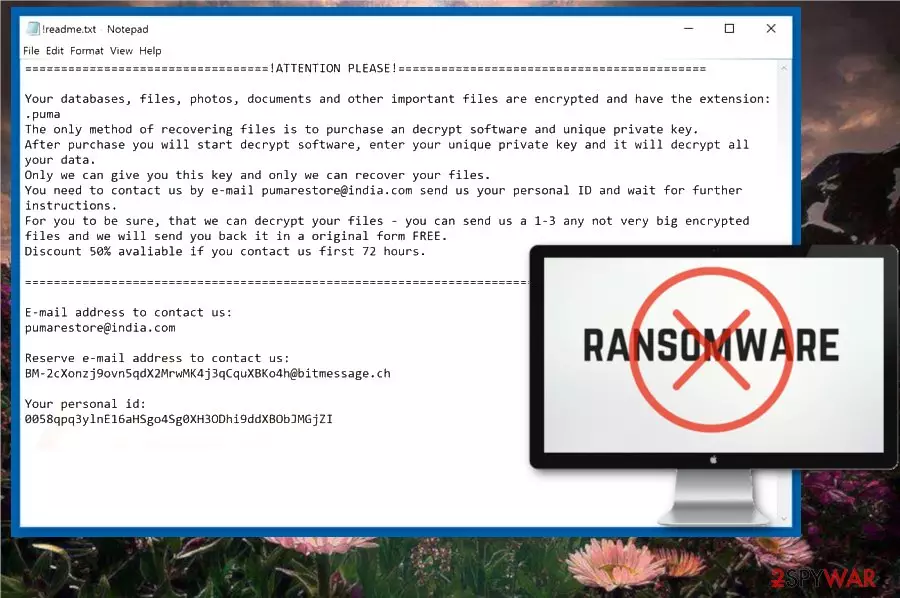
PUMA ransomware virus is a file-locking malware that focuses on encryption process.[1] This is a cyber threat that encrypts various personal data and then marks those encoded files using .puma file extension. Also, victims say that the same virus marks files using .pumax and .pumas extensions. There is no information if these are different versions of the virus but PUMA ransomware virus hailed from a well-known cryptovirus – STOP ransomware. malware strains in this family have a few similar features, for example, the ransom note is placed in the text file named !readme.txt. Although hackers who developed this threat suggests a test decryption on this ransom message, you shouldn't contact them in any way because the decryption process, in most cases, is not possible.
| Name | PUMA ransomware |
|---|---|
| Type | Cryptovirus |
| Related | STOP ransomware |
| File extension | .pumax, .pumas, .puma |
| Ranson note | !readme.txt |
| Contact emails | pumarestore@india.com |
| Given time | 72 hours |
| Distribution | Spam email attachments with macro-filled document files |
| Removal | Use FortectIntego and remove PUMA ransomware |
PUMA ransomware virus belongs to STOP ransomware family which uses both AES and RSA encryption algorithms, so the newest variant shouldn't be that different from previous versions in the family. Especially when the ransom note is displayed in the file named the same as before. The ransom message also looks not much changed. The contact email is changed according to the version.
PUMA ransomware ransom message reads the following:
==================================!ATTENTION PLEASE!===========================================Your databases, files, photos, documents and other important files are encrypted and have the extension: .pumaThe only method of recovering files is to purchase an decrypt software and unique private key.After purchase you will start decrypt software, enter your unique private key and it will decrypt all your data.Only we can give you this key and only we can recover your files.You need to contact us by e-mail pumarestore@india.com send us your personal ID and wait for further instructions.For you to be sure, that we can decrypt your files – you can send us a 1-3 any not very big encrypted files and we will send you back it in a original form FREE.Discount 50% avaliable if you contact us first 72 hours.===============================================================================================E-mail address to contact us:pumarestore@india.comReserve e-mail address to contact us:BM-2cXonzj9ovn5qdX2MrwMK4j3qCquXBKo4h@bitmessage.chYour personal id:005o5bktzfn
PUMA ransomware developers encourage victims to contact these hackers behind a virus but you shouldn't do so because paying the ransom or contacting cybercriminals can lead to more severe damage on the system or even data or money loss.[2]
Security experts[3] recommend performing PUMA ransomware removal instead. This is crucial if you want to get back to a safe computer and recover your files from a backup or cloud service. This cryptovirus can run another round of encryption on data you add.
You need to remove PUMA ransomware from the device properly and the best option for this is anti-malware tools like FortectIntego. Based on detections rate[4] this is a persistent ransomware, so you may need to enter the Safe Mode before a thorough system scan.
Remember that PUMA ransomware can alter various parts of your system and data on program folders or even Windows Registry keys. This is a cyber threat that focuses on persistence and has a few different modules of tracking and collecting data found on the device. It can access your account credentials, email addresses or different information stored on the device. Make sure to clean the system thoroughly and get rid of this virus as soon as possible.

Macro-filled documents come as safe-looking spam attachments
Spam email campaigns are one of the most used techniques employed for malware distribution. Ransomware is no exception. Email spam can be spread around the world and quickly. Usually, these emails pose as notifications from well-known companies, services or providers and claim that attached files have important information.
Unfortunately, safe-looking Microsoft Word, Excel or PDF files often filled with macro viruses. The minute you open and download the document ransomware payload gets on the system or system is infected with malware which is set to distribute direct ransomware around.
No matter that these files often get called Invoices, Receipts or Financial information, they contain either direct script or a link that redirects you to download site. You need to avoid opening emails that you haven't expected and try to scan the document before downloading.
PUMA ransomware elimination requires professional help
To remove PUMA ransomware from the device, enter the Safe Mode with networking and scan the system fully using an antivirus program. You can find a guide that helps you to reboot the PC in this mode and you can employ FortectIntego, SpyHunterCombo Cleaner or MalwarebytesMalwarebytes for the job too.
After PUMA ransomware removal makes sure to double-check is the system is virus-free and then you can plug in the external device with your backups or use files stored on cloud services. Data recovery is the main concern after the virus elimination but not everyone backs their data.
If you need an alternative to file backups, you can try one of the methods listed below. We provide a few software suggestions and Windows features down below. Also, check System Restore option for PUMA ransomware virus termination.
Did this guide help?
Be the first to comment