

IsraBye ransomware is the new version of a data wiper virus that makes your files unrecoverable
| Name | IsraBye ransomware |
|---|---|
| Type | Cryptovirus, wiper |
| Symptoms | Corrupts files on the targeted system and displays a ransom message on the screen |
| File extension | .israbye |
| Related | End of Israel virus |
| Distribution | Spam email attachments |
| Main danger | Affects important files or even erases them from the device |
| Fix | Use FortectIntego and clean the system, remove IsraBye ransomware from the PC using anti-malware tools |
IsraBye ransomware virus is a threat that contains a complex code and affects not only your files but the whole system of the targeted computer. The device needs to be cleaned and secured after the malware termination so that you can use the device again normally.
Unfortunately, there is no specific information about the possibility of file recovery after IsraBye ransomware attack. The previous version of this threat disguised its malicious data wiper functionality behind ransomware-like encryption process. However, there is no certain information that IsraBye is a wiper malware.[1]
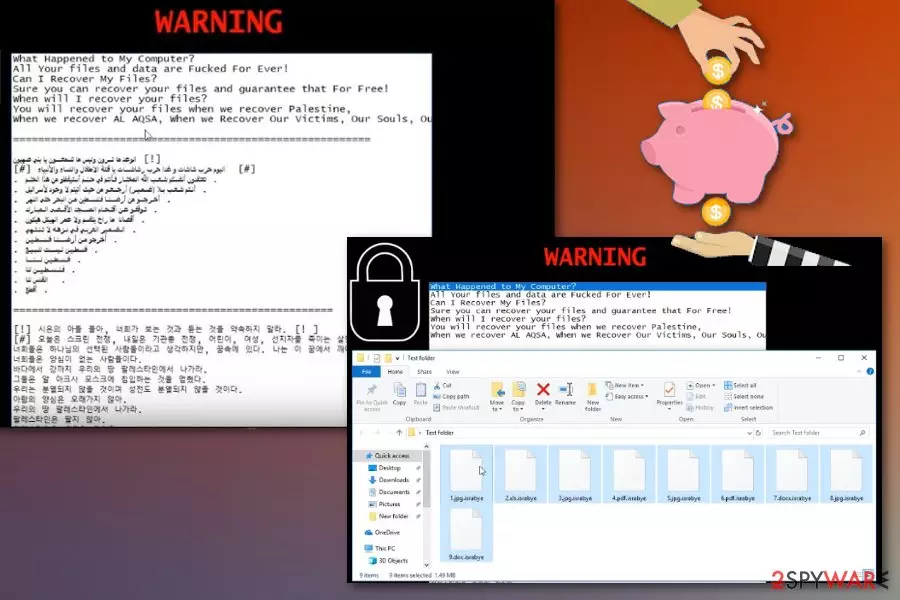
Nevertheless, you need to remove IsraBye ransomware as soon as possible to make sure that there is no danger to the device or your files. You should focus on virus removal and ignore the ransom message that gets displayed on the lock screen. The ransom note is written in three languages, and the English version reads the following:
What Happened to My Computer?
All Your files and data are **cked For Ever!
Can I Recover My Files?
Sure you can recover your files and guarantee that For Free!
When will I recover your files?
You will recover your files when we recover Palestine,
When we recover AL AQSA, When we Recover Our Victims, Our Souls, Our Freedom.
This offensive IsraBye ransomware message encourages people to pay, but we do not recommend paying or contacting these hackers because it may lead to permanent data or even money loss and gets you nowhere.[2] Decryption also is in question, so make sure to terminate this malware and then restore affected files from data backup or employ data recovery tools that we suggest below.
Also, we have a few ransomware elimination tips below the article and software that helps with IsraBye ransomware removal and cleaning after the fact. Tools like FortectIntego can eliminate related virus damage and clean the system from additional unwanted programs to improve the security of your computer.

Spam email attachments deliver files infected with malicious code
In the cybersecurity world, there are tons of different techniques used to distribute malware of any kind. However, when it comes to more dangerous threats like ransomware or cryptominers, the primary distribution method is spam email campaigns. Researchers,[3] note that many developers design their malware products to install ransomware via suspicious files or messages.[4]
The main spreading technique used by ransomware developers include emails notifying about certain financial information from the specific legitimate company. This strategy works because of malicious actors and their method of disguising rogue activity behind a well-known company or service name.
You can avoid these emails and do not open notifications from services you don't use. Also, paying more attention to email you expect and opening questionable files can save your device from cyber infections. The only thing you need to do is deleting suspicious emails that state about “financial information” or “order details.” Also, scan the file attachment before opening if you are not sure about the purpose of the document.
Eliminate IsraBye ransomware from the system and clean it thoroughly
The best tip regarding IsraBye ransomware removal is employing reputable antivirus program and scanning the system thoroughly to achieve best results. This is a dangerous virus that keeps changing various crucial parts of the system to make sure it is surely on the targeted device.
You need to remove IsraBye ransomware using your reliable antivirus program or any other reputable tool designed to fight malware. This is the best method because these programs scan the system fully indicating which applications or files are corrupted or possibly malicious.
After the IsraBye ransomware virus termination, make sure to double-check if the system clean. You can easily do so with the program you used in the elimination process or employ FortectIntego, SpyHunterCombo Cleaner or MalwarebytesMalwarebytes for this assignment. Make sure to get rid of all potential threats and then restore files.
Did this guide help?
Be the first to comment