

CryTekk ransomware is a virus that not only operates as an extortionist but also tries to direct users to spoofed PayPal payment page
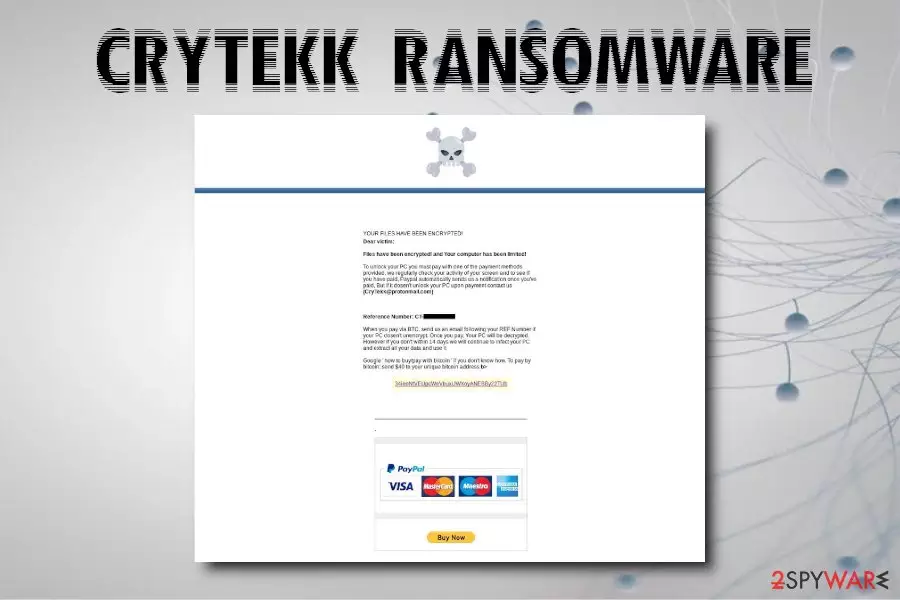
CryTekk ransomware is a file locking virus that is based on HiddenTear open-source project. After the infiltration, malware performs several changes to the system and begins a scan, looking for personal files like pictures, documents, videos, audios, databases, etc. Once located, the cyber threat makes use of AES encryption to encode data and appends .locked file extension. Next, CryTekk ransomware contacts a remote server that is controlled by hackers to send the encryption key and upload a ransom note README.html onto victim's machine. The message from cybercriminals explains what happened to their personal files, and asks users to pay $40 in BTC and contact hackers via CryTekk@protonmail.com. This malware string is poorly written and can be decrypted. However, the “catch” is to make users disclosed their credit card details on a spoofed PayPal page.
| Name | CryTekk ransomware |
| Type | Ransomware |
| Extra element | Phishing via spoofed PayPal page |
| Derivation | HiddenTear |
| Cipher | AES |
| Ransom size | $40 in BTC |
| Ransom note | README.html |
| Contact | CryTekk@protonmail.com |
| Decryptable? | Yes |
| Elimination | Use powerful anti-malware software |
| Damage removal | Make use of FortectIntego |
While combining ransomware functionality with other threats (such as banking trojans, data-stealers,[1] cryptominers, etc.) is not uncommon, CryTekk ransomware authors added a new element that was never used before – phishing. In fact, the size of the ransom makes researchers believe that the main goal is not $40, but the credit card details disclosure, which would be used for unauthorized bank account use or could be sold on the Dark Web.[2]
CryTekk ransomware drops the ransom note that states:
YOUR FILES HAVE BEEN ENCRYPTED!
Dear victim:
Files have been encrypted! and Your computer has been limited!
To unlock your PC you must pay with one of the payment methods provided, we regularly check your activity of your screen and to see if you have paid. Paypal automatically sends us a notification once you've paid. But if it dosen't unlock your PC upon payment contact us
(CryTekk@protonmail.com)Reference Number: CT-[redacted]
When you pay via BTC, send us an email following your REF Number if your PC dosen't unencrypt. Once you pay, Your PC will be decrypted. However if you don't within 14 days we will continue to infect your PC and extract all your data and use it.
Google 'how to buy/pay with bitcoin' if you don't know how. To pay by bitcoin: send $40 to your unique bitcoin address b>[redacted]
PayPal
Buy Now
Along with the usual payment method, CryTekk virus authors offer to pay via the popular payment site PayPal. As soon as victims click on the “Buy Now” button, they are redirected to a quite legit looking site. There, users are asked to enter their credit card details and later personal information, such as name, date of birth, address, phone number, and other data. Once they proceed, a message pops up, claiming that the account restoration was successful.
While it is an obvious scam, it might be entirely believable for those who never encountered a ransomware infection before. Without a doubt, users should remove CryTekk ransomware as soon as possible and ignore criminals. The scheme is merely a trick to disclose valuable personal information and credit card details.
For CryTekk ransomware removal, you should rely on powerful security software. Be aware that not all tools might recognize the threat, so a scan using multiple apps might be needed. After the elimination of the virus, you should scan your machine with FortectIntego in order to restore its functions to the original state.
You can then contact the security researcher Michael Gillespie[3] for free decryption, recover data from backups or try third-party software as a last resort.

Ransomware can be avoided – follow these tips
Regular users usually underestimate the severity of serious cyber infections like ransomware. They ignore advise from experts and expose themselves to various hazards when browsing the web. To their surprise, they find their files locked without a backup available. It is an unfortunate scenario. However, there are several suggestions from industry experts that can decrease the possibility of the infection to a minimum. Follow these simple tips:
- Install anti-malware software with real-time protection feature;
- Keep backups of your files and update them regularly;
- Avoid high-risk websites, such as torrent, file-sharing, cracks, porn, etc.;
- Do not casually open spam email attachments or click on links inside;
- Update your operating system and the software as soon as security updates are released;
- Use ad-block;
- Scan unknown files with such tools like Virus Total;
- Use strong passwords for all your accounts and change them frequently.
Eliminate CryTekk ransomware and only then proceed with file recovery
Before you can recover your files, you need to remove CryTekk ransomware from your machine. As we already mentioned, the malware is not too sophisticated, so the process should not be complicated, as long as you use appropriate security software.
Nevertheless, if there are any troubles with CryTekk ransomware removal, we suggest you enter Safe Mode with Networking and perform a full system scan from there. If you don't have backups, you can contact the security researcher for help or make use of third-party data recovery software. We provide all the instructions below.
Did this guide help?
Be the first to comment