

Fastbk@qq.com ransomware is one of the Matrix ransomware variants that appends .FASTA extension to encrypted files
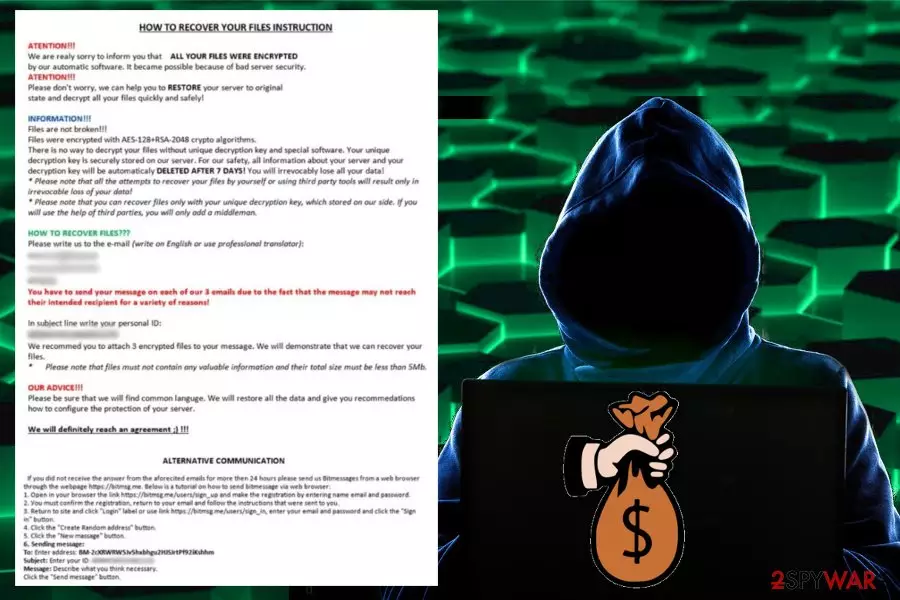
Fastbk@qq.com ransomware – the cryptovirus that is using both, AES and RSA, algorithms in data encryption. Alternatively, this virus is known as Fasta ransomware. Once this malware infiltrates the system, it finds files for the encryption and then demands the payment for an alleged decryption key. Virus developers have even been offering to test their recovery service by sending them 3 encrypted files, but you shouldn't trust these cybercriminals because fastbk@qq.com virus is one of Matrix ransomware that has been active for more than three years now. Developers have been slightly altering the primary version by releasing updated variants to make more profit from inexperienced victims. The ransom note placed in #README_FASTA#.rtf is typically stating that your files will be automatically deleted after seven days, but paying shouldn't be considered because it may lead to permanent data loss anyway. You need thorough virus removal and data recovery instead.
| Name | fastbk@qq.com ransomware / Fasta ransomware |
| Type | Cryptovirus |
| Ransom note | #README_FASTA#.rtf |
| File extension |
.[fastbk@qq.com].randomcharacters.FASTA |
| Encryption methods | AES 128 and RSA 2048 |
| Family | Matrix ransomware |
| Contact email | fastbk@qq.com |
| Elimination | Remove fastbk@qq.com ransomware with antivirus and clean the system from virus damage with FortectIntego |
Fastbk@qq.com virus is the malware that can be called most dangerous because the ransomware attack involves cryptocurrency and can lead to permanent money or data loss. People behind this threat are not trustworthy. Cybercriminals only care about the payment and your files may get deleted no matter if you pay or not.[1]
However, fastbk@qq.com ransomware is not only encrypting your files. File encoding makes your audio files, documents, photos or archives affected but there is a huge possibility of system alterations that include:
- added system files;
- altered registry;
- deleted files;
- disabled functions or programs.
If fastbk@qq.com ransomware adds or alters Windows Registry entries, it makes sure that the malicious process is launched every time your device is rebooted, this ensures persistence and difficult termination. Also, for that purpose ransomware is set to disable antivirus programs or security features on the device.
But these features are secondary and you cannot notice any of the alterations besides the main Fasta ransomware process – encryption. When the process is done, and your files get marked with the appendix, a ransom note is delivered in every folder containing encoded data. #README_FASTA#.rtf reads the following:
HOW TO RECOVER YOUR FILES INSTRUCTION
ATENTION!!!
We are realy sorry to inform you that ALL YOUR FILES WERE ENCRYP‘I‘ED
by our automatic software. it became possible because of bad server security.
ATENTIION!!!
Please don‘t worry. we can help you to RESTORE your server to original
state and decrypt all your files quickly and safely!INFORMATION!!!
Files are not broken!!!
Files were encrypted with AES-128+RSA-2048 crypto algorithms.
There is no way to decrypt your files without unique decryption key and special software. Your unique
decryption key is securely stored on our server. For our safety, all information about your server and your
decryption key will be automaticaly DELETED AFTER 7 DAYS! You will irrevocably lose all your data!
Please note that all the attempts to recover your files by yourself or using third party tools will result only in
irrevocable loss of your data!
Please note that you can recover files only with your unique decryption key, which stored on our side. If you
will use the help of third parties, you will only add a middleman.HOW TO RECOVER FILES???
Please write us to the e-mail (write on English or use professional translator):
[Redacted]You have to send your message on each of our 3 emails due to the fact that the message may not reach
their intended recipient for a variety of reasons!In subject line write your personal ID:
[Redacted]We recommed you to attach 3 encrypted files to your message. We will demonstrate that we can recover your
files.
Please note that files must not contain any valuable information and their total size must be less than 5Mb.OUR ADVICE!!!
Please be sure that we will find common languge. We will restore all the data and give you recommedations
how to configure the protection of your server.We will definitely reach an agreement 😉 !!!
ALTERNATIVE COMMUNICATION
if you dld not receive the answer from the aforecited emails for more then 24 hours please send us Bltmessages from a web browser
through the webpage https://bitmsg.me. Below is a tutorial on how to send bitmessage via web browser:
1. Open in your browser the link https://bitmsg.me/users/sign_up and make the registration by entering name email and password.
2. You must confirm the registration, return to your email and follow the instructions that were sent to you.
3. Return to site and click “Login” label or use link https://bitmsg.me/users/sign_in, enter your email and password and click the “Sign in“ button
4. Click the ‘Create Random address“ button.
5. Click the ‘New massage” button.
6. Sending message:
To: Enter address: BM-2cXRWRW5Jv5hxbhgu2HJSJrtPf92iKshhm
Subject: Enter your ID: [Redacted] Message: Describe what you think necessary.
Click the “Send message” button.
This lengthy Fasta ransomware developers' message states that you should contact them via fastbk@qq.com and discover the ransom amount for your files. Researchers[2] always note that cybercriminals offers test decryption and encourages you to contact them to create a feeling of trust.
Unfortunately, fastbk@qq.com ransomware developers are well known for previous activity with Matrix ransomware and other versions. Cybercriminals can disappear immediately after the transfer and forget about the promise to restore your data.
You should remove Fasta ransomware from the system as soon as you get the ransom note or notice files marked with suspicious extension. Waiting for more than a week can lead to deleted files permanently. If ransomware does so, data recovery using software or tools becomes barely possible.
The best tip for data recovery is to do that only after the initial Fastbk@qq.com ransomware removal. When you are sure that malware is deleted from the device, you can plug in the external device to your PC or use tools for file restoring.
Fastbk@qq.com ransomware removal should be performed using anti-malware programs because this type of PC security tool can detect malicious programs, infected files or malware like this cyber threat. During a full system scan program searches all parts of the system and indicates what needs to be fixed.
Then you can remove fastbk@qq.com ransomware with the same anti-malware program and proceed with file recovery. However, when you add recovered files to the infected device, your data can get permanently damaged, so check for malware additionally and remove virus damage using FortectIntego or similar PC repair program.

Your computer system can get infected from a malicious email attachment
Email spam campaigns get even more clever these days.[3] Phishing campaigns can be set to deliver various malware directly or also distribute different attacks and a cocktail of malicious cyber threats. Spam emails often don't even go to the spam email box and look legitimate enough, so people open them and download attached files.
Once the document, archive or PDF is downloaded and opened on the device, malicious content can get enabled either automatically, or you press some button and allow the malicious script to launch its designed functionality. The direct ransomware can get on your device this way, or payload dropper infects the system with the virus.
The only solution when you want to avoid these infections is to clean the email box more frequent and pay more attention to emails that you receive. Well-known companies or services are not sending Order information or Invoice marked emails to people that are not using their products.
Terminate fastbk@qq.com ransomware when you notice the malicious presence
If you wait too long before performing fastbk@qq.com ransomware removal, you can risk getting additional malware infections or even permanently losing your important files due to the second encryption round or deletion. So make sure to react as soon as possible to avoid these consequences.
Make sure to remove fastbk@qq.com ransomware using reputable anti-malware tools like FortectIntego, SpyHunterCombo Cleaner, or MalwarebytesMalwarebytes, so you can be sure that the program is not affecting your device in other ways. Also, since the virus can alter or disable some functions, you may benefit from Safe Mode before the system scan. You can find how to enter this mode in our instructions down below.
Did this guide help?
Be the first to comment