

DeltaSEC ransomware is malware that relates to Jigsaw family but fails to encrypt any files
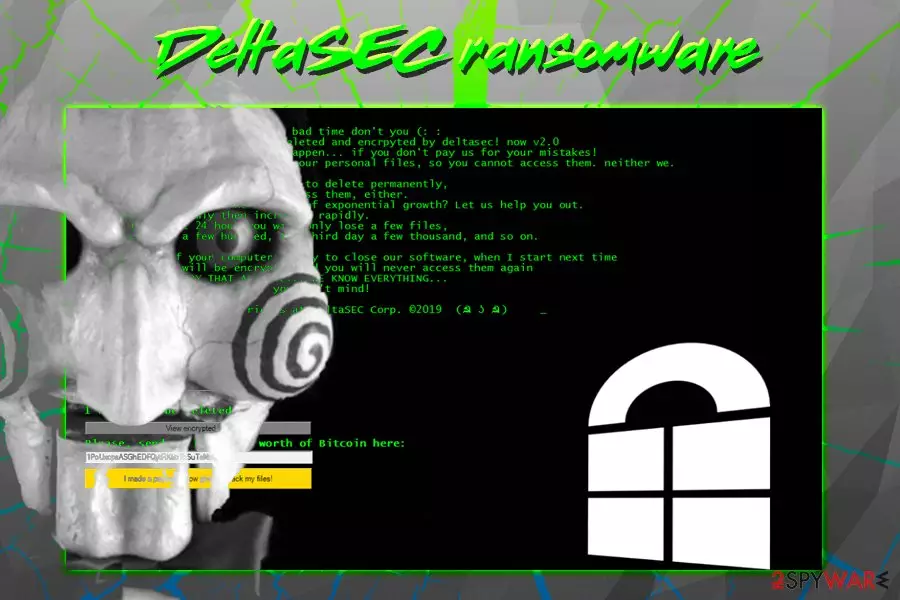
DeltaSEC ransomware was first spotted by MalwareHunterTeam in mid-February 2019.[1] The malware stems from a well-known Jigsaw virus family and typically encrypts files using AES encryption algorithm, drops a ransom note which is presented in a pop-up window, and demands ransom payment in Bitcoin for the decryption tool. It seems like DeltaSEC virus authors had a similar course of events in mind, however, they failed to correctly write up the base 64 string, which resulted in a failure of the encryption process. However, the infection does perform system modifications, like deleting Shadow Volume copies, modifying Windows Registry and displaying a ransom note. The text in the pop-up window is presented in a typical Jigsaw-like manner, threatening to delete files gradually. Victims are also asked to pay “at least” $60 worth of Bitcoin to the provided wallet. As evident, users should not pay and instead focus on DeltaSEC ransomware removal process.
| Name | DeltaSEC |
| Type | Ransomware |
| Family | Jigsaw |
| Related files | JigsawRansomware.exe |
| Discovery date | February 2019 |
| Ransom note | Pop-up window with no title |
| File extension | N/A |
| Ransom size | $60 in Bitcoin |
| Decryptable? | Yes (does not encrypt any files) |
| Elimination | Use malware removal tools like FortectIntego or SpyHunterCombo Cleaner |
DeltaSEC ransomware is most likely delivered with the help of various distribution methods, such as:
- Spam emails;
- Fake updates;
- Exploits;
- Brute-force attacks;
- Repacked installers;
- Malicious sites, etc.
Once inside, DeltaSEC virus performs multiple modifications to the Windows system, such as deletion of volume snapshots, adding/editing registry keys, file opening/copying/writing, module loading, etc. Once these changes are performed, malware spawns a pop-up window which states the following:
.NET Framework Initialization Error
DeltaSEC Has Succesfully hacked ur pc: NOW see the results
After clicking OK or closing the window, users are greeted with a lengthy and vulgar ransom note from DeltaSEC ransomware authors. In the memo, hackers are trying to mock the victims, implying that they are going to “have a bad time.” Ironically, bad actors are the ones that should be made fun of, as their claims that data is locked are entirely false.
Thus, users should immediately check their data. They will then realize that personal files are not encrypted, and there is no need to contact or paying DeltaSEC ransomware creators.
Nevertheless, there is a possibility that cybercriminals will fix the bug and release the update, which can be applied directly to the infected victims' computers. Therefore, users should immediately remove DeltaSEC ransomware from their devices using a reputable security application that can detect the threat.
For DeltaSEC virus termination, we recommend using FortectIntego or SpyHunterCombo Cleaner, although other security application that can detect the malware can be used as well.[2]

Use these tips to stay away from malware infections
Malware is a multi-million illegal business that is sometimes used by state-governed groups. Other times, hackers simply want to get easy money or seek financial help due to unemployment (or so developers of ARTEMY ransomware claim). Regardless of the reasons, crypto locking malware is beneficial to its creators but can be devastating to users and organizations.
Therefore, it is vital to take care of precautionary measures that could save victims from the permanent data and, in some cases, money loss. Here are some tips from experts[3] that can reduce the infection chance to a minimum:
- Employ comprehensive security application and keep it up to date;
- Do not open spam email attachments or click on links unless you are absolutely sure the author is who he/she claims he/she is;
- Use an ad-blocker, but do not forget to add exclusions to sites you want to support;
- Patch your system and the installed applications as soon as security updates are released;
- Be careful when downloading torrent files – scan them using tools like Virus Total;
- When installing freeware or shareware from the internet, make sure you pick Advanced/Custom installation settings in order to prevent all the optional components from entering your device.
Finally, ensure that you are preparing backups regularly. This can save you from a lot of trouble in case ransomware manages to infect your PC.
Remove DeltaSEC ransomware from your computer to stay safe
Even if the virus does not encrypt data, you should remove DeltaSEC ransomware as soon as possible. For that, we recommend using security applications like FortectIntego or SpyHunterCombo Cleaner, although feel free to use any other program that can detect and eliminate the threat. Be aware that malware might prevent proper operation of security software due to its heavy modification to system files. In such a case, you should access Safe Mode with Networking as explained below.
Once you take care of DeltaSEC ransomware removal, you should be safe to use your computer again. Because the files are not encrypted, you do not need to take any other actions. However, in case the malware becomes properly functional in the future, we are leaving some option file recovery methods in case backups are not available.
Did this guide help?
Be the first to comment