

BigBobRoss ransomware is the cryptovirus that requires a ransom in Bitcoin to return encrypted files marked with .obfuscated appendix
BigBobRoss ransomware is the cryptovirus that has a few versions actively spreading around the globe. It has also been named as Obfuscated ransomware, based on the file marker. The biggest damage caused by the virus is its encryption process which is launched against every file on the system. To inform the infected user about the damage made, malware also delivers a ransom note in the Read Me.txt file which requires using one of these emails:BigBobRoss@computer4u.com; Big8obRoss@protonmail.com; RobSmithMba@protonmail.com; support@robsmithmba.com. The virus was first spotted in January. However, more recent activity shows that the first variant was switched with other versions, including .djvu and .ecryptedALL. Remember that there is no need to pay the ransom or contact these people because it may lead you to data and money loss. Besides, keep in mind that most of the versions in this family can be decrypted, thanks to Emsisoft and Avast decrypters.[1]
| Name | BigBobRoss ransomware |
|---|---|
| Type | Cryptovirus |
| File marker | [id=unique_victims'_number]original_filename.obfuscated, .djvu, .ecryptedALL |
| Executable files | BigBobRoss.exe; bedoneupx.exe |
| Contact emails |
|
| Encryption method | AES-128 |
| Removal | Employ FortectIntego for BigBobRoss ransomware removal |
| Decryption | You can find all the information on Emsisoft decrypter tool here |
The initial BigBobRoss ransomware virus discovery was made on the second week of January, when malware researchers reported about the new ransomware sample. First two details about this threat were .obfuscated file extensions and ransom note file Read Me.txt.
At the time, BigBobRoss ransomware was called various names since developers haven't marked the name of their product as others do. Obfuscated was based on the file marker and BigBobRoss on the email shown in the ransom message.
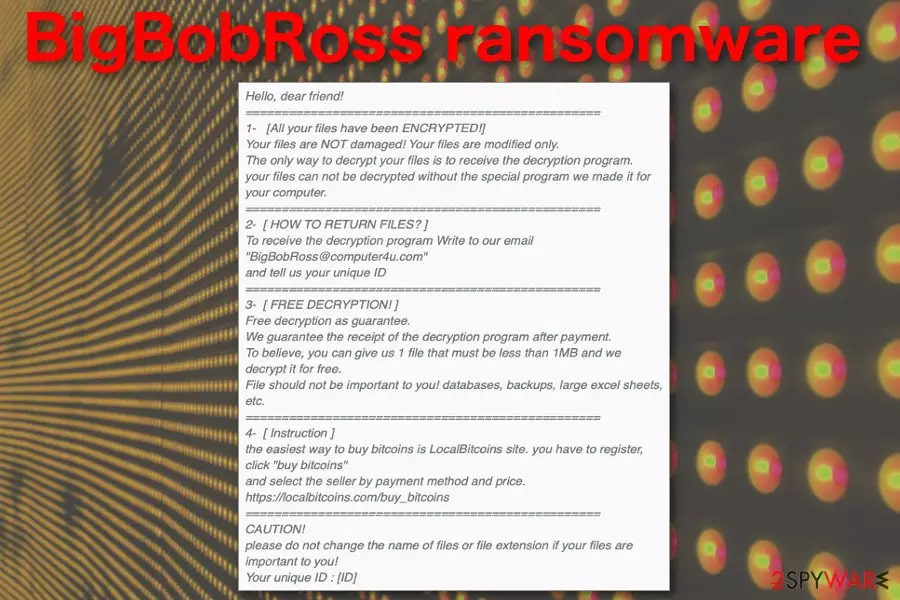
BigBobRoss ransomware ransom note reads the following:
Hello, dear friend!
=================================================
1- [All your files have been ENCRYPTED!]Your files are NOT damaged! Your files are modified only.
The only way to decrypt your files is to receive the decryption program.
your files can not be decrypted without the special program we made it for your computer.=================================================
2- [ HOW TO RETURN FILES? ]To receive the decryption program Write to our email “BigBobRoss@computer4u.com”
and tell us your unique ID=================================================
3- [ FREE DECRYPTION! ]Free decryption as guarantee.
We guarantee the receipt of the decryption program after payment.
To believe, you can give us 1 file that must be less than 1MB and we decrypt it for free.
File should not be important to you! databases, backups, large excel sheets, etc.=================================================
4- [ Instruction ]the easiest way to buy bitcoins is LocalBitcoins site. you have to register, click “buy bitcoins”
and select the seller by payment method and price.https://localbitcoins.com/buy_bitcoins
=================================================
CAUTION!
please do not change the name of files or file extension if your files are important to you!
Your unique ID :
There was no relation to other ransomware families at the time, so BigBobRoss ransomware gained a new name in the cybersecurity world. Developers were silent for a while, but in March the new version with the same marker but new email addresses came out. Following that, the decryption tool was released for this virus.

When BigBobRoss ransomware developers released .encryptedALL and .djvu variants, researchers were expecting this reaction from cybercriminals.[2] Often after the decryptor developers make a new version to compensate. The notorious GandCrab is one of many examples.[3]
You should remove BigBobRoss ransomware from the machine as soon as possible. The best tip for the process from experts[4] is to get the anti-malware program and clean the system thoroughly. You should use FortectIntego or a similar program and perform a system scan to delete all possible threats.
Although there are a few methods of BigBobRoss ransomware removal or even a few decryption tools, the system should be entirely virus-free so that the user can work on the machine regularly. Remember that ransomware alters various system programs or functions to keep persistent.
For this reason that BigBobRoss ransomware alters system settings, we recommend rebooting the machine in Safe Mode with Networking before scanning the system with anti-malware program. This way all cyber threats can be found since the program is not disabled or blocked by the virus.
Email spam gets used to infect targeted computers with ransomware
The primary method used to spread ransomware is the email spam that delivers infected attachments on safe-looking emails named as financial notifications from known companies, services or even software providers. Emails may contain a direct link to downloading page or a document attachment.
Spam emails often pose as sent from DHL, eBay or any other commonly used website that may send invoices or receipts. This way virus developers mask the real purpose of the message – delivering the malware. Once you download the file automatically or click on the Enable content button in the document, malicious macros lands on the system.
You should avoid clicking on emails with grammar mistakes or different suspicious content because those emails with red flags often contain malicious script or programs. Delete emails received out of nowhere and check the email box more often to clean unwanted material.
Terminate BigBobRoss ransomware and avoid infections in the feature
The best tip that security experts give to users is to keep their software updated and employing a reputable antivirus program. For the best BigBobRoss ransomware removal results, you should also employ the anti-malware tool and scan the system entirely.
This way you can remove BigBobRoss ransomware and get rid of all associated files or programs at the same time. The application indicates possibly dangerous programs and suggests removing them by following some simple steps. Use FortectIntego, SpyHunterCombo Cleaner, or MalwarebytesMalwarebytes for this job.
When BigBobRoss ransomware virus is terminated, you can get back to the safe and secure computer, browse online without risk and replace encrypted files using data backups. Also, you can find a decryption tool below.
Did this guide help?
Be the first to comment