

vxCrypter ransomware is the cryptovirus that follows the steps of old ransomware that was never finished
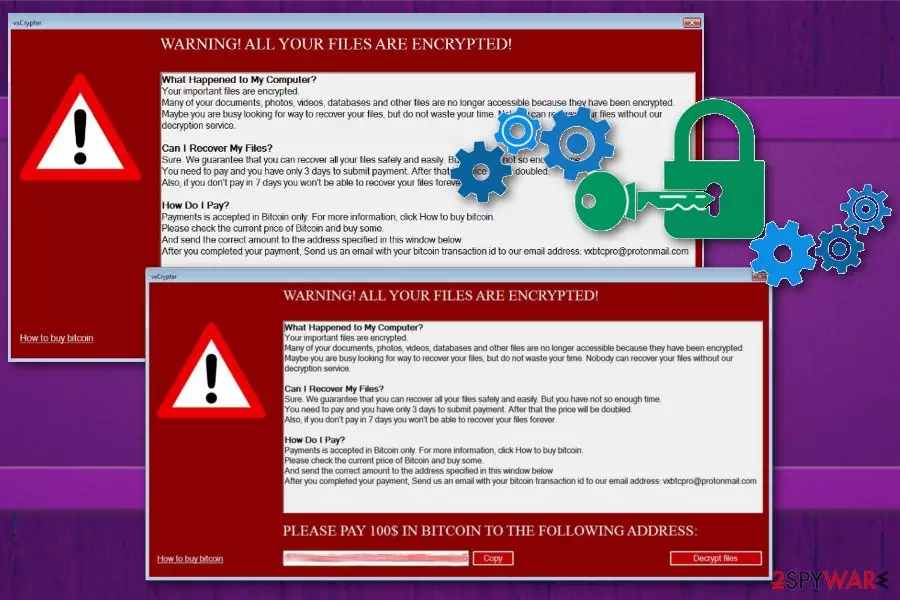
| Name | vxCrypter ransomware |
|---|---|
| Type | Cryptovirus |
| Based on | vxLock ransomware |
| File marker | .xLck |
| Contact email | vxbtcpro@protonmail.com |
| Ransom amount | $100 in Bitcoin |
| Ransom message | Appears in the program window called vxCrypter |
| Distribution | Spam email attachments |
| Other facts | Deletes duplicate files, is still in development |
| Elimination tips | Remove vxCrypter ransomware with MalwarebytesMalwarebytes |
vxCrypter ransomware virus has a few distinct features that include deleting files instead of encrypting them, delivering the ransom message on the program window and self-naming. The fact of deleting files can be explained because it may affect the speed of the initial encryption process. During the file-locking files with the following extensions get locked: .txt, .doc, .docx, .xls, .xlsx, .ppt, .pptx, .sqlite, .odt, .jpg, .jpeg, .bmp, .gif, .png, .csv, .sql, .mdb, .sln, .php, .asp, .aspx, .html, .xml, .psd, .xsd, .cpp, etc.
Additionally, data in these formats get deleted by vxCrypter ransomware because it finds duplicates and removes them. Executable files with .exe appendix or files belonging to the digital library (.dll) are not affected. Due to some glitches and bugs, it is thought that ransomware is in development still.
Nevertheless, vxCrypter ransomware is a harmful crypto malware that demands a ransom in a self-named program window with the message that states about possible steps, file recovery, and the ransom amount. The message also informs victims that the payment should be transferred in less than three days to guarantee the file recovery.
Nevertheless, the doubled ransom amount is not the best result since paying for vxCrypter ransomware developers may lead to:
- data loss;
- file deletion or damage;
- money loss;
- damaged system.
You need to remove vxCrypter ransomware and don't trust cybercriminals behind this malicious program. There is no guarantee that your files can get recovered by them.[2] The best solution for file recovery is replacing them with backed up data, and for that, you need a malware-free machine.
Employ MalwarebytesMalwarebytes for vxCrypter ransomware removal and scan the system thoroughly with this tool. Then you can follow the steps and terminate the detected threats, corrupted files or malicious programs entirely from the affected computer. Also, experts[3] note that additional PC repair process can help fix virus damage, for this job we recommend using FortectIntego.

Typical ransomware delivery involves spam email attachments
Cybersecurity world is wide as well as categories and types of malware, distribution techniques. Ransomware is one of the most dangerous cyber threats that involve personal files, money and even personal email boxes since the primary spreading method is infected email attachments.
Malicious file attachments are MS Office, Open Office or text, PDF files, database or executable files that include payload dropper or macro viruses and spread malware directly on the device.[4] Once the email is received, file downloaded and opened on the computer, ransomware has a place to infiltrate and infect.
You can avoid this infection if you pay more attention to emails you receive and don't open the ransom document found on the notification. Even though these emails pose as legitimate messages from companies or services, be sure that you use the service or product you got the email about, before opening received notification.
Terminate vxCrypter ransomware as soon as possible and avoid possible damage to your system
For vxCrypter ransomware removal and system cleaning purposes, you should get a reputable anti-malware program like FortectIntego, SpyHunterCombo Cleaner, or MalwarebytesMalwarebytes and scan the computer thoroughly. Then the program checks your device entirely and indicates malicious programs, malware or corrupted files.
To remove vxCrypter ransomware completely from the machine, you need to follow the suggested method and pay close attention to see what intruders got deleted. This process takes a few minutes, but your device gets cleaned entirely.
Make sure to get rid of the vxCrypter ransomware virus damage and all related files, so your files can be recovered. Scan the system again with a different antivirus tool or PC repair program and then plug in your backup device with safe files.
Did this guide help?
Be the first to comment