

Croc ransomware is the cryptovirus that demands payment from victims if they want to get their files back
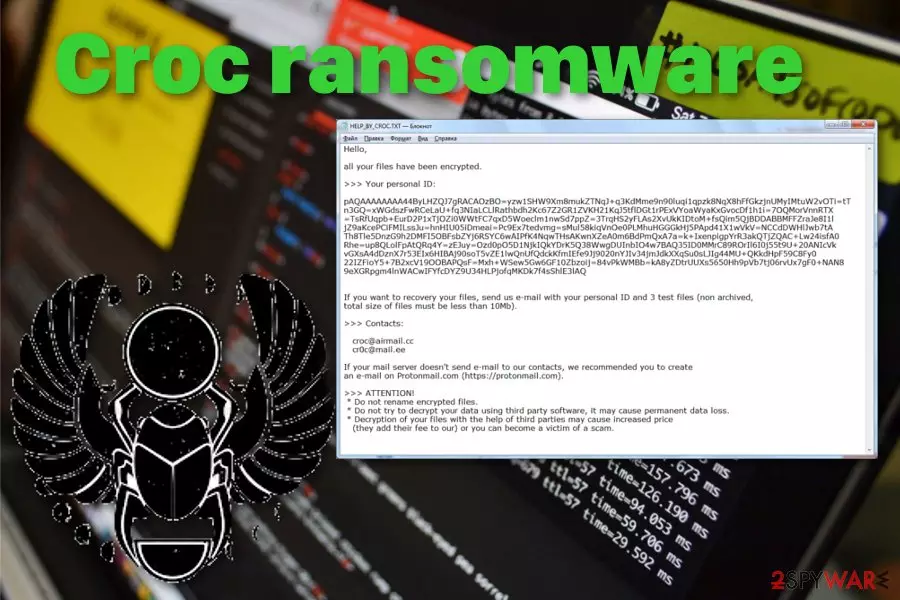
In that text file, virus developers inform the victim about the encryption process and offer an opportunity to decrypt a few test files for them if the user contacts criminals via croc@airmail.cc, cr0c@mail.ee. This is not recommended because cybercriminals have only one purpose and goal – getting money from their victims.[1] There is little to no chance of getting your data back, especially when it comes to dangerous crypto malware like Croc file-encrypting virus.
| Name | Croc ransomware |
|---|---|
| Type | Cryptovirus |
| Family | Scarab ransomware |
| File extension | .croc |
| Ransom note | HELP_BY_CROC.txt |
| Encryption method | AES and RSA[2] |
| Distribution | Spam email attachments, exploit kits, infected files with ransomware payload |
| Contact emails | croc@airmail.cc, cr0c@mail.ee |
| Removal | Get a reputable anti-malware tool for a proper Croc ransomware removal. Clean the possible virus damage with FortectIntego |
Croc ransomware is the crypto-extortion based virus because that categorizes as ransomware because virus developers make users data useless and locked to demand a ransom in cryptocurrency. It starts the attack with encryption, and when the initial batch of data gets locked, the ransom note gets delivered on the screen.
Croc ransomware presents a text file – HELP_BY_CROC.txt that reads the following:
Hello,
all your files have been encrypted.
>>> Your personal ID:
pAQAAAAAAAA ***
you can use less than 10Mb.
>>> Contacts: croc@airmail.cc cr0c@mail.ee If your mail server doesn't send e-mail to our contacts, we recommend you to create an e-mail on Protonmail.com (https: // protonmail. com). >>> ATTENTION! * Do not rename encrypted files. * Do you want to make a permanent data loss?
Decryption of your * files is with the help of a cause THIRD, Parties may Increased price
(the add for They Their fee to Our) or you CAN Become a victim of a scam a.
You shouldn't trust people behind Croc ransomware and avoid contacting them n general as well as paying the ransom because they are not reliable and may affect your device or files even more instead of recovering them. Additionally, besides the encryption process and ransom demand, cryptovirus alters system files and functions on the infected machine.
These alterations include changed Windows registry entries, system files, deleted or disabled programs and functions. Croc ransomware tries to stay persistent on the computer, so various system security programs or features may get disabled and even deleted.
Because of that, you can benefit from System Restore or Safe Mode features of the Windows operating system during the Croc ransomware removal. Also, for this process, experts[3] recommend using professional anti-malware programs and scanning the device fully using them.

During a full system scan tools like FortectIntego or any other antivirus program can check various places on the machine and detect various PUPs besides more severe malware. Then you can altogether remove Croc ransomware and fix virus damage, clean the computer entirely.
Cryptocurrency is the preferred payment method of many ransomware developers. So Croc ransomware is not the exception. However, remember how dangerous and challenging paying the ransom may be.[4] You should get rid of this malware completely before trying to restore files because attempting any data recovery may lead to permanent data loss when the virus is not deleted fully.
When you need to restore files after Croc ransomware encryption rely on data backups stored on an external device or cloud service, since you save those files. However, when you need an alternative, you can try data recovery methods, and software suggested below the article.
A payload dropper that initiates the malicious script hides on spam email
Ransomware payload gets delivered with the help of spam email campaigns when the social engineering tactics and other deceptive techniques help deliver malicious files to users. Legitimate-looking emails pose as notifications from services, companies and other known sources.
Unfortunately when the email gets opened its only a matter of downloading and opening the attached file, and the system gets infected with ransomware itself or malware that is designed to spread cryptovirus further. Macro virus-filled documents or PDFs only need to be opened, and the malicious script releases on the PC.
Avoid opening these emails and downloading attachments from them. Delete all emails received without expectation, pay more attention to what services you use and companies you get products from. Be more suspicious to every sender and look out for red flags like grammar mistakes or typos.
Make sure to delete Croc ransomware and all programs running in the background or files added to the system folders
Croc ransomware virus makes boot option changes and alters registry keys to make sure the threat runs on the system all the time and affects various parts of the computer. These alterations also ensure that various recovery menus cannot be accessed, security functions cannot be launched.
All these additional setting alterations affect the initial Croc ransomware removal process because it keeps anti-malware programs from running correctly or even makes virus immune to security tools. For that reason, make sure to get reputable anti-malware like FortectIntego, SpyHunterCombo Cleaner, or MalwarebytesMalwarebytes and scan the machine thoroughly.
This way you can remove Croc ransomware and any additionally delivered malware or files, programs. Trojans, miners or redirects get detected and terminated as well as the ransomware itself.
Did this guide help?
Be the first to comment