

Colorit ransomware is the cryptovirus that demands Bitcoins for encrypted users' files
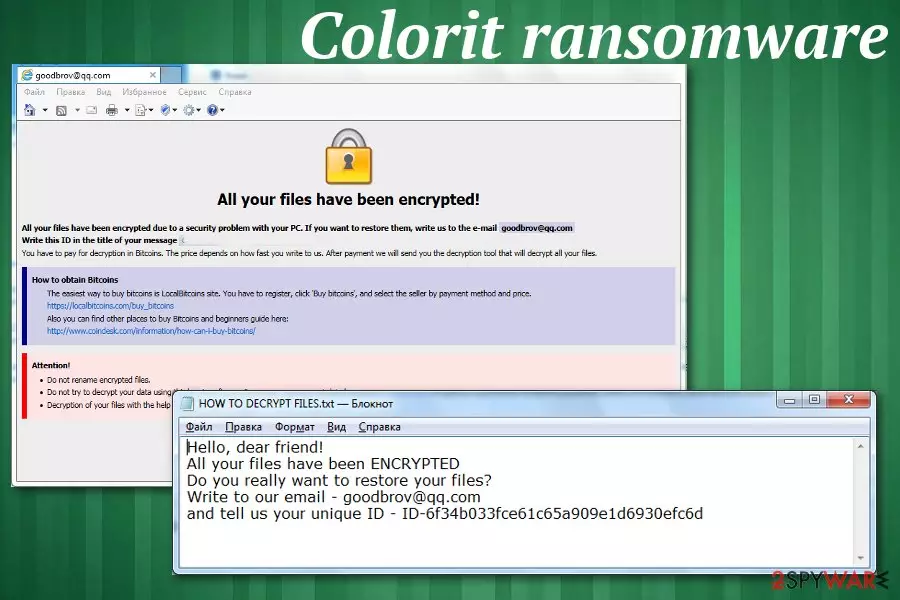
Colorit ransomware is the new version of the malware that appears similar to other threats because it uses similar features. It is common for crypto malware to mimic others with ransom note files, contact emails or payment instruction windows, in this case. However, this is a confirmed version of DCRTR-WDM ransomware.
As previous variants in the same cryptovirus family Colorit ransomware uses a sophisticated encryption algorithm, makes users' data useless by locking those files and then demands a ransom in the note placed as HOW TO DECRYPT FILES.txt file. Also, when data gets marked with .COLORIT file extension, browser window named as the ransom note delivers more information regarding the payment methods.
Although the message that COLORIT ransomware developers release, contains only contact email, reaching them is not recommended or advised since it can lead to data or money loss and more severe damage to your device. Since various AV engines can detect this threat, you should rely on anti-malware programs and scan the computer entirely to get rid of the notorious cryptovirus instead of paying the ransom demand.[1]
| Name | Colorit ransomware |
|---|---|
| Type | Cryptovirus |
| Distribution | Spam email attachments, phishing messages, infected documents |
| Symptoms | Files get encrypted and locked, system security functions disabled, a ransom note appears on the locked screen |
| File marker | .COLORIT |
| Family | DCRTR-WDM ransomware |
| Danger | Exposes to malicious content, hackers can damage or steal users' data, affect the infected machine significantly |
| Elimination | Use FortectIntego for Colorit ransomware removal |
Colorit ransomware virus is the cyber threat that belongs to one of the most dangerous virus category – cryptovirus. This is the type of malware that performs encryption-based attacks on targeted systems. Since it focuses on creating ransom notes in English, malware can spread on the bigger part of the world. Although ransomware is the threat that mainly gets on Windows OS, Mac devices also can get infected by similar threats.[2]
The first step of COLORIT ransomware attack is an encryption process, and then virus places the ransom note called HOW TO DECRYPT FILES.txt on the desktop and in every folder with encoded data. The message reads:
Hello, dear friend!
All your files have been ENCRYPTED
Do you really want to restore your files?
Write to our email – goodbrov@qq.com
and tell us your unique ID
Additionally to this file, Colorit ransomware developers want to pose as other threats in this category that display payment instructions, places where to get Bitcoins and other information regarding cryptocurrency wallets and the ransomware attack. These instructions appear on the screen when the encryption is done. HOW TO DECRYPT FILES.hta displays the following:
All your files have been encrypted!
All your files have been encrypted due to a security problem with your PC. If you want to restore them, write us to the e-mail goodbrov@qq.com
Write this ID in the title of your message 6f34b033fce61c65a909e1xxxxxxxxxx
You have to pay for decryption in Bitcoins. The price depends on how fast you write to us. After payment we will send you the decryption tool that will decrypt all your files.
How to obtain Bitcoins
The easiest way to buy bitcoins is LocalBitcoins site. You have to register, click 'Buy bitcoins', and select the seller by payment method and price.
https://localbitcoins.com/buy_bitcoins
Also you can find other places to buy Bitcoins and beginners guide here:
http://www.coindesk.com/information/how-can-i-buy-bitcoins/
Attention!
•Do not rename encrypted files.
•Do not try to decrypt your data using third party software, it may cause permanent data loss.
•Decryption of your files with the help of third parties may cause increased price (they add their fee to our) or you can become a victim of a scam.
The particular ransom amount is not revealed in these files, but COLORIT ransomware developers specify the amount when the victim writes them an email asking for redemption and file recovery. This payment may differ from hundreds of dollars to thousands, based on the amount and the importance of the encrypted data.
However, as many experts[3] always note paying the ransom demanded by cybercriminals like Colorit ransomware creators is not a good idea. You should clean the machine instead and then rely on data recovery software or your file backups and restore affected files.

Colorit ransomware encrypts data from photos, documents, audio, and video files and makes those files useless. In most cases, this is the primary concern for victims, but ransomware also:
- disables system security functions;
- adds new registry entries;
- deletes files and programs;
- damages or steals data.
You should remove Colorit ransomware from the machine and avoid any communication with cybercriminals behind this threat. They are not trustworthy or reliable because the only purpose of such malware is to gain money from victims or steal their personal and valuable information.
For the best results, you should perform automatic Colorit ransomware removal and use FortectIntego or a similar anti-malware program in the process. Professional antivirus tools can check the machine thoroughly and indicate dangerous or malicious, corrupted files and programs.
When COLORIT ransomware virus gets detected alongside other related programs and files, tools like this can delete the threat from your device and improve the performance significantly this way. You should also consider keeping the application on the machine and running a full scan occasionally to keep the system virus-free.
Spam email campaigns and phishing message attacks deliver a malware payload
The most popular method used to distribute such threats like ransomware involves fake email notifications posing as the legitimate company or service, so the user is more likely to believe that this is a truthful message. Unfortunately, this is only a method used to deliver malware on unsuspected users' devices via one click of the button.
Ransomware infiltration happens when the user triggers malicious macros delivered via the spam email attachments, in most cases, PDF or Word documents. Once the document gets downloaded and opened on the targeted machine malicious script is launched, and ransomware payload dropper activates the malware infection.
This can be avoided by paying more attention to processes that happen online, received emails and other notifications that appear on the screen. When you delete emails sent from suspicious companies or services or notifications with grammar mistakes you avoid getting cyber infections.
Terminate Colorit ransomware and clean the machine thoroughly
For the automatic Colorit ransomware removal process, you should employ trustworthy anti-malware programs like FortectIntego, SpyHunterCombo Cleaner, or MalwarebytesMalwarebytes. These tools fit the requirements because the antivirus program performs a full system scan and malware removal process.
This is especially crucial when you need to remove Colorit ransomware, so all programs and files can get deleted altogether during one system cleaning. Employ a program from a reputable source to avoid additional infiltrations. Remember that not every antivirus tool performs the same since they all have different databases of malware programs.
Did this guide help?
Be the first to comment