

Godes ransomware is a file-locker virus that tricks people into paying $980 ransom by encrypting their files and marking them with .godes extension
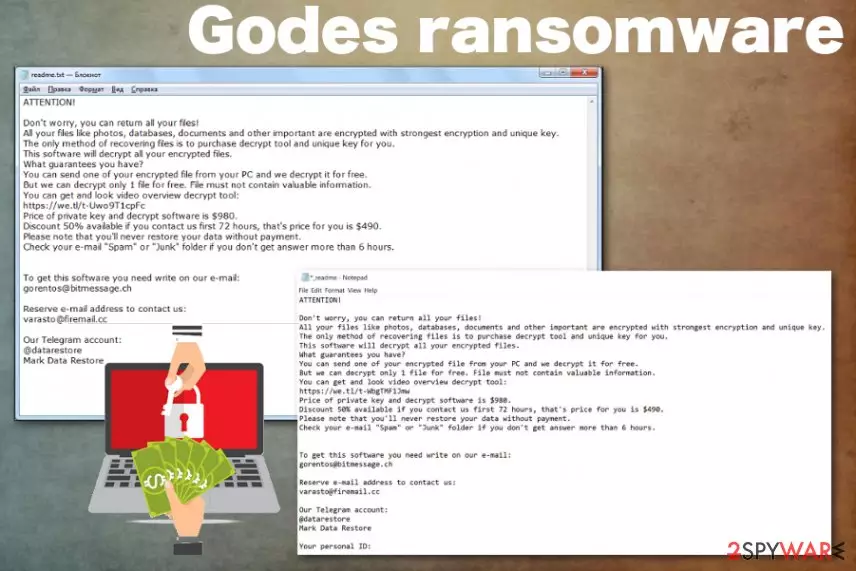
Godes ransomware is the cryptovirus that encourages victims to contact the cybercriminals behind the threat when important data gets encrypted and becomes useless. This is a variant of the STOP virus/Djvu ransomware that is already known for the cybersecurity researchers, so there is a possibility to get the affected data decrypted. For that, you should rely on
, and the STOP decrypter tool that is continuously updated after each new version in this family of ransomware gets released in the wild. However, this is one of the more active cryptovirus versions, so keep your encrypted data and wait for the needed update, while obliterating the threat from the system.Particular Godes ransomware virus features include all the common and typical symptoms of the file-locking malware and other features that developers are not changing for a while. Since the ransom note gets delivered in _readme.txt, the message itself remains the same as for other previous versions, and the ransom amount still is $980, contact emails gorentos@bitmessage.ch, varasto@firemail.cc are used for a while in the family, the only unique feature belonging to this variant is .godes file marker which gets placed on every document or a different file after encryption.
| Name | Godes ransomware |
|---|---|
| Type | Cryptovirus |
| File marker | .godes |
| Ransom note | _readme.txt |
| Family | DJVU/STOP virus |
| Contact emails | gorentos@bitmessage.ch, varasto@firemail.cc |
| Distribution | Spam email attachments, other malware |
| Decryption | STOP decryptor (download) |
| Elimination | Install FortectIntego to remove Godes ransomware alongside the virus damage |
Godes ransomware cryptovirus is the common yet one of the most dangerous cyber threats that lock victims' file using an encryption algorithm.[1] The initial focus of this virus is to make victims' data useless because this way, the ransom note can be delivered with a direct ransom demand.
The Godes ransomware attack starts with finding files in particular formats that are needed for the encryption. Photos, videos, audio files, documents, and even archives get chosen for the process and get encoded what leads to useless and locked data. Then the virus marks all the affected files with .godes file extension.
Once the initial process of file locking ends, the ransom note file is placed in every folder containing such encoded data and on the Desktop. This text file named _readme.txt displays all the details about Godes ransomware encryption process and reveals more tips on the payment and possible decryption, contact methods. Developers claim that you can get a discount of 50%, but you shouldn't even consider contacting them or paying the demanded amount.

If you consider the test decryption offered by criminals, you can get more severe malware installed than this initial Godes ransomware, or even tricked into revealing personal information. Any contact between the victim and the crypto-extortionist can lead to money or data loss because these people are focusing on getting money from people, not on restoring their files.
Godes ransomware ransom message states the following:
ATTENTION!
Don’t worry, you can return all your files!
All your files like photos, databases, documents and other important are encrypted with strongest
encryption and unique key.
The only method of recovering files is to purchase decrypt tool and unique key for you.
This software will decrypt all your encrypted files.
What guarantees you have?
You can send one of your encrypted file from your PC and we decrypt it for free.
But we can decrypt only 1 file for free. File must not contain valuable information.
You can get and look video overview decrypt tool:https://we.tl/t-514KtsAKtH
Price of private key and decrypt software is $980.
Discount 50% available if you contact us first 72 hours, that’s price for you is $490.
Please note that you’ll never restore your data without payment.
Check your e-mail “Spam” or “Junk” folder if you don’t get answer more than 6 hours.
To get this software you need write on our e-mail:gorentos@bitmessage.ch
Reserve e-mail address to contact us:
varasto@firemail.cc
Our Telegram account:
@datarestore
The message, as well as other features of the virus, are not changed when compared to other previous versions in the same family. However, these facts don't make the Godes ransomware virus less dangerous or malicious. You should react as soon as you notice any suspicious activity on the machine because while your files get encrypted, this ransomware also alters system settings and affects the performance of the machine significantly.
Godes ransomware removal is important for the whole device because such threat directly encodes your personal files, but alter all the important system folders and preferences in addition. The automatic method helps to eliminate all those changes because system tools and anti-malware programs can indicate various issues and virus damage during the thorough check on the computer.
When all the particular issues with your device get indicated, you can remove Godes ransomware and other possibly installed programs or malware at the same time. This is the best recommendation from experts[2] because automatic virus termination methods allow deleting all the damage and improve the general performance of the infected machine afterward.
You should choose a reliable anti-malware tool for the process of system cleaning and Godes ransomware virus damage removal. It is a big chance, based on the detection rate,[3] that most of the commonly found antivirus programs can work for the process. We can also recommend using FortectIntego to double-check and clean the programs that may be left behind.

Malicious code may be used as URLs or file attachments on legitimate-looking emails
The primary goal of such a virus is to encrypt users' files and demand a ransom. For that reason, such threats like ransomware come to the system using silent and malicious techniques. One of the most used methods for this type of virus is spam email campaigns during which people download and open files or links filled with malicious script.
Such infection happens when the user receives an email with either a file attached to the notification directly or suspicious hyperlinks, in-text links. The user needs to download and open the document or a PDF attached to such email to trigger the malicious macros and infect the machine with malware.
You can avoid these infections if you pay closer attention to the email you get on the email box. When the notification raises suspicions, you need to delete them immediately. Do not risk getting any cyber infection on the machine by opening and downloading questionable files or clicking on shortened or hidden links.
Get rid of Godes ransomware virus damage by cleaning the system fully
Since Godes ransomware virus is the threat that affects significant parts of the machine, you need to take precautionary measures and check all the parts of the device to be sure that everything runs smoothly and malware is not damaging your PC. This threat can disable some functions on the system like security tools and third-party antivirus programs.
For that reason, you should reboot the machine in the Safe Mode before scanning the system with anti-malware tools and remove Godes ransomware this way. Antivirus program then can detect all the malicious programs and corrupted files without virus interference.
Make sure to fully scan the machine and repeat the check a few times to be sure that Godes ransomware removal gave you the best results possible. Also, tools like FortectIntego, SpyHunterCombo Cleaner, or MalwarebytesMalwarebytes can help you clean the machine from malware, virus damage and restore needed Windows files.
Did this guide help?
Be the first to comment