

Asd ransomware is a computer infection that blocks access of all personal files on the infected computers and demands a ransom in Bitcoins
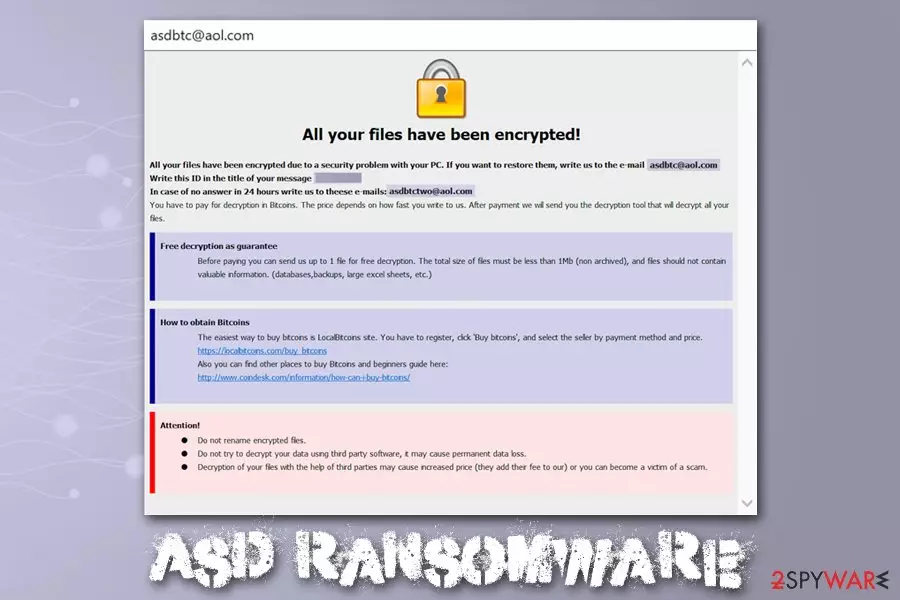
Asd ransomware is malware that focuses on money extortion by encrypting all personal files on the targeted Windows systems. Suchlike modified files can no longer be accessed, and are marked with .asd file extension, among other changes that are performed to data. To retrieve access to files, victims require an AES and RSA-generated key that is only accessible to cybercriminals. As evident, hackers ask for Bitcoins for the Asd ransomware decryptor, although the precise sum is not provided.
To explain the situation more clearly to victims, Asd ransomware developers provide a ransom note which is dropped in two formats – FILES ENCRYPTED.txt, as well as a .hta file. These notes also contain contact details of cybercriminals – asdbtc@aol.com and asdbtctwo@aol.com – which can be used for Asd ransomware decryptor price negotiation.
| Name | Asd ransomware |
| Type | Cryptomalware, File locking virus |
| Family | Malware belongs to one of the leading ransomware families – Dharma/Crysis |
| Distribution | Most commonly used distribution methods include malicious spam email attachments, Remote Desktop intrusions, as well as pirated software installers and cracks |
| File extension | Each of non-system and non-executable files are appended with .id-[ID].[asdbtc@aol.com].asd file extension. Example of an encrypted file: filename.jpg.id-3T743R20.[asdbtc@aol.com].asd |
| Ransom note | Two ransom notes are dropped folders where locked files are located – FILES ENCRYPTED.txt and info.hta |
| Contact | For ransom negotiation purposes, cybercriminals provide two email addresses: asdbtc@aol.com and asdbtctwo@aol.com |
| File decryption | The only secure method to decrypt files is by using data backups prepared prior to the infection. Other methods include using third-party recovery software or paying cybercriminals – the latter is risky. |
| Virus removal | To delete malicious software safely from the computer, access Safe Mode and perform a full system scan with powerful anti-malware software |
| OS recovery | Ransomware not only encrypts all personal files on the system but also changes various settings and intercepts system files. After malware removal, you might experience system crashes or errors because of that. To remediate your Windows OS, scan it with FortectIntego |
The Asd virus derived from one of the most prominent families – Dharma/Crysis and was first spotted by researcher Jakub Kroustek in the first half of December 2019. Victims who previously paid ransom for the decryption tool said that malware authors often ask for extra money after payment, so trusting them is not recommended. Before using alternative file recovery solutions, users should backup the encrypted files and remove Asd ransomware from their computers.
Asd ransomware operation and file encryption specifics
It is important to note that Asd ransomware also makes several changes to the host machine after the intrusion, which usually happens after users open a malicious spam email attachment, do not protect their RDP connections, or downloading software crack like KMSpico or a fake installer. Nevertheless, hackers might use other attack vectors for propagation to increase the infection rate.
As ransomware performs the following changes to the system:
- Deletes all Shadow Volume Copies with the help of “vssadmin delete shadows /all /quiet” command;
- Modifies Windows registry to enable boot every time Windows is launched;
- Contacts a C2 server and delivers computer's name and some other information;
- In some cases, uninstalls security software to complicate Asd ransomware removal.
Once all the preparations are complete, the malware starts its encryption routine by using a combination of AES and RSA ciphers, which makes it even more difficult to break (in fact, the algorithm used in the newest versions is so strong that many security experts say that decrypting them is impossible,[1] as it would require thousands of years of mathematical calculations performed by the most advanced computers). Only system and malware files are skipped by Asd ransomware – everything else gets encrypted and becomes inaccessible.
The message in the shorter version of the Asd virus ransom note states:
all your data has been locked us
You want to return?
write email asdbtc@aol.com or asdbtctwo@aol.com
Far more details are included in the other ransom note – it indicates that users might send one file for test decryption to ensure that Asd ransomware decryptor works. However, experts[2] advise not to trust cybercriminals, as they might send a fake tool, or might ask for more money.

The ransom size is never provided by any Dharma versions, as the amount highly depends on various factors, such as if the infected computer comes from an organization or is a regular user, as well as how soon victims contact attackers. In the known cases, companies were asked for around 1 BTC, while regular users might be asked for a much smaller sum.
If you happened to be a victim of Asd ransomware, you should make a copy of all the encrypted files and then terminate the infection. Alternative methods for file recovery are listed in the recovery section below, although you should be aware that chances for successful decryption are low. In case you have problems post-termination and Windows are crashing or returning errors, you should perform a scan with FortectIntego – it will remove virus damage, and you will not have to reinstall the OS.
Perform necessary protection steps to avoid ransomware attacks
Dharma/Crysis ransomware is so prevalent due to the distribution methods that the attackers use. While some malware families like Djvu stick to pirated software installers, others employ a variety of attack vectors to ensure a large number of infections, consequently increasing the chances of victims paying the ransom. Unfortunately, it also increases hackers' will to make new viruses, as it is simply profitable – this is why ransomware has been on the rise in 2018 and 2019.[3]
Therefore, the best way to stop cybercriminals is not to get infected with ransomware in the first place. Here are the most used distribution methods of Dharma developers:
- Spam email attachments and hyperlinks. In some cases, hackers use double file extensions to make it look like the attached file is not executable. Additionally, it was also observed that malicious actors insert hyperlinks that lead to self-extracting and password-protected file, which also includes the installer of a well-known anti-virus vendor, diminishing the suspicions for recipients. To mitigate the attack, treat each email with suspicion and never open attachments or click on links unless you are sure that the email came from a legitimate source.
- RDP connections. Malware developers often abuse Remote Desktops that use a default TCP port 3389 and apply leaked credentials to access the machine remotely.[4] After the intrusion, they install malware manually, sometimes uninstalling anti-malware solutions in the process. To stop RDP-based attacks, you should use a different RCP port and use a strong password.
- Fake installers. Malicious actors also use fake copies of anti-virus or other trusted software in order to trick users into opening the executable. These files are usually distributed via various third-party software hosting sites as well as shared networks. To avoid fake versions of programs, you should only rely on executables coming from official websites.
As the primary countermeasure to ransomware, you should backup all their important files on a regular basis.

Before removing Asd ransomware, backup the encrypted files
While Asd ransomware removal is one of the first step that is required towards the recovery after the infection, you should also take into consideration your locked files. Unlike other malware, ransomware does not decrypt data after it is removed. In fact, deleting malware might sometimes damage files beyond repair and will render them permanently damaged. To avoid that, you should backup all the locked data before you uninstall Asd ransomware.
To remove Asd ransomware, you need to perform a full system scan with anti-malware software – you can try using SpyHunterCombo Cleaner or MalwarebytesMalwarebytes, although any other reputable malware removal tool should suffice. If you are having troubles and the virus stops your security tool from working, access Safe Mode with Networking as explained below.
After you get rid of Asd virus, you can then attempt file recovery. Unfortunately, there is no working decryption tool created for this version of Dharma, so the only way to retrieve data is by using third-party recovery software or Windows Previous Versions feature. Note that chances of retrieving files using these methods are low, although it is not impossible. The less you use your computer post ransomware infection, the bigger the chances you can restore at least some of your data with recovery tools.
Did this guide help?
Be the first to comment