

Self ransomware – a virtual parasite that performs the encryption procedure on any type of Windows operating system, including Windows 7, Windows 8, and Windows 10
Self ransomware is a file-locking virus that resides from the Dharma family and initiates encryption on all files and documents found. It brings a specific executable to the Windows computer system and initiates a full scan in search of encryptable components. Afterward, the notorious malware appends the .id[random characters].[black@gytmail.com].self extension to each filename. .self file virus makes sure that no document or file is left undecryptable and the victims can no longer access their blocked data unless they get the decryption tool from somewhere.
Since malicious actors employ online keys such as AES and RSA, the encryption and decryption software differ for each user and are held by the developers only. As a solution to the situation, Self ransomware developers offer buying the key from them by transferring a particular amount of Bitcoin. Even though there is no certain sum provided in the FILES ENCRYPTED.txt and pop-up window ransom notes, crooks will likely reveal the payment amount and outline all of the conditions when the victims contact them via black@gytmail.com email address.
| Name | Self ransomware |
|---|---|
| Type | Ransomware virus/malware |
| Family | Dharma ransomware |
| Extension | When all files are locked by using a unique cipher such as AES or RSA, the ransomware virus appends the .id[random characters].[black@gytmail.com].self to each filename |
| Ransom note | The ransomware virus displays a ransom message in the form of a pop-up window and in a text message named FILES ENCRYPTED.txt |
| Crooks' email | Criminals include the black@gytmail.com email address in the ransom message in order to make contact with the victims and discuss all of the conditions related to the ransom demands and payment process |
| Distribution | Malicious payload gets delivered through email spam campaigns and the suspicious attachments that come clipped to the email letters. Also, ransomware viruses can be distributed through cracked software, malvertising, hacked RDP, and by exploiting system vulnerabilities |
| Removal | You can get rid of the ransomware virus with the help of reliable antimalware software. Do not try to eliminate the malware on your own as you might make accidental mistakes or skip some crucial skips |
| File recovery | If you do not have backups of your locked files and documents, you can try recovering them with the help of third-party data restoring software that has been included to the end of this article |
| System repair | If the ransomware has made some damage to your infected Windows computer system, you can try repairing the corrupted areas with the help of software such as FortectIntego |
Dharma ransomware has been recently releasing a big variety of similar variants, including [black@gytmail.com].self ransomware, and seems to be keeping up with Djvu ransomware which also is a very active threat family. File-encrypting viruses are likely to spread through email spam campaigns, hacked RDPs,[1] software cracks, malvertising, and by exploiting various OS/software vulnerabilities. Of course, this happens secretly and anonymously.
Self virus can appear on any type of Windows computer system, including Windows 7, Windows 8, and Windows 10. Even though this type of malware has not been targetting Macs or Linux-based OS, we cannot predict what is going to happen in the future as cybercriminals are becoming more and more advanced and have been thinking of different ways how to spread their created cyber threats to a wider range of users.
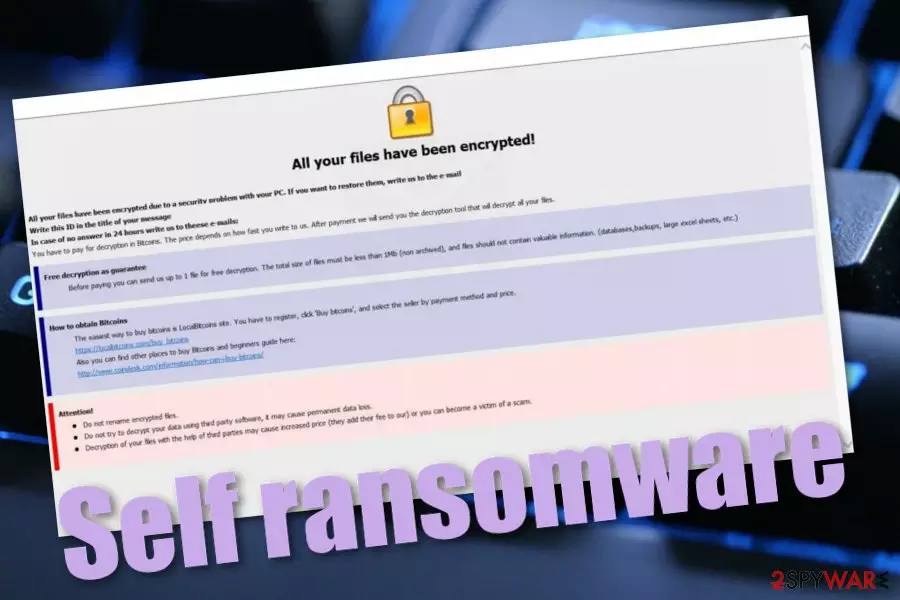
Self ransomware mostly targets English-speaking people, according to the language in which its ransom note is written in. A lot of users know or speak English, so these types of targeted infections are the most successful depending on the number of infected victims. The ransom note pop-up window of this Dharma ransomware variant looks like this:
All your files have been encrypted!
All your files have been encrypted due to a security problem with your PC. If you want to restore them, write us to the e-mail black@gytmail.com
Write this ID in the title of your message 1E857D00
In case of no answer in 24 hours write us to theese e-mails:black@gytmail.com
You have to pay for decryption in Bitcoins. The price depends on how fast you write to us. After payment we will send you the decryption tool that will decrypt all your files.
Free decryption as guarantee
Before paying you can send us up to 1 file for free decryption. The total size of files must be less than 1Mb (non archived), and files should not contain valuable information. (databases,backups, large excel sheets, etc.)
How to obtain Bitcoins
The easiest way to buy bitcoins is LocalBitcoins site. You have to register, click 'Buy bitcoins', and select the seller by payment method and price.
hxxps://localbitcoins.com/buy_bitcoins
Also you can find other places to buy Bitcoins and beginners guide here:
hxxp://www.coindesk.com/information/how-can-i-buy-bitcoins/
Attention!
Do not rename encrypted files.
Do not try to decrypt your data using third party software, it may cause permanent data loss.
Decryption of your files with the help of third parties may cause increased price (they add their fee to our) or you can become a victim of a scam.
Self ransomware developers do not provide any particular ransom demands, however, these people urge for Bitcoin cryptocurrency payments as such type of digital currency transaction allows both parties to stay anonymous. By granting themselves safety, crooks can urge for a price anywhere from $100 to $2000 and above. However, you should not deliver the money to them due to these reasons:
- You can be provided with a fake tool after the payment.
- The crooks might urge for more money after you make the first transfer.
- You might receive no decryption tool at all.
Crooks will try to convince you to pay them by offering to provide evidence of the decryption tool's existence. Hackers suggest users send them one small file that does not include more space than 1MB and they will decrypt it for free. Another tactic that Self ransomware developers use is trying to scare people by claiming such things that using other software for decryption will increase the key's price or that it might cause permanent data loss.

If Self ransomware has encrypted some of the very valuable important data and you want to get it back badly, there are some alternatives you can try. If you cannot restore the files from a backup, you should go to the end of this page where you will find some handy data recovery techniques. Of course, if you want to succeed in the file restoring process properly, you need to perform the Self ransomware removal first, otherwise, the data will remain blocked.
If you are looking for ways to remove Self ransomware from your Windows computer system, reliable antimalware software needs to be employed in this case. Security experts from NoVirus.uk[2] do not recommend trying to eliminate the file-encrypting virus on your own as this might bring only more damage to your device. If the ransomware virus has already corrupted some of your Windows OS areas or software, you can try initiating a repair process with a tool such as FortectIntego.
However, note that some data recovery software might not operate properly if Self ransomware has permanently damaged or deleted the Shadow Volume Copies of your encrypted files. If this has happened, you are left with other file restoring alternatives. Another thing that the virus might do is corrupt host files and prevent you from accessing security-related sites. If these components get damaged, you should delete them together with the ransomware virus.
Another reason to uninstall Self ransomware from your Windows computer is the possibility that this virus might bring other malicious strings such as trojans to the computer system. If your antimalware is having a hard time detecting the malware, it might be blocking your antivirus tool or initiating some other malicious changes on the device. To reverse the suspicious settings, you should reboot the computer system in Safe Mode with Networking.
According to VirusTotal provided information,[3] Self ransomware brings malicious payload named [random characters]svhostru.exe into the Windows computer system. This product has been detected as a virus by 63 antimalware engines out of the total 73 which is a really fascinating number! Some of the detection names include Trojan.Ransom.Crysis.E, Win32:RansomX-gen [Ransom], Ransom.Crysis.Generic, and others.

The distribution process of malicious payload
If you have been infected with a ransomware virus, you might have wondered where did the infection come from. Most of the time, the person himself makes a mistake somewhere and the malicious payload gets downloaded to the computer system. This can happen while opening a malicious attachment that comes clipped to an email spam message, when entering an infected hyperlink, through malvertising, hacked RDP, and when crooks exploit operating system vulnerabilities.
Despite the fact that you should always have an updated antivirus program operating on your Windows computer system, you can also perform the below-provided guiding steps to help yourself prevent ransomware attacks:
- Do not open any attachments that come clipped to email messages before scanning them with antimalware software. This way you will be notified if the malicious payload is hidden there.
- Stop visiting third-party downloading sources such as peer-to-peer[4] ones. These networks come filled with infectious hyperlinks that sometimes include malware or often hold software cracks that can also be misused for virus distribution.
- Do not click on every ad that you see. If some adverts have been bothering you very often lately, install AdBlock or Adblock Plus to your web browser to block the incoming advertisements or check your computer system for a possible adware infection.
- Make sure that your operating system, software that is placed on it, and other apps are kept frequently updated, otherwise, they might include bugs and flaws that can be misused by hackers for malware such as ransomware installation.
Self ransomware elimination from Windows OS (automatical)
You should not try to remove Self ransomware on your own as this type of virus is too complex to get rid of by relying only on your skills. You might not even notice how you accidentally skip some important steps or miss to delete a malicious product that the ransomware virus has planted on your Windows machine.
Our security experts recommend proceeding with the Self ransomware removal process by employing reliable antimalware software. Also, you should scan the entire system for possible damage with other tools such as SpyHunterCombo Cleaner or MalwarebytesMalwarebytes. If this software discovers any affected areas, you can try repairing them by employing FortectIntego.
If you are having trouble to uninstall .self files virus, the malware might be blocking your antivirus or initiating other malicious changes on your PC. To fix that, you should reboot your Windows computer system in Safe Mode with Networking or activate the System Restore feature to disable the suspicious modifications and bring your device back to the previous state.
Did this guide help?
Be the first to comment