

AoBo keylogger is a monitoring application that might be injected in a Mac without your consent
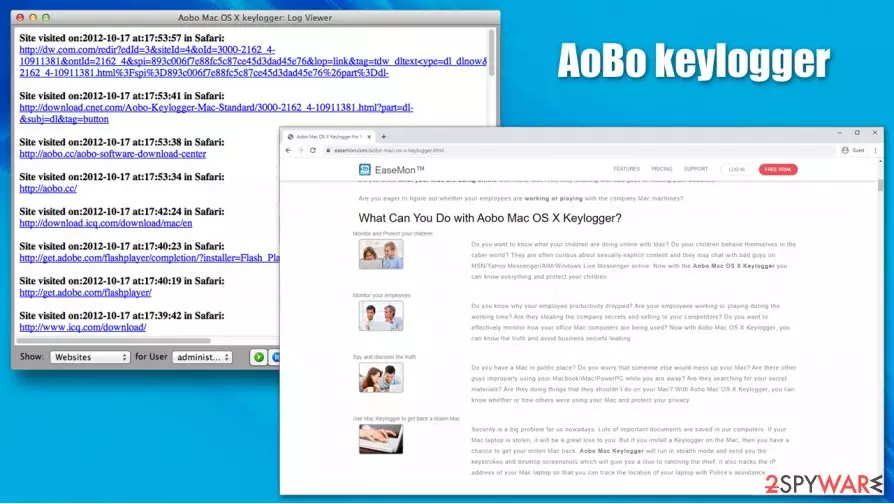
AoBo keylogger is initially a legitimate program by AiBo Software and is used to monitor Mac operating systems. Its main features include recording keyboard and mouse inputs, taking screenshots, monitoring visited websites and chat conversations, reading emails, and chat application contents – all this data is later secretly sent to a pre-determined email or an FTP server.
Monitoring apps are relatively common and can be used for legitimate purposes, for example, control and protect children from harmful online material or ensure that the employees of the company are performing tasks they are meant to. Nonetheless, AoBo keylogger might be installed on one's Mac without permission, allowing secret surveillance and data harvesting. Threat actors can later use these sensitive details for malicious purposes, compromising victim's online safety and computer security in the process.
To make matters worse, most users would never know that the app is running, as it is operating in the background and is not visible on the Activity Monitor. In this article, we will explore methods of effective AoBo keylogger removal techniques and ways of catching it on the system.
| Name | AoBo keylogger |
| Type | Keylogger, monitoring software, Trojan |
| Operating system | macOS, Mac OS X |
| Distribution | Users can get infected with a keylogger in various different ways, including spam email campaigns, fake updates, drive-by downloads, software cracks, etc. |
| Symptoms | By design, keyloggers are programmed to stay invisible on the computer, so regular computer users would never notice their operation in the background; in case malware is affected by bugs, victims might notice application or system crashes, errors, and similar issues |
| Dangers | Stolen information is particularly sensitive, so users could suffer from consequences, including monetary losses or identity theft |
| Removal | The only secure way to eliminate they keylogger along with all its monitoring modules is by scanning the machine with powerful anti-malware software |
| Optional steps | If you want to improve your Mac's performance by removing duplicate and junk files, clearing temp files and performing other tweaks automatically, we recommend using FortectIntego |
When you hear the word “keylogger,” a malicious program comes to mind. This is because Windows monitoring programs have been actively misused by cybercriminals for their own malicious task fulfillment purposes, so the word received a negative meaning over the years.
Unfortunately, the situation did not change much over the years, and, along with keyloggers that were created by malware authors (e.g., Dridex, Agent Tesla), legitimate applications continue to be misused by hackers. This time, bad actors are targeting macOS/Mac OS X users with AoBo keylogger virus infections.
Initially, the AoBo keylogger is installed by an authorized party who has access to a particular device, either physically or via the network. In contrary, the app can also be injected by malicious actors for the sole purpose of data theft, and there are multiple different ways ho victims can get infected. For example, it can spread disguised as an illegitimate installer for a pirated version of a well-known application, such as Adobe Photoshop or MS Office suite.
Once inside the system, the virus opens AirPort access, allowing cybercriminals to access computers on the same network – this is another reason to remove AoBo keylogger as soon as possible. It also performs other system changes that might prevent users from noticing its operation in the first place.
During its operation, the keylogger can steal a variety of personal data, including:
- Chat conversations (Skype, iChat, AIM, Messenger, etc.)
- All keyboard inputs typed during the operation of any applications;
- Screen captures, recorded at particular time intervals;
- Visited websites;
- Social networks, banking, shopping, and other account credentials;
- Email texts and attachments, and much more.

The malware can be extremely difficult to detect, as it hides all its tracks and operates in the background, without giving away any signs or symptoms. Nonetheless, the AoBo virus might be installed with other infections, providing some hints of its presence. For example, suspicious mouse movements or clicks, random errors and crashes, high computer resource usage, and similar. These side-effects might be difficult to fix manually, so we recommend using repair tools such as FortectIntego.
When it comes to AoBo keylogger uninstall, you should employ powerful anti-malware for the purpose – experts[1] recommend relying on tools such as SpyHunterCombo Cleaner or MalwarebytesMalwarebytes. While manual termination is possible, it is not recommended for regular consumers, as it is better to ensure that all the malicious components are eliminated thoroughly.
Macs are not immune to malware, and keyloggers are a significant threat to user safety
For many years users believed that they are safe, and no malware can penetrate macOS computers due to their advanced security measures, such as Gatekeeper, XProtect, and other built-in defenses. Nonetheless, social engineering[2] and phishing are a big part of the cybercriminal activities, and defenses mean nothing when users are convinced to allow the malicious file to be injected into the system in the first place.
One of the most common malware infection methods for Mac users is fake Flash Player updates. These popups can be encountered on various websites, and users are prompted to either update the alleged Flash or download a new copy of it. The message looks legitimate to those inexperienced ones, although there are plenty of signs that the scheme is fake. For example, the prompt comes from an unknown URL rather than the official Adobe website.
Even a legitimate version of Flash is an outdated plugin that is barely used anymore – it has been replaced by more innovative technologies such as HTML 5 (it will be discontinued by Adobe by the end of 2020).[3] Besides, the plugin is riddled with vulnerabilities that can be abused by cybercriminals to inject malware on users' machines automatically.
Additionally, you should never open suspicious email attachments or click on the embedded links, download software cracks, patch your system with the newest updates, and employ third-party security software for enhanced security.

Delete AoBo keylogger to protect your privacy
There are no doubts that AoBo keylogger removal should not be delayed. The only problem is that you might never know that the software is operating in the background since it is designed to be stealthy in the first place. Evidently, traces can be found, but you need to know where to look. Here are a few directories that you should check to see if no suspicious .plist and other files are present:
System Preferences > Accounts> Login Items
System Preferences > Users&Groups > Profiles
Users/aUser/Library/LaunchAgents/
~/Library/LaunchAgents
~/Library/Application Support
~/Library/LaunchDaemons
However, instead of looking for malicious entries yourself, you can employ powerful anti-malware software that would be able to remove AoBo keylogger automatically. Simply download a reputable tool of your choice and perform a full system scan. Note that anti-malware tools can detect the infection as Application.MAC.OSX.AoboKeylogger.A, OSX/ABKkeystroke logger, OSX/AoboKeylogger.b, PUA:MacOS/AoboKey, OSX.Spyware.AoboKeyLog, hence stopping the intrusion in the first place.
Delete from macOS
Remove the unwanted application:
- From the menu bar, select Go > Applications.
- In the Applications folder, look for any suspicious entries, then drag them to Trash (or right-click and pick Move to Trash).


Delete leftover files and folders:
- Select Go > Go to Folder.
- Enter /Library/Application Support and remove any suspicious folders related to the unwanted program.
- Repeat the same check in the /Library/LaunchAgents and /Library/LaunchDaemons folders, deleting any suspicious entries.

- Finally, empty the Trash to permanently remove the leftovers.

Did this guide help?
Be the first to comment