

Nibiru ransomware – data-locking malware that threatens to crash the infected computers if ransom is not paid
Nibiru ransomware is a malicious program designed to encrypt all personal data on the computer and the connected networks and then demand ransom for its return. Once inside the system, it encrypts all personal pictures, videos, documents, archives, and other files by using a combination of AES + RSA encryption algorithms, which also appends a .Nibiru extension in the process. Victims can no longer access these files and require a unique key that only cybercriminals who deployed the ransomware have access to.
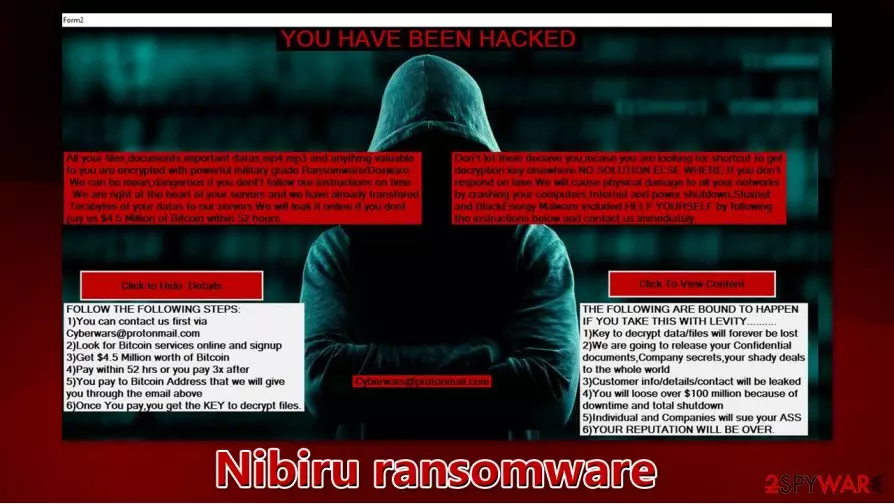
Once the encryption is complete, the Nibiru virus does not provide a text-based ransom note (like it is typical for other strains) but instead locks the screen of all the infected machines. There, users can see a message from the attackers – it claims that $4.5 million ransom needs to be paid to recover the locked data. For communication purposes, malicious actors also provide an email cyberwars@protonmail.com. They also claim that the decryption key required for file recovery will be deleted after 52 hours of the infection.
| Name | Nibiru ransomware |
| Type | Ransomware, cypro-virus, file locking virus |
| Malware family | Stupid ransomware |
| Related | Nibiru.exe, iIbj7C5GiR0xGUkk.exe |
| Extension | Files appended with .Nibiru extension, e.g., “picture.jpg” is turned into “picture.jpg.Nibiru” |
| Ransom note | There is no ransom note file delivered. Instead, users are presented with a lock-screen titled “Form2” – it prevents any interaction with the Windows operating system |
| Contact | cyberwars@protonmail.com |
| File recovery | If no backups are available, recovering data is almost impossible. Nonetheless, we suggest you try the alternative methods that could help you in some cases – we list them below |
| Malware removal | Perform a full system scan with powerful security software, such as SpyHunterCombo Cleaner. Since the infection locks the screen, you should access Safe Mode with Networking as explained below and then perform a scan from there |
| System fix | Malware can seriously tamper with Windows systems, causing errors, crashes, lag, and other stability issues after it is terminated. To remediate the OS and avoid its reinstallation, we recommend scanning it with the FortectIntego repair tool |
Nibiru ransomware belongs to the category of data-locking malware specializing in encrypting corporate networks and servers – a tactic known as “Big Game Hunting.” These threats are typically operated by large-scale cybercriminals and focus on bigger ransoms rather than the smaller ones, unlike regular consumer-focused threats such as Foqe.
Since the malware targets companies rather than regular users, it is highly likely that the threat is propagated via the following methods:
- Remote Desktop (RDP) connections that are open to the internet
- Targeted phishing emails
- Exploits and vulnerabilities.[1]
Before locking data, cybercriminals snoop around the network and move laterally, obtaining the credentials of relevant Windows accounts. During this time, they also extract various sensitive information/files and transfer them to a remote server. Only then Nibiru virus is deployed.
Once inside, it modifies the Windows registry and deletes Shadow Copies to prevent a quick data recovery – it infects the whole network and encrypts all files located on the connected computers. As a result, these files obtain .Nibiru extension and can no longer be accessed.
Nibiru file virus developers have a very straightforward approach when it comes to the payment. They do everything to ensure that victims would be persuaded to pay the ransom. The lock screen contains several threats about data decryption – crooks say that trusting them is the only option to recover files, and, if the ransom is not paid on time, they will publish the collected sensitive information, which will also ruin the company's reputation and cost millions of dollars to recover from.

Malicious actors also say that if the ransom is not paid within 52 hours, the decryption key will be permanently deleted:
YOU HAVE BEEN HACKED
All your files,documents,important datas,mp4,mp3 and anything valuable
to you are encrypted with powerful military grade Ransomware/Doxware.
We can be mean,dangerous if you dont't follow our instructions on time.
We are right at the heart of your servers and we have already transfered
Terabytes of your datas to our serves.We will leak it online if your dont
pay us $4.5 Million of Bitcoin within 52 hours.Don't let them deceive you,incase you are looking for shortcut to get
decryption key elsewhere.NO SOLUTION ELSE WHERE.If you don't
respond on time.We will cause physical damage to all your networks
by crashing your computers,Internet and power shutdown,Stuxnet
and BlackEnergy Malware included.HELP YOURSELF by following
the instructions below and contact us immediately.Cyberwars@protonmail.com
Click to Hide Details
FOLLOW THE FOLLOWING STEPS:
1)You can contacts us first via
Cyberwars@protonmail.com
2)Look for Bitcoin services online and signup
3)Get $4.5 Million worth of Bitcoin
4)Pay within 52 hrs or you pay 3x after
5)You pay to Bitcoin Address that we will give
you through the email above
6)Once You pay,you get the KEY to decrypt files.Enter Your Key
Click To View Content
THE FOLLOWING ARE BOUND TO HAPPEN
IF YOU TAKE THIS WITH LEVITY……….
1)Key to decrypt data/files will forever be lost
2)We are going to release your Confidential
documents,Company secrets,your shady deals
to the whole world
3)Customer info/details/contact will be leaked
4)You will loose over $ 100 million because of
downtime and total shutdown
5)Individual and Companies will sue your ASS
6)YOUR REPUTATION WILL BE OVER.
Cybersecurity experts[2] do not recommend paying a ransom, and instead, use alternative recovery methods we provide below. However, it is important to perform Nibiru ransomware removal before the file recovery can be successful, as the virus will continue to encrypt the incoming files. Besides, if the malware is not deleted, access to a machine is impossible due to the lock screen.
It is important to note that the malware affects several parts of the Windows operating system, e.g., it disables the Task Manager. These changes might be difficult to reverse, so we recommend using FortectIntego repair software after you remove Nibiru ransomware virus from the infected computers. To do that, you should disconnect each of the machines from the network, access Safe Mode with Networking, and then launch a scan with SpyHunterCombo Cleaner, MalwarebytesMalwarebytes, or another powerful security software.
Recover .Nibiru files washout paying criminals
Although cybercriminals are using scare tactics to may victims pay, it is important to note that this malware strain is relatively new, the sum that is being asked for is huge, and there is still no guarantee that .Nibiru file decryptor will be delivered once the ransom is paid.
Instead of communicating with the attackers, you should use backups to recover .Nibiru files. If no backups were retained or were encrypted during the infection process, there are very few options to retrieve all data successfully. Nonetheless, you can try the following methods:
- Using third-party recovery software;
- Trying built-in Windows restore points.
For the above to work, malware must fail to delete Shadow Volume Copies, however, which does not happen that often.
Since Nibiru ransomware focuses on attacking corporations and harvests sensitive details that might contain corporate secrets, some victims might be inclined to pay to remove .Nibiru extension and prevent a data breach.[3] As noted, this is quite risky, as the ransomware developers ask for $4.5 million in Bitcoin.

Use powerful anti-malware to remove Nibiru ransomware
The first issue that users might encounter during Nibiru ransomware removal is the lock screen. Since the virus disables the Task Manager, it is impossible to shut it down or use any other Windows features. To bypass this functionality, you should access Safe Mode with Networking and scan the device with SpyHunterCombo Cleaner, MalwarebytesMalwarebytes, or another anti-malware to ensure that all the malicious components are deleted fully.
Before you attempt to remove Nibiru ransomware virus from each of the machines, you should disconnect them from the network to ensure that infection would not spread repeatedly. Experts also advise using PC repair tools such as FortectIntego if the infection managed to damage some Windows system files, and some of the infection damage could not be reverted with security software. Finally, recover .Nibiru files by using backups or following our recovery instructions below.
Did this guide help?
Be the first to comment