

Merin ransomware is a cyber threat that stems from Nefilim crypto-malware family
Merin is a type of virus that is classified as ransomware. These threats are known for accessing user machines without permission and encrypting all files, which means that they can no longer be accessed. This way, cybercriminals behind the attack can ask for a ransom payment in return for a unique key.
The virus encrypts all data with two encryption algorithms – AES and RSA, making the process secure. At this time, the malware appends .MERIN extension to each of them/ For example, a file “picture.jpg” is turned into a “picture.jpg.MERIN,” which also makes it lose its regular file icon, replacing it with a blank one. Once encryption is finished, the Merin virus drops a ransom note MERIN-DECRYPTING.txt, placed in all the folders where locked data is located.
In the note, the attackers claim that they are willing to provide the decryption tool for a particular sum of money, to be paid in bitcoin cryptocurrency (although the precise amount is not mentioned). They also provide contact emails johnmoknales@protonmail.com, thomposmirk@protonmail.com, and jeremynorton@tutanota, to be used for communication purposes.
| Name | Merin ransomware |
|---|---|
| Type | Ransomware, data locking malware, cryptovirus |
| Malware family | Nefilim ransomware |
| Encryption method | RSA + AES |
| File extension | .MERIN |
| Ransom note | MERIN-DECRYPTING.txt |
| Contact | johnmoknales@protonmail.com, thomposmirk@protonmail.com or jeremynorton@tutanota |
| File Recovery | If no backups are available, recovering data is almost impossible. Nonetheless, we suggest you try the alternative methods that could help you in some cases – we list them below |
| Malware removal | Perform a full system scan with powerful security software. In case it does not succeed, you can access Safe Mode with Networking as explained below |
| System fix | Malware can seriously tamper with Windows systems, causing errors, crashes, lag, and other stability issues after it is terminated. To remediate the OS and avoid its reinstallation, we recommend scanning it with the FortectIntego repair tool |
Merin ransomware belongs to a well-known crypto-extortionist family known as Nefilim. Cybercriminals behind this strain focus on attacking corporations and businesses instead of home users, as the latter category can not pay huge ransoms. Instead, the threat actors choose to go for particularly targeted attacks, typically performed via weakly protected Remote Desktop connections or a combination of compromised credentials and a phishing email. Previous notable victims of the ransomware gang include Toll Group, Fisher & Paykel, Stadler Rail, Dussmann Group, etc.
Typically, anti-malware tools such as SpyHunterCombo Cleaner or MalwarebytesMalwarebytes would be able to stop the infection. One of the Merin virus samples is recognized by various security vendors under the following names:[1]
- Ransom.Nephilim
- Heuristic.HEUR/AGEN.1137758
- Nefilim-HBV!C8D6B57A0096
- Trojan-Ransom.Nemty
- Gen:Trojan.Heur.FU.bqX@aCTaYpm
- Win32:Malware-gen
- Win32/Trojan.e55, etc.
However, since the infection is not automated but rather human-operated, cybercriminals can disable all the security measures once they breach the network. Thus, it is important to take adequate precautions when dealing with high-profile cybercriminals: equip machines with end-point security solutions, use strong credentials, be cautious of phishing emails and never leave computers using RDP open to the internet. Since malware is manually installed, there also might be difficulties with Merin ransomware removal.

As soon as hackers deploy the crypto-malware, it begins the encryption process of local and networked files – PDF, MS Office, JPG, HTML, and other commonly-used extensions are targeted. Nonetheless, the malware skips system and executable files, as its goal is not to corrupt the Windows system (although it might happen, so we recommend employing FortectIntego after virus elimination) but hold personal files hostage for a ransom to be paid in bitcoin.
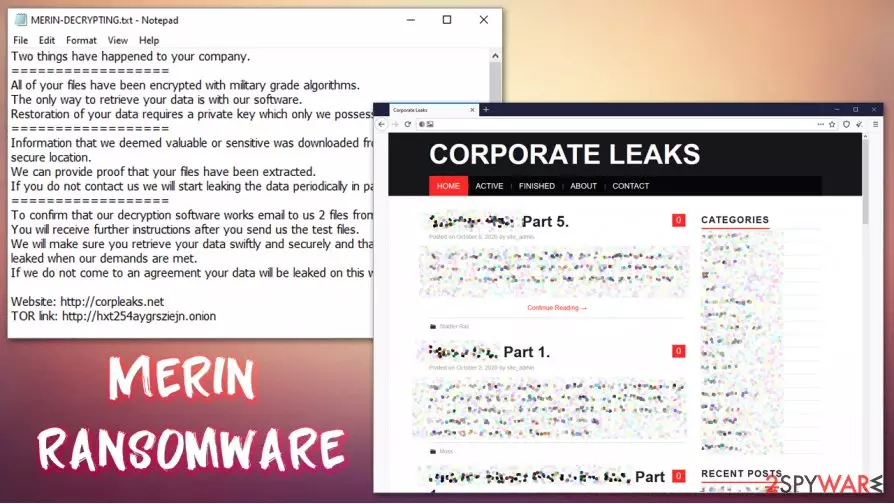
After the .MERIN file locking process, the following ransom note can be viewed by victims:
Two things have happened to your company.
==================
All of your files have been encrypted with military grade algorithms.
The only way to retrieve your data is with our software.
Restoration of your data requires a private key which only we possess.
==================
Information that we deemed valuable or sensitive was downloaded from your network to a secure location.
We can provide proof that your files have been extracted.
If you do not contact us we will start leaking the data periodically in parts.
==================
To confirm that our decryption software works email to us 2 files from random computers.
You will receive further instructions after you send us the test files.
We will make sure you retrieve your data swiftly and securely and that your data is not leaked when our demands are met.
If we do not come to an agreement your data will be leaked on this website.Website: http://corpleaks.net
TOR link: http://hxt254aygrsziejn.onionContact us via email:
Johnmoknales@protonmail.com
Thomposmirk@protonmail.com
Jeremynorton@tutanota.com
File encryption is not the only mechanism that cybercriminals use for money extortion, however. When the attackers breach the network, they also leak all sensitive documents of the company. The data can include corporate secrets, product details, employee or customer information, etc. Due to this reason, Merin ransomware infection should be treated as a data breach.
Recover .MERIN files from backups, but there is a catch
Nefilim gang first began its operations with Nemty ransomware in August 2019. Since then, a decryption tool has been released, and the cybercrime scheme has suffered a huge hit. Since then, the group was reformed and malware renamed, currently successfully attacking prominent businesses and corporations.
Merin ransomware virus was first spotted in mid-October 2020 by a security researcher S!Ri.[2] Since cybercriminals carefully plan their operations, they do not deploy the ransomware straight away. Instead, they move laterally over the network, acquiring the important credentials and disabling security solutions. During this time, the most important company documents are leaked and delivered to attackers' servers. If victims decline to pay the ransom, all the data is then published on a specialized website hosted by criminals.
Precisely due to this reason, many companies choose to pay the attackers, as they can usually recover .MERIN files by using backups. In some cases, however, backups might also be encrypted, or no important data copies are used in the first place. File encryption is a particularly secure process, and since the virus uses a combination of RSA and AES, .MERIN file recovery becomes impossible without backups.

In some rare cases, at least some portion of the data can be recovered by using alternative solutions such as built-in Windows recovery features or third-party recovery tools such as Data Recovery Pro. However, keep in mind that there is no way to remove .MERIN extension unless a unique key from the attackers is obtained.
Then again, a data breach is a serious threat for any business, and can even result in bankruptcy. Therefore, the law enforcement agencies and security experts[3] are very torn on advice regarding ransom payments.[4] In some cases, cooperating with the attackers might be the only way to ensure the business does not go down; on the other hand, paying the hackers only proves that the illegal business model works, and they continue looking for the new targets.
Remove Merin ransomware from the infected computers by using security solutions
While the Nefilim ransomware gang mainly specializes in attacking corporations, it does not mean that regular computer users can not be infected. First of all, it is important to note that Merin ransomware removal will not get rid of .MERIN extension, as data encryption is a completely different process from the malware infection (although the former cannot occur without the latter).
If you decided not to pay the ransom, one of the first steps you should take once infected is to remove Merin ransomware virus from the infected machines. Before doing so, you should disconnect each of the machines connected to the same network to avoid the re-infection and repeated file encryption process.
To delete the Merin file virus from the system, you should perform a full system scan with SpyHunterCombo Cleaner, MalwarebytesMalwarebytes, or another reputable anti-malware software. In case the attackers tampered with Windows machine in a way it is not possible, you can access Safe Mode with Networking and launch the scan from there. Finally, for PC remediation, you can employ repair tools such as FortectIntego.
Did this guide help?
Be the first to comment