

Mhcadd is a cryptovirus with the sole purpose – money extortion
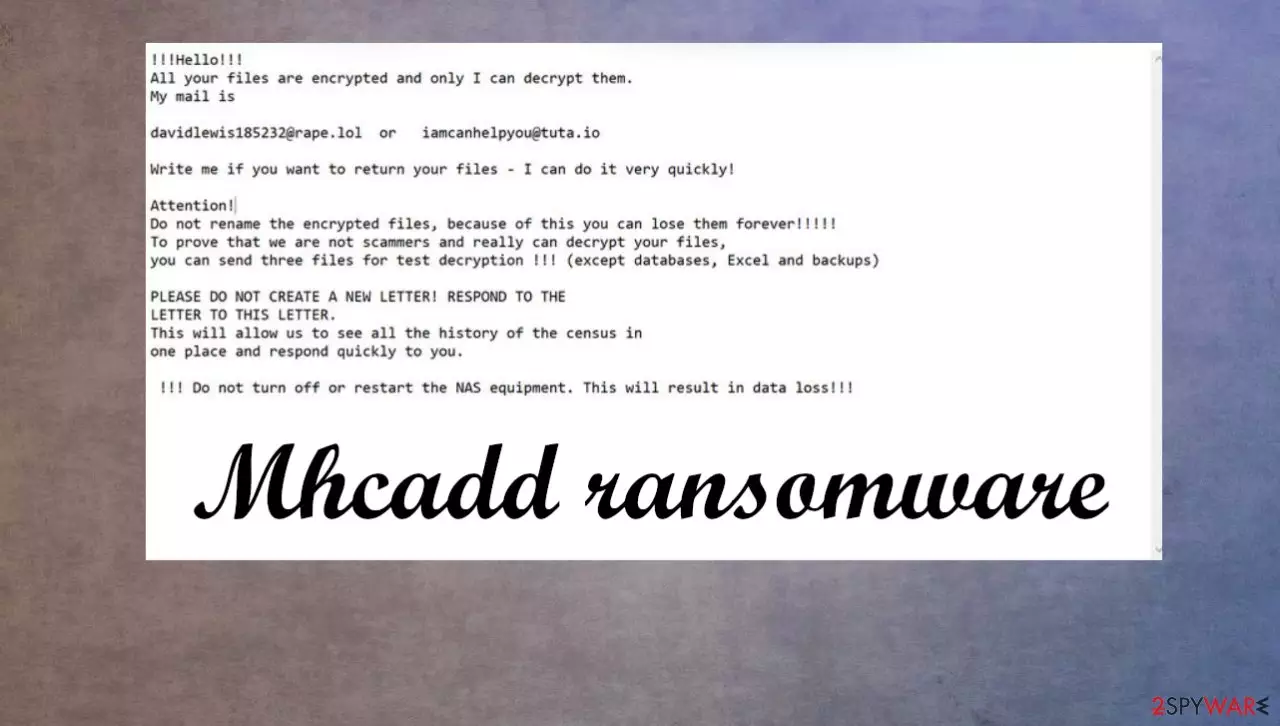
Mhcadd ransomware is a virus that upon gaining access to soon to be victims' computer, encrypt all non-system files and demands a ransom for decryption. All affected files are appended with .mhcadd extension, making the data unavailable to the user. Once the virus has completed step one, it creates ransom note files named “HOW TO RESTORE YOUR FILES.txt” in all contaminated folders. This malware belongs to the Snatch ransomware family.
In the ransom demand, the cybercriminals urge the victims not to try renaming encrypted files and not restart or shutdown the NAS equipment (Network-attached storage devices [1]), as that may lead to permanent data loss. To prove that they're the only ones that can decrypt the data, the perpetrators are offering to send them three files for the so-called test decryption. Two emails are provided to get in touch with the perps – davidlewis185232@rape.lol, iamcanhelpyou@tuta.io. As always, we advise against meeting the criminal demands.
| name | Mhcadd ransomware |
|---|---|
| type | File-locker |
| Family | Snatch ransomware family |
| appended extension | All non-system files are appended with an .mhcadd extension |
| Ransom note | HOW TO RESTORE YOUR FILES.txt can be found in all encrypted folders |
| criminal contact details | davidlewis185232@rape.lol, iamcanhelpyou@tuta.io |
| distribution | Infected email attachments, file-sharing platforms |
| virus removal | Scan your system with powerful anti-malware software |
| system tune-up | As soon as virus removal is complete, use FortectIntego to fix all affected system files |
Instead of contacting the attackers, users can restore their data from backups. If they don't exist – try and keep backups from now on, on at least two separate devices, e.g., cloud, USB, or any other offline storage device.
Ransomware, worms, trojans horses[2] are just a few of the threats on the internet waiting to be downloaded. Other malware can be used to inject the payload of Mhcadd files virus on the machine. Once unaware users get tricked and download the malware from a malicious site or via spam email attachment – infection starts.
Always use dependable anti-malware software to evade dealing with cybercriminals. This way, you can avoid infections and such procedures like ransomware termination. However, to fight the threat, you need to react as soon as possible – once you receive the demanding message.
The ransom demanding note (HOW TO RESTORE YOUR FILES.txt) contains this message:
!!!Hello!!!
All your files are encrypted and only I can decrypt them.
My mail isdavidlewis185232@rape.lol or iamcanhelpyou@tuta.io
Write me if you want to return your files – I can do it very quickly!
Attention!
Do not rename the encrypted files, because of this you can lose them forever!!!!!
To prove that we are not scammers and really can decrypt your files,
you can send three files for test decryption !!! (except databases, Excel and backups)PLEASE DO NOT CREATE A NEW LETTER! RESPOND TO THE
LETTER TO THIS LETTER.
This will allow us to see all the history of the census in
one place and respond quickly to you.!!! Do not turn off or restart the NAS equipment. This will result in data loss!!!

Nowadays, powerful and trustworthy anti-malware software is a must. It will safeguard computer users' passageways on the internet. To remove Mhcadd virus, we advise using MalwarebytesMalwarebytes or SpyHunterCombo Cleaner. These apps will not only automatically isolate and eliminate the virus from devices but also protect them from future attacks.
After successful Mchadd ransomware removal, use a system tune-up FortectIntego software, to find and fix any altercations the virus has done to system files. If not attended to, these modifications could lead to devices exhibiting abnormal behavior, such as extreme lag, overheating crashing, etc.
Malware distribution methods
The most common ways cybercriminals are spreading their creations: infected email attachments, misleading ads, file-sharing platforms. When opening an email user must pay attention to a lot of details, starting from the sender. Does the user know him, does the email contain any grammatical mistakes? Does it look legitimate? Maybe something fishy stands out. Don't open the email, or even worse – the email attachment, for it could get you into heaps of trouble.

File-sharing platforms, like torrent sites, is another feasible way to contaminate a computer. As the files can be uploaded by anyone who knows what's really hiding behind, e.g., Mortal Combat crack.exe or NBA2k20 game cheats. Try and avoid any illegal activation tools (aka cracks), game cheat codes, and any other suspicious material. Pay attention to details and online material, as experts[3] note.
Mhcadd virus removal instructions from infected devices
First thing's first, after anti-malware software detects the malware – remove it immediately. The longer any malware stays in your computer system, the more harm it can do, and therefore it will be harder to get your devices' performance back to normal. To remove Mhcadd ransomware, use MalwarebytesMalwarebytes or SpyHunterCombo Cleaner software; it will automatically detect all its allocated files, isolate them from doing any more damage and delete them.
Ransomware is commonly known to modify Windows system files. Keep that in mind when you are dealing with the infection and its damage.
Even after successful ransomware removal, your computer could exhibit peculiar, unusual behavior, like overheating, severe lag, and so on. To eradicate any changes the malware has done to your system, use the FortectIntego tool. It will automatically detect all modifications and revert them with a push of a button.
Did this guide help?
Be the first to comment