

ELDAOSLA ransomware – a new file-locking virus from Phobos ransomware family
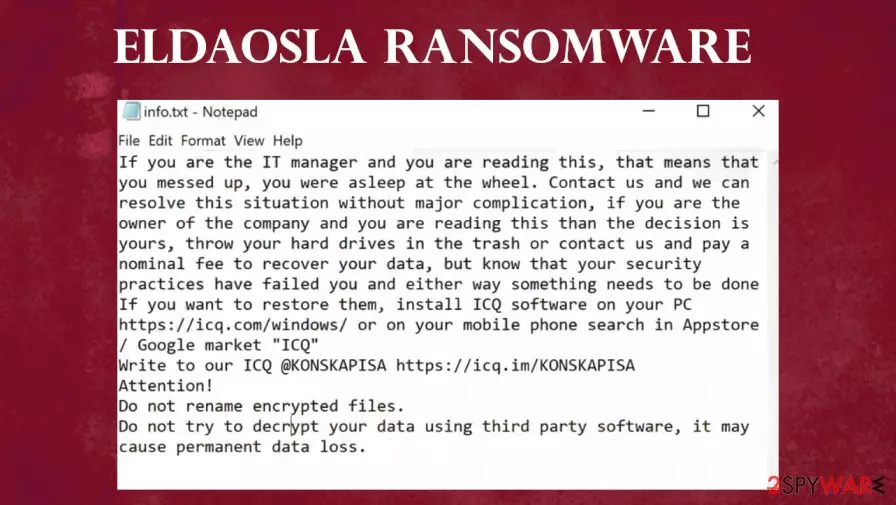
Developers of ELDAOSLA virus, in both ransom demanding notes, are warning the victims not to rename the files or try and decrypt them with any third-party software, as it may lead to permanent data loss. They graciously offer free decryption of up to 5 files to prove that they can and will decode user files after payment of some sort is made (most probably in cryptocurrency Bitcoins). Cybercriminals provide their ICQ messenger ID (@KONSKAPISA) to contact them and explain how to get that app on either a PC or a mobile phone. The message in the info.txt is quite humorous; you can read both ransom notes at the bottom of this paragraph.
| name | ELDAOSLA ransomware |
|---|---|
| Type | Cryptovirus, Ransomware |
| family | Phobos ransomware family |
| appended file extension | Three-part extension appended to all non-system files |
| ransom note | Two similar ransom notes are generated. One appears as a .txt file, the other as a pop-up window |
| criminal contact details | Criminals give their ICQ Messenger contact – @KONSKAPISA |
| distribution | Torrent websites, file-sharing platforms, infectious email attachments |
| ransomware removal | Trustworthy anti-virus software should be used to remove ELDAOSLA ransomware |
| system tune-up | Unfailing system tune-up FortectIntego tool should be used to undo any harm the ransomware did to the devices' system files |
Despite the fact that agreeing to pay the ransom to the cybercriminals might seem like the only viable option to get encrypted data back, there are numerous examples[1] that after complying with the demands, victims either got scammed more or didn't hear back from the perpetrators at all. If users had backups – great!; remove ELDAOSLA ransomware with a dependable anti-malware software like MalwarebytesMalwarebytes or SpyHunterCombo Cleaner and afterward restore the data from backups.
If the victims didn't have a powerful anti-virus app that would have prevented the ELDAOSLA files virus from infecting their devices and didn't keep backups – a tough choice is upon thee. Not many choices are available, either pay the requested ransom and pray that the cybercriminals will be honest enough to deliver on their promise; export all contaminated data to offline storage like a USB drive and wait for a public key to be created to unlock encrypted files, or format hard drives and rebuild the system from scratch.
Whichever option victims choose, experts[2] advise using the FortectIntego tool to automatically scan and fix any issues that the ELDAOSLA virus might have caused to the infected devices' system files and settings. By repairing the damage, computer systems won't exhibit any strange behavior, like crashing, severe lag, etc.

Both ELDAOSLA virus ransom note in the text file encloses the message:
If you are the IT manager and you are reading this, that means that you messed up, you were asleep at the wheel. Contact us and we can resolve this situation without major complication, if you are the owner of the company and you are reading this than the decision is yours, throw your hard drives in the trash or contact us and pay a nominal fee to recover your data, but know that your security practices have failed you and either way something needs to be done
If you want to restore them, install ICQ software on your PC hxxps://icq.com/windows/ or on your mobile phone search in Appstore / Google market “ICQ”
Write to our ICQ @KONSKAPISA hxxps://icq.im/KONSKAPISA
Attention!
Do not rename encrypted files.
Do not try to decrypt your data using third party software, it may cause permanent data loss.
Basic principles used by cybercriminals to affect computer systems
Cybercriminals' job isn't just to create the malware. Their main task is to outsmart computer users: to trick them into opening a mischievous hyperlink to a malicious site where soon to be victims would instantly receive a malware payload file, or open a legitimately looking email with an infectious attachment, or download some licensed software activation tool with contamination hidden within it.
The internet is full of different kinds of viruses just waiting for unaware users to click on them. In this day and age, anti-malware software is a must for all computer users that want to evade dealings with cybercriminals, losing their data, losing their money, harming their precious devices. Always stay mindful while browsing.

Guidelines on ELDAOSLA ransomware virus removal and a quick system fix
Any malware, whether it is ransomware, adware[3], or any other computer software with ill intentions, should be removed from the infected system hastily. To remove ELDAOSLA ransomware victims should use MalwarebytesMalwarebytes or SpyHunterCombo Cleaner for this anti-malware software will locate all files related to this virus on the infected device and automatically isolate and eliminate them. Furthermore, it will protect computers from probable attacks in the future.
Following successful ELDAOSLA ransomware removal, users should seriously consider doing a full system scan with the FortectIntego tool to detect any changes made to the system settings and its files and repair any damage that has been done. This action will prevent computers from significant operating issues.
Did this guide help?
Be the first to comment