

oinstall.exe is the file that can be found as malicious by AV tools
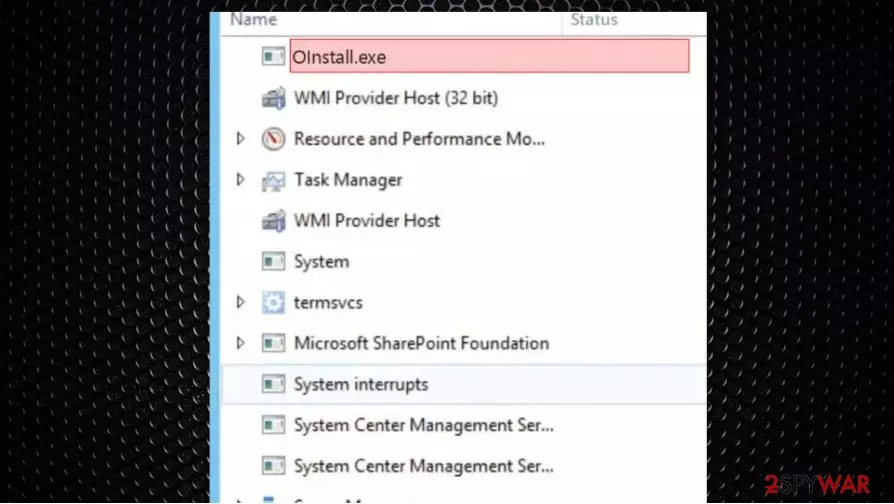
oinstall.exe – the executable that raises questions about its legitimacy and secureness when programs designed to find malware indicate the file as possibly dangerous. It sometimes is detected as Trojan.Gen.2 or Trojan.Smoaler, PUA:Win32/AutoKMS, HackTool:Win32/AutoKMS by Defender, and other anti-malware or security tools.
oinstall.exe generally is related to the process known as Office 2013-2016 or OInstall, so it belongs to software OInstall by WZTeam or WZT. You should investigate further and check the particular location of the executable before you jump to removing the file entirely from the machine.
| Name | oinstall.exe |
|---|---|
| Type | Trojan |
| Issues | The three can be used to mine cryptocurrency while running on the particular resources of the computer. Your data might get stolen by this virus or additional malware installed with the help of oinstall.exe virus |
| Distribution | A trojan like this can end up installed from a spam email attachment or directly from malicious/ hacked sites |
| Elimination | You can remove oinstall.exe by running a proper anti-malware tool that finds and removes the intruder completely |
| Repair | System damage might trigger other issues for you, so using FortectIntego or a similar tool could help with the virus damage repair |
There are possibilities that the purpose of this trojan is to install other malware, spread ransomware,[1] or more damaging threats. Also, such malware can be set to mine cryptocurrency, use resources to run other processes, steal data directly from the machine. oinstall.exe removal processes get more difficult due to the fact that this intruder is using the name of a common executable.
However, Oinstall.exe is not essential for Windows and will often cause problems. So you can remove it if it bothers you – it shouldn't cause serious damage to the system, except the program it launches or is related to. The file is located in the C:\Windows folder or sometimes in a subfolder of the users' profile folder.
The program has a visible window that is launched with the install exe file. It is not a Windows core file. The app is launched periodically by the Windows Task Scheduler, and it appears to be a compressed file. It should be a secure file, but trojan developers use the commonly found file name and type to mask their shady purposes. If the file is malicious and triggers serious issues, you need to remove oinstall.exe as soon as possible.

oinstall.exe trojan can trigger various issues on the machine. One of the malicious procedures related to this threat – cryptocurrency mining.[2] You should be concerned about the existence of this file and the processes that are possibly related to the intruder. Check the system with SpyHunterCombo Cleaner or MalwarebytesMalwarebytes, so you can terminate the virus.
In general, you should be cautious and make sure to check some details about oinstall.exe. The more indicative things besides the AV detection can be shady symptoms of the computer issues:
- Extremely high or just unusual CPU or graphics cards usage;
- Windows and also programs run slower;
- Programs do not launch as smoothly;
- General sluggishness and seed, internet issues;
- Occasional crashes of the OS.
Experts[3] recommend fighting such intruders as soon as possible, because in many cases, trojans, like oinstall.exe can go away or stop working once the initial goal is achieved. If the system is infected with additional malware, your device might get damaged, so repair such alterations and corruptions with FortectIntego or a similar program.
Infectious files delivered via spam email attachments and malicious links
You can't be sure that sites you end up visiting randomly are not malicious or dangerous in a different way. Hackers use various techniques to spread their creations, so you might caths the computer infection without realizing it. It happens when you do not pay enough attention to details when installing programs or opening emails.
Spam email campaigns get used to automatically attach malicious files to those emails that claim about important messages and invoice notifications. You need to pay close attention and be suspicious when the email includes a link to a particular site or the attachment as a document or a different file.
Make sure to clean the system from all the traces of this suspicious oinstall.exe virus
You might have a difficult time while trying to remove oinstall.exe because threats cannot get easily found or even detected by your AV once additional changes get made. You can enter the Safe mode with Networking and then run SpyHunterCombo Cleaner or MalwarebytesMalwarebytes, so the threat is terminated.
As for those changes and corruption of files, programs that affect the general performance of your machine, and the results of oinstall.exe removal, you can fix the damage. System files, functions, to her parts of the machine gat get repaired with a program like FortectIntego, for example.
Did this guide help?
Be the first to comment