

FUSION ransomware – money extortion cryptovirus that threatens to publish stolen data if a ransom isn't paid
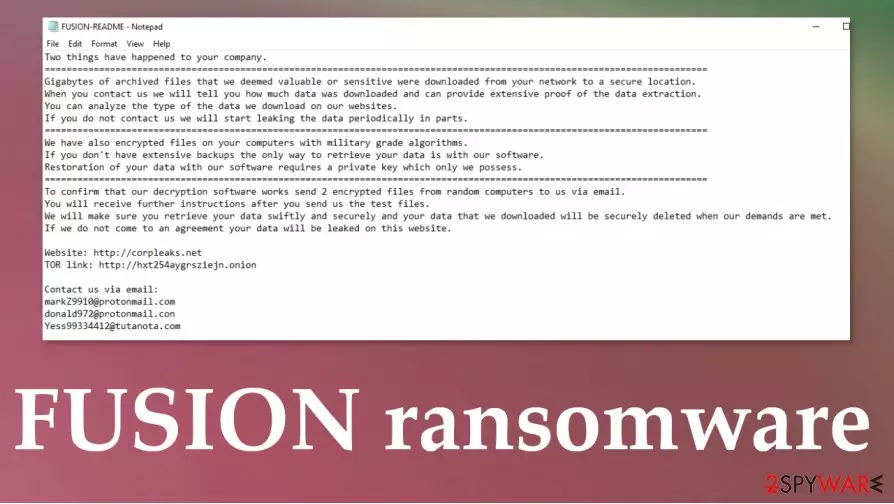
FUSION ransomware is a nightmare of a crytovirus, for it not only encrypts all non-system files, but it also steals some of the data. If the demands of the cybercriminals are not met, they're threatening to publish the stolen data publicly. Cryptoviruses from the Nefilim ransomware family are all alike. After the encryption, the part is done and all files are appended with an .FUSION extension, some of the data from the targeted computer systems is downloaded to the perpetrators' servers. Although this virus targets mainly companies, everyday computer users might be at risk too.
In all folders that were contaminated, victims can find a ransom note, named FUSION-README.txt, with ample instructions on what has happened, and what to do next to regain access to the files. Creators of the FUSION ransomware virus explain that two things have happened, first gigabytes of files have been stolen, and if no contact is made, the cybercriminals will start leaking the data in small portions. By doing that company's various documents, plans would be leaked, including employee details, phone numbers, addresses, etc. A website is provided where the sensitive data will be exposed -http://corpleaks.net. Secondly, files on the targeted system were locked with army-based algorithms, and that only they possess the required decryption key.
| Name | FUSION ransomware, Fusion cryptovirus |
|---|---|
| type | Malware, Ransomware |
| family | Nefilim ransomware family |
| ransom note | FUSION-README.txt |
| appended file extension | .FUSION |
| additional info | FUSION ransomware not only encrypts all non-system files with military-grade algorithms, but it also steals gigabytes of valuable data and threatens to publish them |
| criminal contact details | williamsturm1985@tutanota.com, mariebautista1990@tutanota.com, juanmanderson@protonmail.com |
| virus removal | FUSION ransomware removal should be entrusted to professional anti-malware software that is capable of detecting[1] the threat |
| system fix | After FUSION virus is eliminated use the FortectIntego tool to get your system back to the pre-contamination phase |
As with most cryptoviruses, developers of FUSION ransomware offer to send them 2 encrypted computer files for a test decryption, thus proving that they really can do what they're saying they can. Three emails are provided to establish contact: williamsturm1985@tutanota.com, mariebautista1990@tutanota.com, juanmanderson@protonmail.com. The perpetrators are guaranteeing that after the ransom is paid they will unlock your files and delete the stolen data from their servers.
As always, we do not recommend communicating with the criminals. Instead, remove FUSION ransomware with steadfast antimalware apps like SpyHunterCombo Cleaner or MalwarebytesMalwarebytes. Constantly update this software and it might protect you from malware attacks in the future.
It is common knowledge among tech-savvy computer users, that cryptoviruses alter system files and settings, helping them pursue their goals. To automatically undo all the changes done to the devices, experts[2] advise using the FortectIntego tool once the FUSION ransomware removal process is successful.

Ransom note, in the FUSION-README.txt, contains this message:
Two things have happened to your company.
===========================
Gigabytes of archived files that we deemed valuable or sensitive were downloaded from your network to a secure location.
When you contact us we will tell you how much data was downloaded and can provide extensive proof of the data extraction.
You can analyze the type of the data we download on our websites.
If you do not contact us we will start leaking the data periodically in parts.
===========================
We have also encrypted files on your computers with military grade algorithms.
If you don't have extensive backups the only way to retrieve your data is with our software.
Restoration of your data with our software requires a private key which only we possess.
===========================
To confirm that our decryption software works send 2 encrypted files from random computers to us via email.
You will receive further instructions after you send us the test files.
We will make sure you retrieve your data swiftly and securely and your data that we downloaded will be securely deleted when our demands are met.
If we do not come to an agreement your data will be leaked on this website.Website: http://corpleaks.net
TOR link: http://hxt254aygrsziejn.onionContact us via email:
williamsturm1985@tutanota.com
mariebautista1990@tutanota.com
juanmanderson@protonmail.com
Ways everyday computer users might get their devices contaminated by malware
Nowadays, the internet is full of threats hidden everywhere. There are different types of malware[3] with different aims, but one thing's sure – no one is safe. Computer users should have trustworthy anti-malware software watching their back, constantly update it, and always keep backups of all sensitive information on at least two separate devices, e.g., cloud, offline storage, and so on.
Ransomware is usually spread using the two most common methods – file-sharing platforms and email spam. Torrent websites and social media platforms is an ideal place to hide malware because no one checks whether someone uploaded a virus or not.

Only the end-user can find that out the hard way. So refrain from downloading any pirated software or any other illegal things from sites like BitTorrent or The Pirate Bay.
Spam emails are sent out by tens of thousands. Some of them might look innocent but actually, they're full of mischievous hyperlinks and infectious attachments. Make sure to never open any spam emails and always scan attachments before opening/downloading them.
FUSION ransomware virus removal and system restore instructions
If your device was infected you should immediately remove FUSION ransomware with reputable anti-virus software like SpyHunterCombo Cleaner or MalwarebytesMalwarebytes, because the longer malware stays on your computer the more damage it could do. Use the aforementioned apps, update them regularly so they could save you from malware attacks in the future.
As soon as FUSION ransomware removal is completed, we highly recommend using the FortectIntego tool to revert any changes done to your system files, ports, and other settings. Malware like this cryptovirus is known to modify these things to make its “life” easier. After automatically scanning and restoring your system to a normal state you will be able to enjoy it anew.
Did this guide help?
Be the first to comment