

Firmadatalari ransomware – a computer infection that targets predetermined set of files and then locks them with encryption algorithm
Firmadatalari ransomware is a cryptovirus that demands a ransom after it locks victims' files. This malware belongs to the Scarab ransomware family that has been terrorizing internet users since June 2017. Like its whole family, the Firmadatalari virus locks targeted computer data (documents, photos, audio/video files, archives, etc.) with an army-based RSA[1] algorithm, which makes it nearly impossible to decode. It also deletes the original names and appends all files with a two-part extension – a random fifteen character sequence and .firmadatalari.
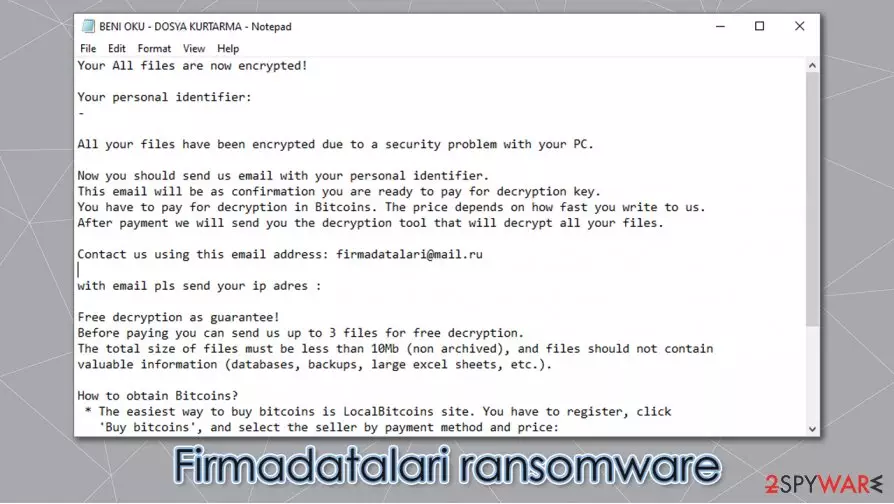
Afterward, a ransom note named “BENI OKU – DOSYA KURTARMA.TXT” is created in all affected folders. The name of the ransom demanding notice is written in Turkish, translated to English – READ ME – FILE RECOVERY. That may suggest that either the virus is aimed at Turkish computer users or that the developers are Turkish. However, the whole message is written in English.
| name | Firmadatalari ransomware, .firmadatalari virus |
|---|---|
| Type | Cryptoware, ransomware |
| Family | Scarab ransomware family |
| appended extension | All non-system files are appended with a two-part extension, consisting of a random sequence of characters and .firmadatalari appendix |
| Ransom note | BENI OKU – DOSYA KURTARMA.TXT |
| Issues | All personal data is renamed and inaccessible |
| criminal contact details | firmadatalari@mail.ru |
| malware elimination | To remove Firmadatalari ransomware victims should use a powerful anti-malware software |
| System Fix | After Firmadatalari ransomware removal, users should first focus on system tune-up with a time-proven FortectIntego tool |
Within it, Firmadatalari ransomware creators explain to the victims that their data was encrypted and the only way to unlock it is to pay a ransom. As a sign of goodwill, the cybercriminals offer to send them three files (up to 10MB) for a test decryption, thus proving that a promised tool exists. They provide an email address (firmadatalari@mail.ru) to which the victims should send the three files and their appointed unique ID. The ransom amount isn't specified. However, it would have to be paid in cryptocurrency bitcoin because the perpetrators explain how to obtain it. Like with all ransomware, the cyber thieves threaten the victims not to use any third-party decryption tools or rename their infected files, for it may lead to permanent data loss.
As always, we advise against any contact with the criminals. Instead, victims should clean their devices immediately; for the longer any malware stays in a computer, the more damage it could do. To remove Firmadatalari ransomware automatically use a trustworthy SpyHunterCombo Cleaner or MalwarebytesMalwarebytes anti-malware software.
Scarab family ransomware is known to damage system files without encrypting them. These damages might cause different symptoms, such as crashes, severe lag, etc. If you want to bring your machine back in shape after Firmadatalari ransomware removal, use the FortectIntego tool. It will automatically find and repair any altercations the cryptovirus has made to system files and settings.
Developers of .firmadatalari ransomware in the ransom note “BENI OKU – DOSYA KURTARMA.TXT” state:
Your All files are now encrypted!
Your personal identifier:
–All your files have been encrypted due to a security problem with your PC.
Now you should send us email with your personal identifier.
This email will be as confirmation you are ready to pay for decryption key.
You have to pay for decryption in Bitcoins. The price depends on how fast you write to us.
After payment we will send you the decryption tool that will decrypt all your files.Contact us using this email address: firmadatalari@mail.ru
with email pls send your ip adres :
Free decryption as guarantee!
Before paying you can send us up to 3 files for free decryption.
The total size of files must be less than 10Mb (non archived), and files should not contain
valuable information (databases, backups, large excel sheets, etc.).How to obtain Bitcoins?
* The easiest way to buy bitcoins is LocalBitcoins site. You have to register, click
'Buy bitcoins', and select the seller by payment method and price:
hxxps://localbitcoins.com/buy_bitcoins
* Also you can find other places to buy Bitcoins and beginners guide here:
hxxp://www.coindesk.com/information/how-can-i-buy-bitcoins
Attention!
* Do not rename encrypted files.
* Do not try to decrypt your data using third party software, it may cause permanent data loss.
* Decryption of your files with the help of third parties may cause increased price
(they add their fee to our) or you can become a victim of a scam.

Guide for being safe while browsing on the internet
The World Wide Web is full of different kinds of malware[2] that is waiting for unaware computer users to download it. It might be hidden in file-sharing platforms, spam emails, malicious sites, etc. So here we come to the rescue! Using our simple steps given below will increase your computer security and might help to evade cybercriminals:
- Acquire a trustworthy anti-virus software. Keep it updated and scan your device frequently
- Use system tune-up tools to keep your Registry and system settings safe
- Always keep your operating system (OS) up-to-date
- Keep backups of all critical data on at least two separate locations, e.g., cloud, offline storage
- Don't visit high-risk websites
- Don't open emails from unknown senders
- Don't download any email attachments before scanning them with a powerful AV first
- Try and stay away from file-sharing platforms, torrent websites
Instructions on Firmadatalari ransomware removal and system tune-up
As mentioned before, contacting the criminals and paying the ransom is not recommended – it may lead to a lose-lose situation where the victims not only don't regain access to their files but lose their hard-earned money too. On the contrary, users should remove Firmadatalari ransomware and restore the health of their computer systems.

Eliminating the virus manually could be too hard even for tech-savvy computer users, so we recommend using SpyHunterCombo Cleaner or MalwarebytesMalwarebytes anti-malware for automatic Firmadatalari virus removal. Keep any of these apps up-to-date, and they might save you from future attacks.
This virus, like all of its previous versions, tends to alternate system settings and files to help them with encryption after Firmadatalari ransomware elimination experts[3] advise using the FortectIntego tool to find and restore any changes made to your machines' core files.
If your anti-virus software couldn't detect Firmadatalari ransomware, try the same thing but while in Safe Mode with Networking.
Did this guide help?
Be the first to comment