

Files appended with .mppq extension? Your Windows machine was hit by ransomware

If you are looking for information on why your files can no longer be opened and are marked with a .mppq extension, you came to the right place. We will explain on what ransomware is and how to deal with this high-risk infection in the most efficient way.
Unfortunately, but ransomware continues to thrive, and became one of the most lucrative malware businesses out there. This particular example belongs to one of the most prevalent crypto-malware families that affect hundreds of users from the USA, Spain, Germany, Thailand, and other countries, daily.
Once installed, Mppq ransomware uses a sophisticated RSA algorithm to lock pictures, videos, documents, and other files. Please rest assured that this infection doesn't modify the file contents. It just prevents you from accessing them.
After encryption, _readme.txt ransom note is delivered, where the attackers state their demands in order for victims to return their files. According to the message, users can retain half of the initial ransom payment if they contact the criminals within 72 hours of the infection and “only” pay $490 instead of the original $980 sum in Bitcoin. Threat actors also leave contact emails to be used for communication purposes:
- helpteam@mail.cc
- helpmanager@airmail.cc.
The possibility of saving half of the initial decrytptor price could push victims into making rash decisions and forwarding the funds to the criminals over. However, victims of Mppq file virus don't have to do that as Emisoft, and other security companies are working on free decryption software for the Djvu family ransomware. While these decrytptors might not always work, you will never know until you try it for yourself, as each case of the infection and data encryption can be different technically.
By reading this article, you will find out all possible ways you can recover files encrypted by this cryptovirus, remove it from your infected Windows computer, and find out how to use tools to repair damaged system files.
| name | Mppq virus |
|---|---|
| Type | Ransomware, file-locker |
| Family | Djvu/STOP ransomware |
| Symptoms of infection | User is unable to open any personal files (documents, pictures, databases, etc.) on the device and some programs, especially security-related, can't be launched; files appear to be renamed; ransom note appears on the desktop |
| Appended file marker | .mppq extension |
| Distribution | Cyber threats from this family usually infect computers of unaware file-sharing platform users |
| Elimination | To remove ransomware, you have to scan your infected device with reputable security software updated with the latest virus signatures |
| System health | To repair virus made alterations to the core system settings, we highly advise you to use the FortectIntego system diagnostics tool |
Pahd virus and other Djvu family ransomware are the most proliferate ones in the world. According to a cybersecurity analytics report,[1] attacks by viruses from this lineage account for more than 50% of all reported ransomware attacks.
Ransom note in .paas file virus doesn't differ from this virus version. That's one of many similarities of file-locker from this family. Few others are that the contact emails rarely change and that all data is encrypted using a military-grade RSA 2048 coding algorithm.[2]

If you see the ransom note shown below, please don't succumb to the assailants' demands and stay calm. The infection has already done its dirty deed, and it accomplished its mission. Instead of believing a word in that note and expanding criminal empire with your money, remove Mppq virus and try other data recovery options. It's worth mentioning that the removal and recovery process is much easier if you've kept data backups.
ATTENTION!
Don't worry, you can return all your files!
All your files like pictures, databases, documents and other important are encrypted with strongest encryption and unique key.
The only method of recovering files is to purchase decrypt tool and unique key for you.
This software will decrypt all your encrypted files.
What guarantees you have?
You can send one of your encrypted file from your PC and we decrypt it for free.
But we can decrypt only 1 file for free. File must not contain valuable information.
You can get and look video overview decrypt tool:
hxxps://we.tl/t-9CYW99VhUR
Price of private key and decrypt software is $980.
Discount 50% available if you contact us first 72 hours, that's price for you is $490.
Please note that you'll never restore your data without payment.
Check your e-mail “Spam” or “Junk” folder if you don't get answer more than 6 hours.To get this software you need write on our e-mail:
helpteam@mail.chReserve e-mail address to contact us:
helpmanager@airmail.ccYour personal ID:
The first step to a successful recovery is to remove Mppq ransomware
If this file-locker virus infected your device, you have to realize that cybercriminals have achieved their primary goal. But the next step is to convince you to pay the ransom in Bitcoins. If you withhold from contacting the criminals and forwarding them the money, their mission would be unsuccessful.
By not paying the malware developers, you would do the world a favor as they would have wasted their time and money. Therefore, they wouldn't increase their income that used to attack more innocent people like yourself, develop more advanced ransomware and means to distribute it.
Thus the only reasonable thing to do is to remove the cyber infection right away. When a ransomware attack is spotted, the first thing you need to do is to unplug your device from the internet either by unplugging the ethernet cable or by switching off the WiFi.
That should be done because some cryptoviruses are able to spread to connected devices and can also encrypt data stored on them. Thus your backups could also be in danger. When the encryption is completed, and _readme.txt ransom note appears, copy all files critical data to a removable storage device, such as an SSD, USB, etc. You can skip that if you've kept backups and they weren't compromised.

Then download MalwarebytesMalwarebytes, a trustworthy anti-malware tool that will automatically remove the virus from your infected Windows computer. Please note that you have to update its virus database before scanning the whole system. There have been reports stating that this ransomware could block the download or launching of security-related software.
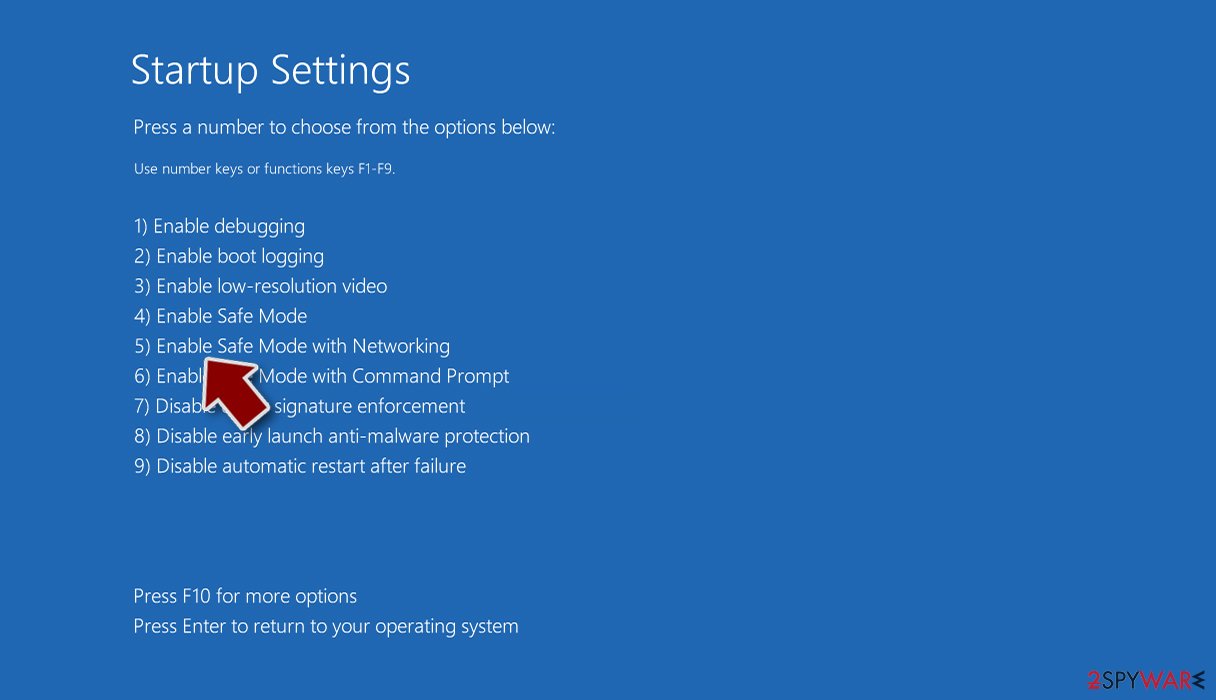
If that's the case with the infection on your computer, please follow the illustrated instructions below to reboot the device in Safe Mode with Networking mode. If you're running Windows 10/8:
- Right-click on the Start button and select Settings.
- Scroll down to pick Update & Security.
- On the left side of the window, pick Recovery.
- Now scroll down to find the Advanced Startup section.
- Click Restart now.
- Select Troubleshoot.
- Go to Advanced options.
- Select Startup Settings.
- Click Restart.
- Press 5 or click 5) Enable Safe Mode with Networking.

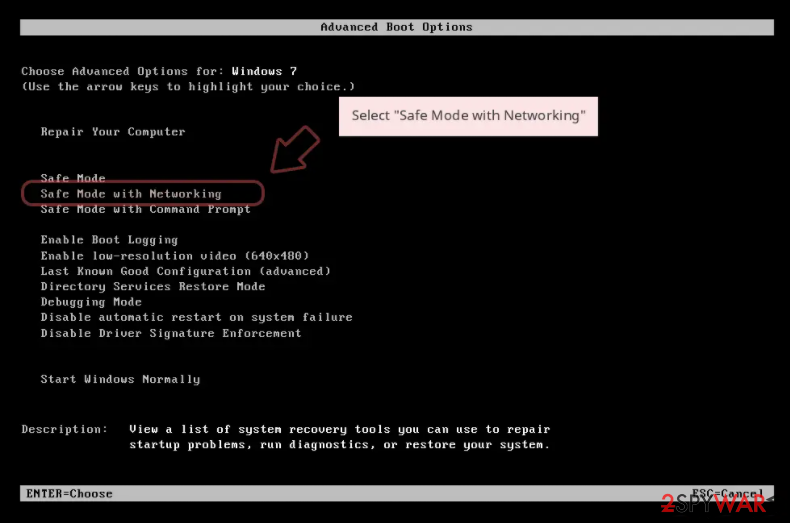
If your infected device is running on Windows 7/Vista/XP, please follow these instructions.
- Click Start > Shutdown > Restart > OK.
- When your computer becomes active, start pressing the F8 button (if that does not work, try F2, F12, Del, etc. – it all depends on your motherboard model) multiple times until you see the Advanced Boot Options window.
- Select Safe Mode with Networking from the list.

Once your computer is rebooted in this mode, you can download SpyHunterCombo Cleaner or another reputable antivirus software, update it with the latest definitions, and perform a full system scan to remove Mppq file virus and all its malicious components from the system forever.
Another important reason for having a proper security tool is because of how most ransomware is distributed. Cybersecurity community experts[3] report that most of these hazardous PC infections arrive in the system camouflaged as regular files through file-sharing platforms, particularly popular torrent domains.
Anti-malware software is constantly scanning all internet traffic and all incoming files. If a file raises any flags or seems at least a bit suspicious, it is immediately sandboxed or quarantined. Therefore the malicious file has no chance of infecting the targeted computer.
Methods for Mppq file recovery and ways to restore system settings
Only when the infection is completely abolished with trustworthy anti-malware software can you proceed to this step. The first part of it is meant to recover all damage caused by the malware. As mentioned before, it makes tons of modifications to the system to establish persistence and quickly reach its goal.
It alters host files, preventing users from visiting security-related domains, including our website. It also deletes Shadow Volume Copies meant to restore old file versions, edits Windows Registry and other core system settings. Even after the ransomware is removed, these modifications could lead to BSoDs, freezing, and other system failures.
Therefore you have to take care of the system's health. The easiest way to fix all irregularities is by running system diagnostics with time-tested, compatible software such as the FortectIntego. Since it will fix all issues automatically, all you need to do is:
- Download the application by clicking on the link above
- Click on the ReimageRepair.exe

- If User Account Control (UAC) shows up, select Yes
- Press Install and wait till the program finishes the installation process
- The analysis of your machine will begin immediately
- Once complete, check the results – they will be listed in the Summary
- You can now click on each of the issues and fix them manually
- If you see many problems that you find difficult to fix, we recommend you purchase the license and fix them automatically.



By scanning your device with this software, you can rest assured that various abnormal PC behavior is in the past. Make sure to perform such a scan at least once a week to keep your system files and settings and bay. After removing the infections and cleaning the computer with FortectIntego software, you can proceed to data recovery.
If you had backups, now you can safely connect to them and recover your data. If not, we're going to propose the most plausible way to recover Mppq files. You will have to download Emsisoft decryption software from its official website and scan your device for encrypted files.
It is important to mention that this tool will not work for everyone – it only works only if files were locked with an offline ID due to the infection failing to communicate with its remote servers. If that's the case, somebody from the victims has to retrieve an offline key and then share it with security researchers at Emsisoft.
That's why you might not be able to recover the encrypted data immediately. Therefore, if the decryption software says your data was locked with an offline ID but cannot be recovered currently, you should try that later. You also need to upload some files – an encrypted one and a healthy one to the company's servers before you proceed.
- Download the app from the official Emsisoft website.
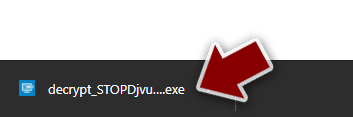
- After pressing the Download button, a small pop-up at the bottom, titled decrypt_STOPDjvu.exe, should show up – click it.
- If User Account Control (UAC) message shows up, press Yes.
- Agree to License Terms by pressing Yes.
- After Disclaimer shows up, press OK.
- The tool should automatically populate the affected folders, although you can also do it by pressing Add folder at the bottom.

- Press Decrypt.



If the tool wasn't able to recover Mppq files, please don't get upset. Below you'll find instructions prepared by our IT specialists on other methods for recovering your files. We've also posted manuals for other useful tricks as to how to back up files and repair the host files.
Please remember that you can't rely 100% on any cybersecurity software as all applications might have vulnerabilities or outdated virus signatures. Although having a trustworthy anti-malware tool is a great way to protect your device from various infections lurking on the internet, you still have to be attentive while browsing the internet.
Please be careful when opening any emails that sender you don't know, don't download suspicious-looking attachments stating that you must open it immediately, refrain from downloading anything from file-sharing platforms, and stay away from ads promising deals that look too good to be true.
Did this guide help?
Be the first to comment