

Zzla file-locker: how to deal with it once infected

If you have never come across the term “ransomware” before, you are not alone. There are thousands of users who get infected with this treacherous type of malware on Windows computers every day without previously encountering it. In fact, it is one of the main reasons why they get infected in the first place. If your files were appended with the .zzla extension, your computer has, unfortunately, suffered a ransomware attack. In this article, we will provide you methods on how to deal with a ransomware infection, as well as methods for potential file recovery.
When a malware payload is executed on a Windows computer, it immediately uses an RSA encryption algorithm to encrypt all personal files stored on the device. Only system files are left unlocked so the infected machine could still boot up and operate. During the encryption process, malware might show a fake Windows Update pop-up window just to mislead users into believing that nothing bad is happening to their computers. However, once the ransom note is presented – the machine is heavily corrupted.
Then the parasite generates a ransom note, titled _readme.txt, and leaves it on the desktop and in some affected folders. It's easy to deduct whether this particular strain of Djvu ransomware family infected your device, as all encrypted files are appended with the .zzla extension.
To regain access to your data, the criminals behind the virus are demanding to forward them $980 in Bitcoins. They even show fake benevolence by offering a 50% discount for those who contact within three days of the incident. Please don't be tricked, as the threat actors use this persuasion technique to push victims into making rash decisions.
The whole message from the perpetrators reads:
ATTENTION!
Don't worry, you can return all your files!
All your files like pictures, databases, documents and other important are encrypted with strongest encryption and unique key.
The only method of recovering files is to purchase decrypt tool and unique key for you.
This software will decrypt all your encrypted files.
What guarantees you have?
You can send one of your encrypted file from your PC and we decrypt it for free.
But we can decrypt only 1 file for free. File must not contain valuable information.
You can get and look video overview decrypt tool:
hxxps://we.tl/t-fhnNOAYC8Z
Price of private key and decrypt software is $980.
Discount 50% available if you contact us first 72 hours, that's price for you is $490.
Please note that you'll never restore your data without payment.
Check your e-mail “Spam” or “Junk” folder if you don't get answer more than 6 hours.To get this software you need write on our e-mail:
manager@mailtemp.chReserve e-mail address to contact us:
helpmanager@airmail.ccYour personal ID:
As you can see, the criminals would like to be contacted via two provided emails (manager@mailtemp.ch, helpmanager@airmail.cc). But please, no matter how relatively small the ransomware amount might seem, don't reach out to the criminals, and don't succumb to their demands. When people pay for these criminals, files rarely get recovered fully. These malicious people might not even have the tool needed for the decryption, but those claims, discount offers, and other convincing claims encourage people to pay up.

When it comes to the origin of Zzla file virus infection, unfortunately, you or someone else using your Windows computer has used file-sharing platforms to download games or software cracks, as that's the primary distribution technique of the Djvu ransomware family.
We don't advise using torrent websites or other high-risk portals. Threat actors can camouflage various malware as any file type, upload it, and wait for unaware computer users to download it. Since no one inspects the downloads, these file-sharing platforms are considered a hotbed for infections.
But what's done is done. Now all that matters is how you respond to this incident. We advise you to do the responsible thing and remove the Zzla virus from your infected device. If you choose to do so, this article will help you do that by providing illustrated instructions for removal, file recovery, and damage repair.
| name | Zzla file virus |
|---|---|
| Type | File-locker, ransomware, cryptovirus |
| Family | Djvu/STOP ransomware |
| Appended file extension | .zzla is appended to all personal documents, pictures, videos, and other files |
| Symptoms of infection | Personal data is inaccessible and appears to have the aforementioned extension added to original filenames; ransom note is found on the desktop; can't access security-related pages and default antivirus software is unresponsive |
| ransom amount | $980/$490 |
| Distribution | File-sharing platforms, malicious spam email attachments |
| Data recovery | Options are limited. You can use a media file repair tool for some formats, rely on decryptor that recovers data locked using offline keys. Otherwise, regain access to your files by using alternative methods described in detail below |
| Elimination | To fully remove the file-locking parasite with all its components, you must use a reliable anti-malware tool. Recommendations below |
| System health | All infections leave traces on the machines, but ransomware damage may be the greatest. Repair it by scanning your system with the FortectIntego system diagnostics tool |
Remove the virus with professional security tools before any file recovery
Windows Defender or third-party anti-malware apps are great security tools, but unfortunately, in some cases, it's not enough to prevent sophisticated malware[1] from accessing your device. This happens because users commonly think that the crack detection as malware is a false positive and deliberately allow the file to be executed on the system. If that happened to you, please refrain from disabling your anti-malware software in the future and believe all the warnings it is providing you.
We can't reiterate too much by stating the importance of malware removal. Forwarding criminals what they demand would only motivate them and finance their whole illegal operation, so they could infect more devices and develop more high-end malware that default protection doesn't recognize.
When you decide to remove Zzla ransomware from your device, the first thing you need to do is to extract all (or essential) encrypted data from your infected device to an offline storage device. It's safe to do that, as the locked files don't contain any malicious scripts themselves. If you've kept backups of all your data, this step can be skipped.

The success of virus detection and removal depends on a particular rate that said the virus can get found malicious. There are many aliases this virus family have, so detection names can include the various name of threats, but that is not the indication.
- W32.AIDetect.malware1;
- Trojan.MalPack;
- ML.Attribute.HighConfidence;
- BehavesLike.Win32.Lockbit.cc;
- Win32:PWSX-gen [Trj].
You should check if the tool you have chosen to use can find[2] the threat on the machine. The detection rate can vary for the particular sample of the threat, but the main popular tools categorized as anti-malware tools and antivirus apps should find malicious pieces and remove them for you properly. This is the best way to remove any malware like this.
Then you need to reboot your device in Safe Mode with Networking, as the ransomware might block you from downloading the MalwarebytesMalwarebytes anti-malware tool needed for its removal. We know that not all of our readers are IT experts, so here's what you need to do to enter the said mode:
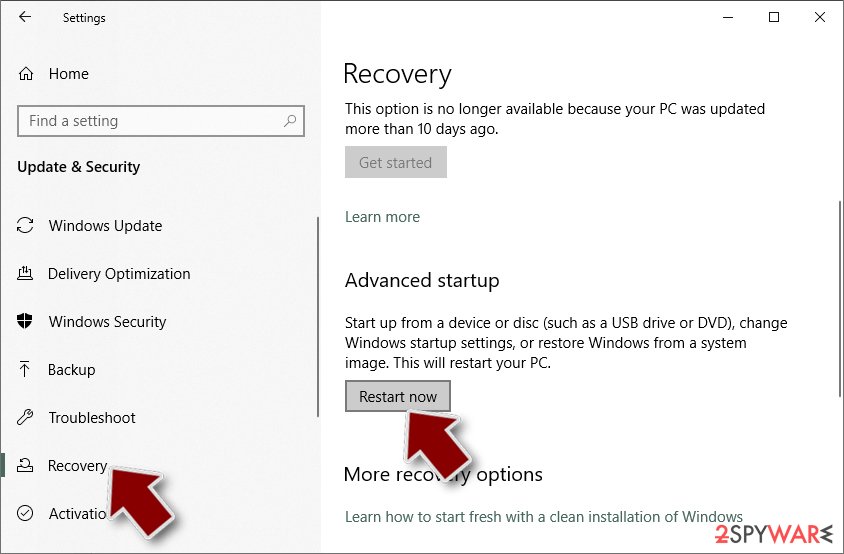
- Right-click on the Start button and select Settings.
- Scroll down to pick Update & Security.
- On the left side of the window, pick Recovery.
- Now scroll down to find the Advanced Startup section.
- Click Restart now.
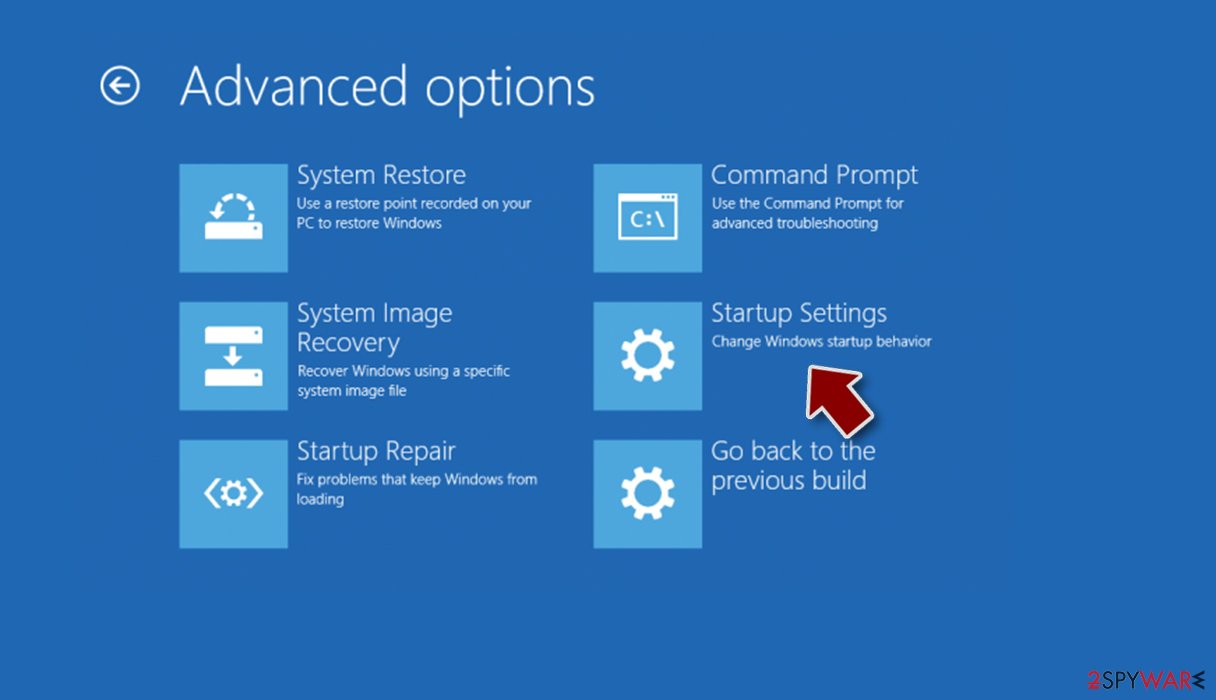
- Select Troubleshoot.
- Go to Advanced options.
- Select Startup Settings.
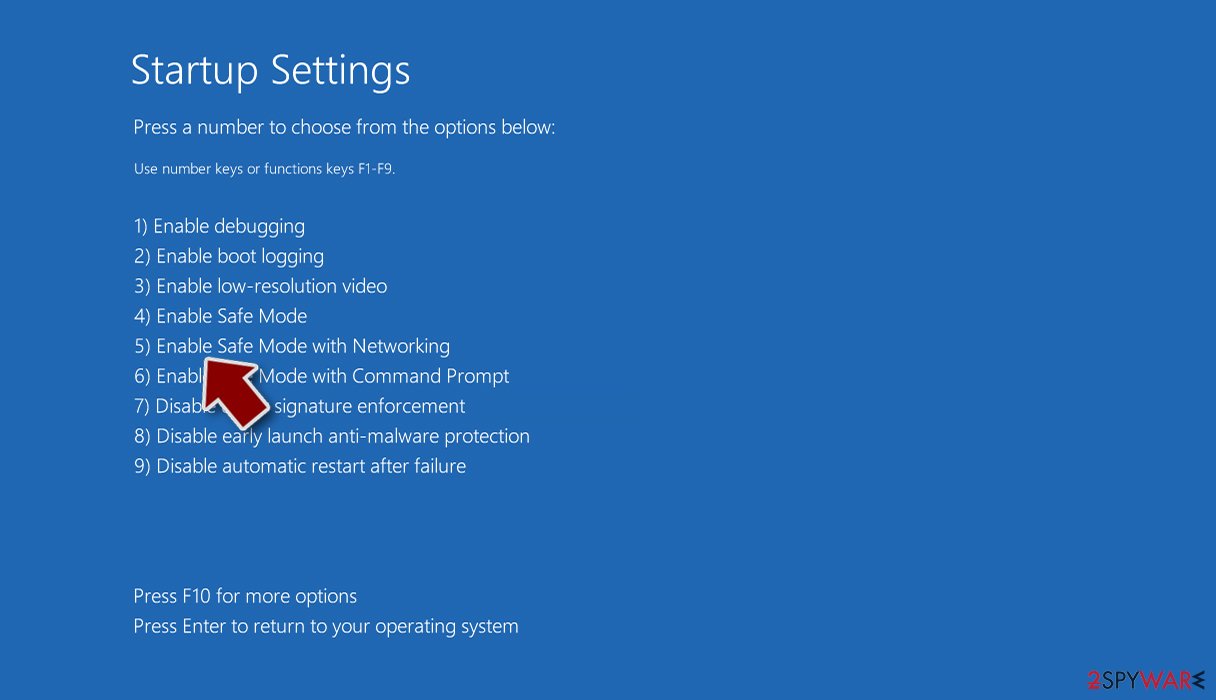
- Click Restart.
- Press 5 or click 5) Enable Safe Mode with Networking.


Once you reach Safe Mode, download either the abovementioned software or the equally powerful SpyHunterCombo Cleaner security tool that's recommended by cybersecurity experts from Europe,[3] update it with the latest definitions, and perform a full threat scan to remove Zzla file virus and all its malicious components. Both of these apps have a free trial option.
They would have blocked the initial download from the file-sharing platform as the real-time protection scans all incoming downloads. If you constantly update your chosen security tool's virus definitions database and regularly scan your system, you won't have to deal with such nightmares in the future.
Repair damaged Windows system files by using diagnostics software
Once Zzla virus is executed, it does all kinds of modifications to system files and settings. It tries to delete Shadow Volume Copies,[4] so you could recover old file versions, edits the host file so you're not able to visit any security-related sites, modifies the registry so it's launched every time your PC is rebooted, and so on.
All these changes might result in various abnormal system behavior, such as BSoDs, freezing, severe lag, infection renewal after removal, and other performance/stability issues. Therefore, it's essential to repair everything that the ransomware got its dirty hands-on as soon as possible.
Unfortunately, you won't be able to do these repairs manually, as they're not recommended even for highly experienced IT professionals. Thus we recommend entrusting this process to the FortectIntego system diagnostics tool that will identify all the virus-caused damages and automatically fix them.
Its patented technology locates all corrupted system files, tracking cookies, edited registry entries, broken DLLs, and all other system-related irregularities. By using this PC repair software, you can start enjoying your device anew:
- Download the application by clicking on the link above
- Click on the ReimageRepair.exe
- If User Account Control (UAC) shows up, select Yes
- Press Install and wait till the program finishes the installation process
- The analysis of your machine will begin immediately

- Once complete, check the results – they will be listed in the Summary
- You can now click on each of the issues and fix them manually
- If you see many problems that you find difficult to fix, you can purchase the license and fix them automatically.



Only by completing the removal with recommended security tools and performing system diagnostics with the FortectIntego software can you rest assured that the virus won't renew itself on the next reboot. Therefore it's safe now to recover your files from backups. If you didn't keep them, please proceed to the next step, where we display encrypted file recovery methods.
Alternative ways to recover encrypted data
There are other options to recover .zzla files, so there's no need to forward any money to the assailants. We've been helping people to get out of sticky situations for over 2 decades. So you can trust that we've collected all possible data recovery techniques. But please don't skip any of the prior steps, and the data recovery could go sideways.
Since the Djvu family ransomware is responsible for most computer infections of this kind globally, a security company called Emsisoft is constantly upgrading its free decryption software to help the victims. Although it won't work 100% of the time, it's your best shot at regaining access to your files for free:
- Download the app from the official Emsisoft website.
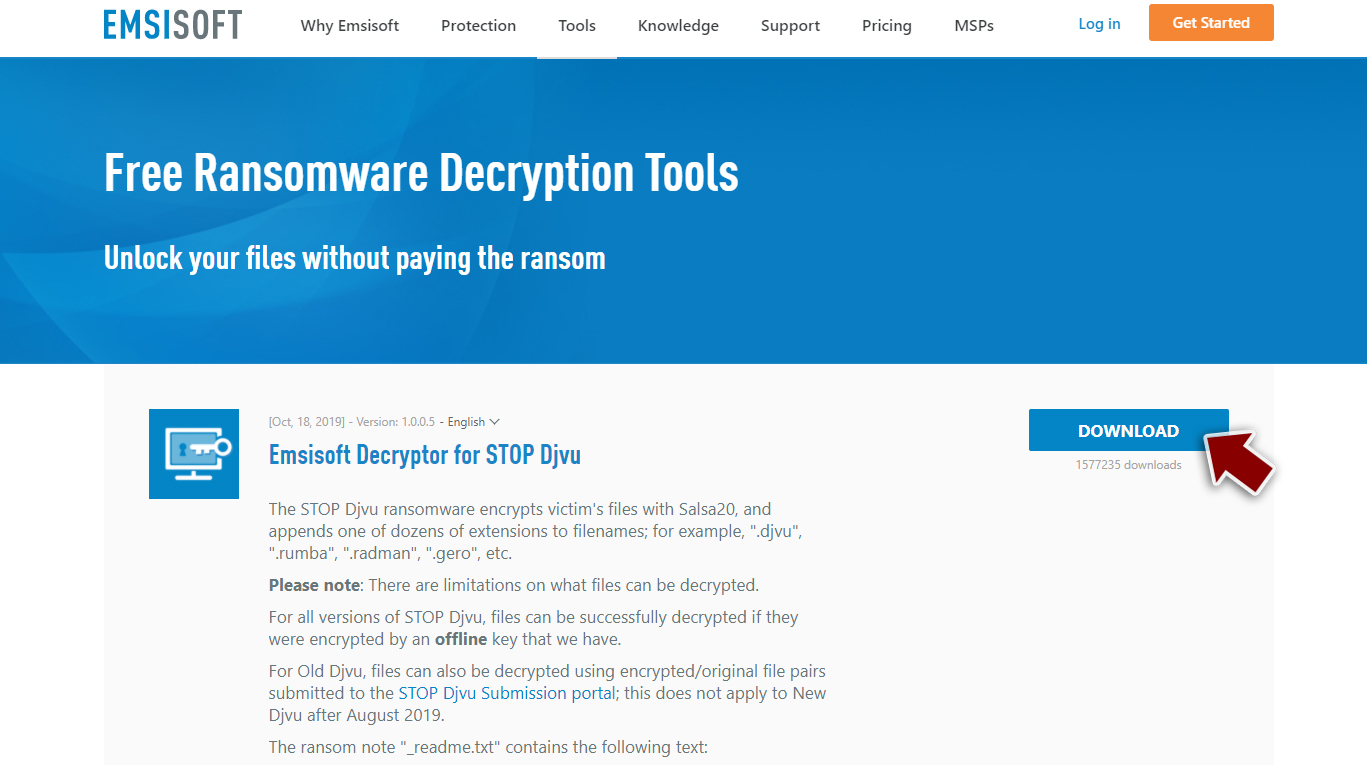
- After pressing the Download button, a small pop-up at the bottom, titled decrypt_STOPDjvu.exe, should show up – click it.
- If User Account Control (UAC) message shows up, press Yes.
- Agree to License Terms by pressing Yes.
- After Disclaimer shows up, press OK.
- The tool should automatically populate the affected folders, although you can also do it by pressing Add folder at the bottom.

- Press Decrypt.



From here, there are three viable outcomes. If someone has already provided a copy of the encrypted file and a regular one, the “Decrypted!” message will appear, letting you know that the files are successfully unlocked and that you can use them again.
If “Error: Unable to decrypt file with ID:” shows up, the aforementioned copies weren't presented to the company; thus, they haven't yet decoded the algorithm. In this case, you will have to arm yourself with patience and try using the free decryptor in a day or a week.
If the Zzla file virus encrypted your personal data with an Online ID, a “This ID appears to be an online ID, decryption is impossible” will appear. That means that this tool is unable to decrypt your data. But luckily, below, you'll find another useful tool that might help you. Here's what you need to do:
- Download Data Recovery Pro.
- Double-click the installer to launch it.
- Follow on-screen instructions to install the software.

- As soon as you press Finish, you can use the app.
- Select Everything or pick individual folders where you want the files to be recovered.

- Press Next.
- At the bottom, enable Deep scan and pick which Disks you want to be scanned.

- Press Scan and wait till it is complete.
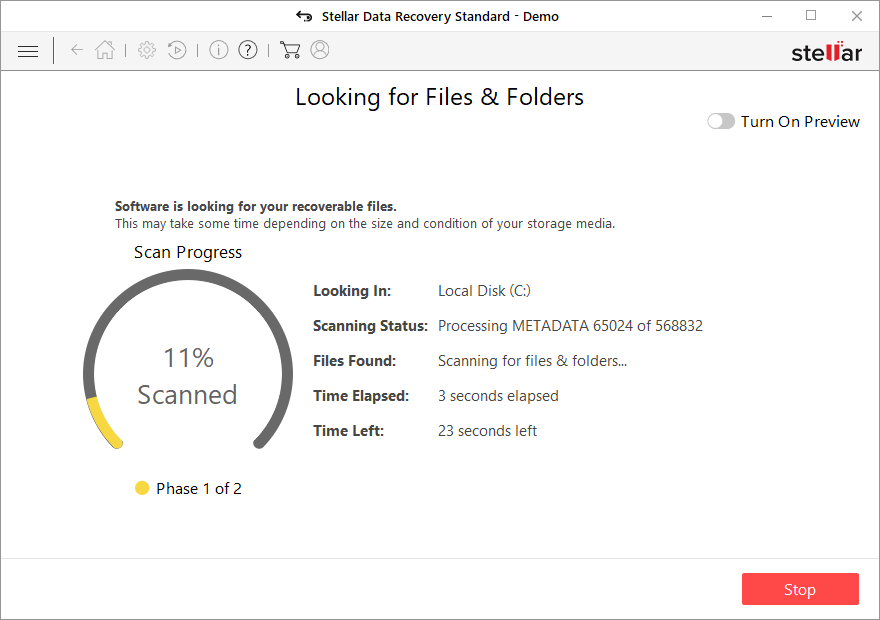
- You can now pick which folders/files to recover – don't forget you also have the option to search by the file name!
- Press Recover to retrieve your files.



We hope that after following all these detailed instructions to recover encrypted files, you can use them again, and your computer runs smoothly. Unfortunately, Zzla ransomware is one of the more advanced versions in this family, so the system gets more affected than it looks and file recovery options are limited.
Make sure to repair various system functions and remove the threat fully before you do anything else on the affected device. this way you can save yourself time and avoid possible damage to the machine functions, secondary file encryption round. keep security tools like SpyHunterCombo Cleaner or MalwarebytesMalwarebytes running and updated, so these threats can get blocked before the initial infection.
Did this guide help?
Be the first to comment