

Janelle ransomware threatens to delete the decryption key after a certain amount of time

Ransomware is a type of computer malware that locks all personal data and then demands ransom for its return. Janelle virus is a member of this category and recently showed up in the cybersecurity landscape. While it is unknown which channels malware uses to propagate, victims get infected without knowing anything about it, and once they realize what's happened, it is already too late.
By that, we mean that all pictures, videos, documents, and other personal files get locked with a strong encryption algorithm,[1] acquiring the .JANELLE extension in the process. Note that the data is not corrupted; it simply requires a unique key to unlock it and bring it back to the working state. If you wonder who has this key – it is the cybercriminals behind the malware attack, although it is obvious that they are not willing to provide it for free.
As soon as the encryption process, which lasts mere seconds, is complete, a pop-up window titled JANELLE (it can be found on the computer's desktop under the index.html name) shows up. It explains the situation to victims and claims that the only way to recover files is by paying a ransom within 24 hours, which should be transferred as $600-worth of bitcoins.
Additionally, ransomware drops another text file, “Readme.txt,” which serves as a FAQ, where most frequently, questions by victims are answered. We strongly discourage victims from cooperating or even contacting the attackers, as there is a chance of being scammed after paying the ransom.
| Name | Janelle ransomware |
|---|---|
| Type | Ransomware, data locking malware, cryptovirus |
| Based on | HiddenTear |
| File extension | .JANELLE, appended to each of the personal files, which means they can no longer be opened or edited |
| Ransom note | index.html and Readme.txt |
| Contact | Via the ransom note |
| Ransom demand | $600 in bitcoin |
| File Recovery | If no backups are available, recovering data is almost impossible. Nonetheless, we suggest you try the alternative methods that could help you in some cases – we list them below |
| removal | Perform a full system scan with powerful security software |
| System fix | Malware can seriously tamper with Windows systems, causing errors, crashes, lag, and other stability issues after it is terminated. To remediate the OS and avoid its reinstallation, we recommend scanning it with the FortectIntego repair tool |
The ransom notes
Let's dive into the analysis of the ransom notes. As we already mentioned, there are two ransom notes that are dropped after the file encryption is complete. One of them immediately opens automatically, so there is no way that victims would miss it. In fact, ransomware does not hide its presence as soon as it manages to infect Windows and encrypt files but rather tries to make sure that users would see the contact and other relevant information – it increases the chances of payment.
Here's the full message from the pop-up window:
Oops! Your FIles have been encrypted
What Happened to My Computer?
Your important files are encrypted. Many of your documents, photos, videos, databases and other files are no longer accessible because they have been encrypted. Maybe you are busy looking for a way to recover your files, but do not waste your time. Nobody can recover your files without our decryption service.Can I Recover My Files?
Sure. We guarantee that you can recover all your files safely and easily. But if you want to decrypt all your files, you need to pay. You have 24 hours to submit the payment. After that the price will be doubled. Also, if you don't pay in 7 days, you will not be able to recover your files forever.How Do I Pay?
Payment is accepted in Bitcoin only. For more information, click
Please check the current price of Bitcoin and buy some bitcoins. For more information, click
And send the correct amount to the address specified in this window.
After your payment, click . Best time to check: 9:00am – 11:00am GMT from Monday to Friday.
Once the payment is checked, you can start decrypting your files immediately.Contact
If you need our assistance, send a message by clicking .
We strongly recommend you to not remove this software, and disable your anti-virus for a while, until you pay and the payment gets processed. If your anti-virus gets updated and removes this software automatically, you will not be able to recover your files even if you pay!Send $600 worth of bitcoin to this address
The ransom note reminds the one used by the notorious WannaCry virus, which started the ransomware spree back in 2017. Unsurprisingly, the structure of the note is also very similar. More recent malware strains such as Djvu do not include the timer, neither do they claim that the key to the files will be lost after a certain period of time.
However, it seems like the authors of Janelle ransomware try to apply pressure to victims, as ticking time might corner them – this is especially true if the locked data is extremely important. Basically, the attackers are using any means in order to make users pay the demanded $600. Keep in mind, however, that there is no proof that the key will be deleted completely after the time expires.

Crooks are also mentioning the fact that using security software might fully corrupt all data, which is also not true, as long as you perform Janelle ransomware removal correctly – it is your first step for recovery. Find all the information needed below. Remember, while paying criminals might seem like the only choice, it is extremely risky, as cybercriminals can never be trusted in general. Besides, it would only encourage them to infect more people.
What to do after being infected?
Ransomware is among the most devastating computer infections. According to the 2021 report, it has seen a rise of 151% in 2021 from the previous year.[2] Corporations are extremely vulnerable to this phenomenon, although home users are also popular targets to cybercriminals. This is why new strains, such as Janelle, emerge (malware does not seem to be connected to any previous malware family).
This is another red flag, however, as cybercriminals might not be experienced enough. For example, the decryption tool might not work or could be infected with other malware. Thus, do not contact the attackers but rather fight the infection. We provide a step-by-step guide below.
1. Remove ransomware
To prevent the ransomware from corrupting your data and remove the infection carefully, you should access Safe Mode and perform a full system scan with SpyHunterCombo Cleaner or MalwarebytesMalwarebytes anti-malware. Before you do this, disconnect your computer from the internet – you can simply plug out the ethernet cable or disconnect your WiFi via a system tray.
Windows 7 / Vista / XP
- Click Start > Shutdown > Restart > OK.
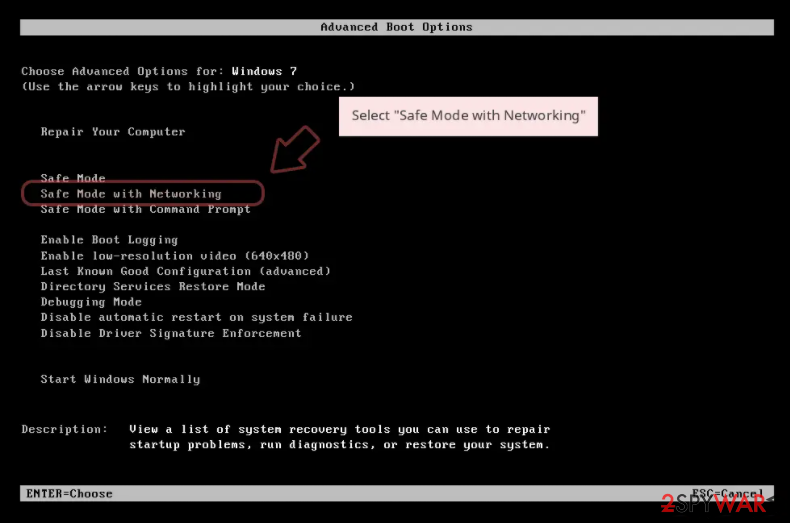
- When your computer becomes active, start pressing the F8 button (if that does not work, try F2, F12, Del, etc. – it all depends on your motherboard model) multiple times until you see the Advanced Boot Options window.
- Select Safe Mode with Networking from the list.

Windows 10 / Windows 8
- Right-click on the Start button and select Settings.
- Scroll down to pick Update & Security.
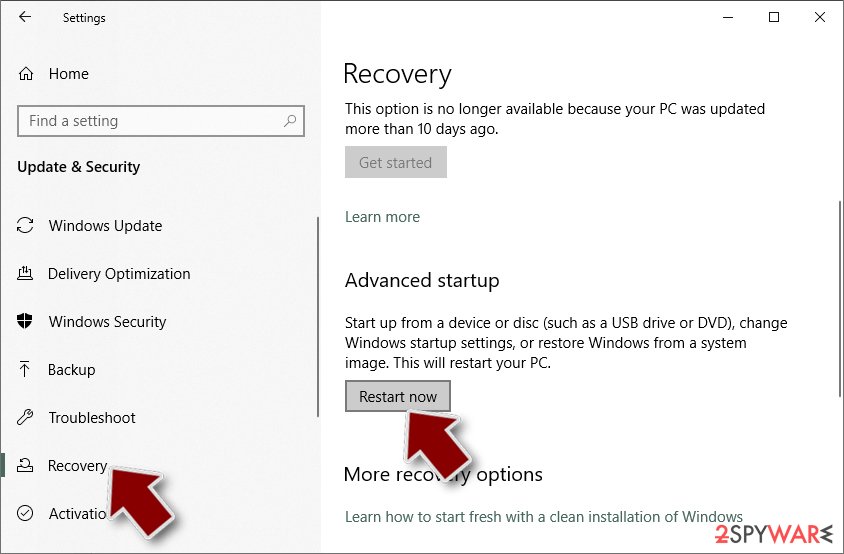
- On the left side of the window, pick Recovery.
- Now scroll down to find the Advanced Startup section.
- Click Restart now.
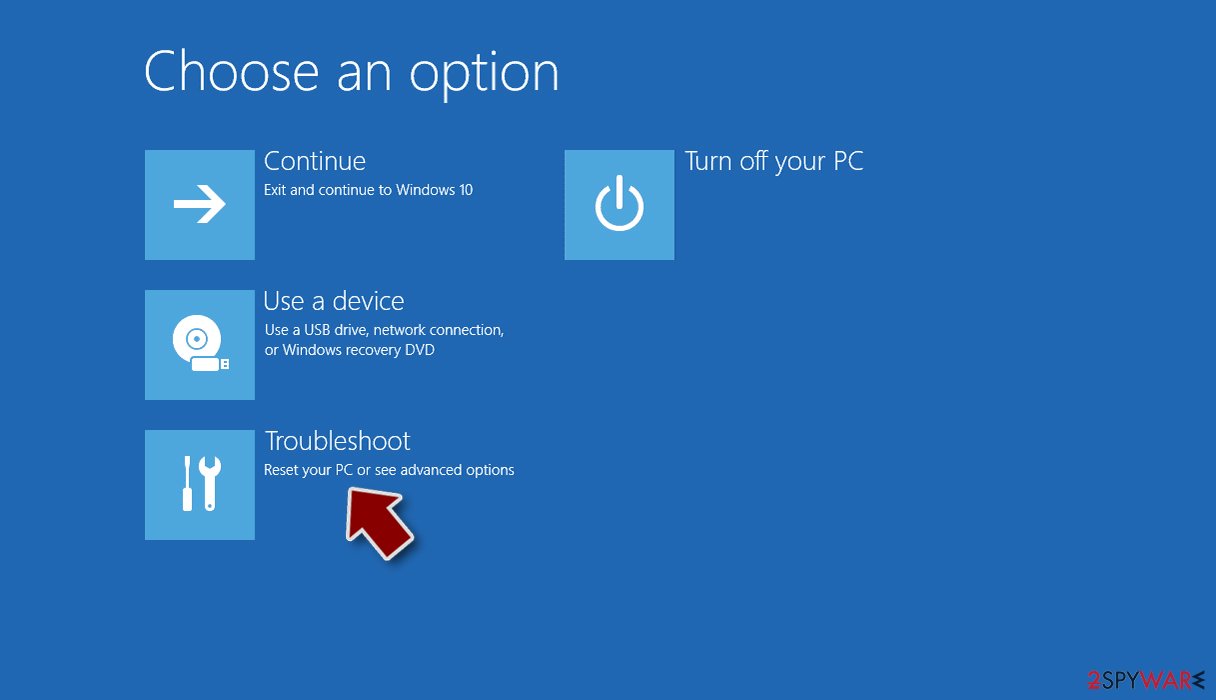
- Select Troubleshoot.
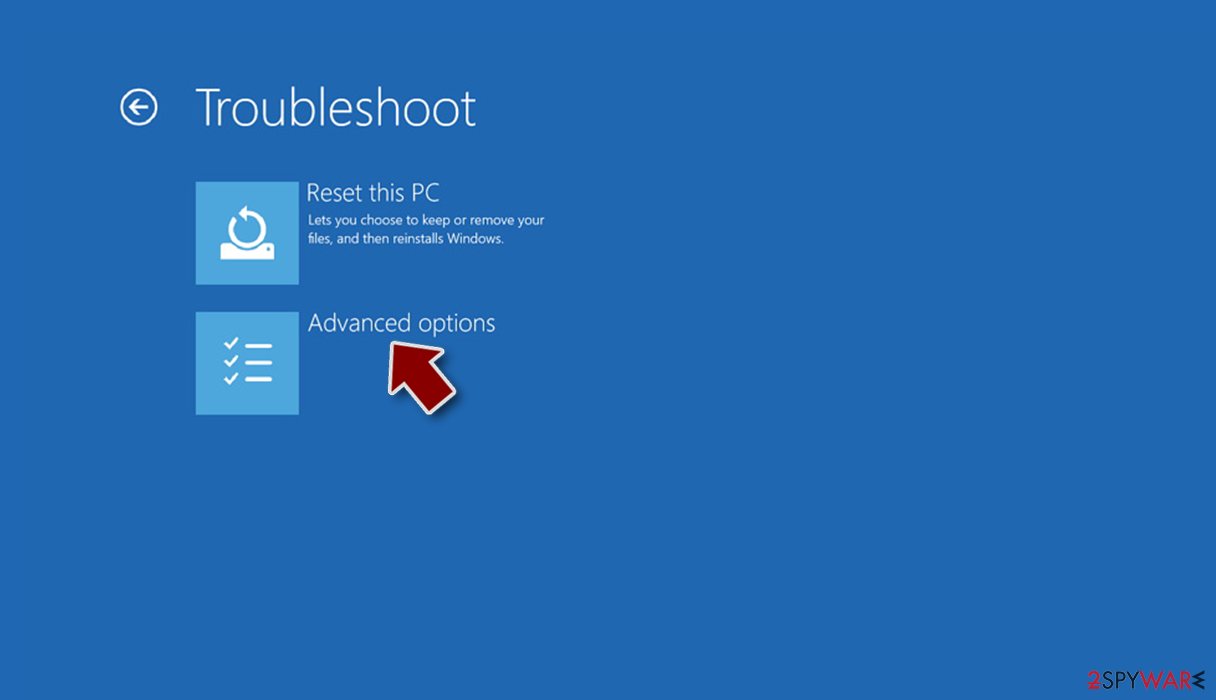
- Go to Advanced options.
- Select Startup Settings.
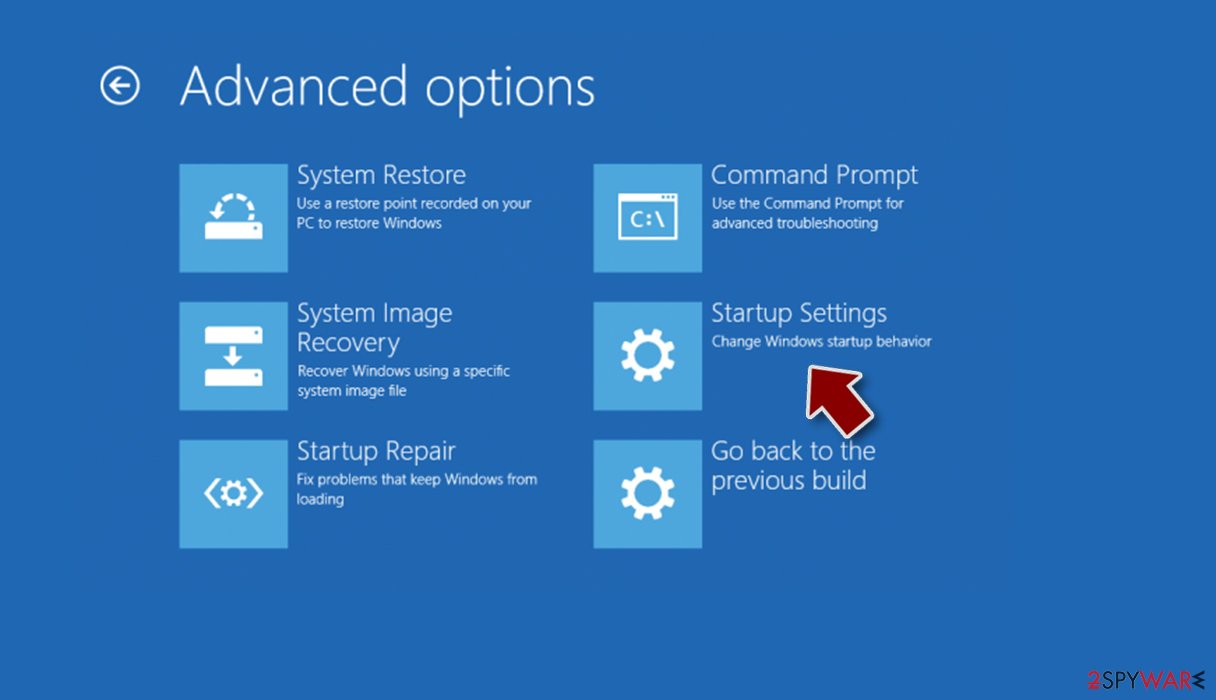
- Click Restart.
- Press 5 or click 5) Enable Safe Mode with Networking.
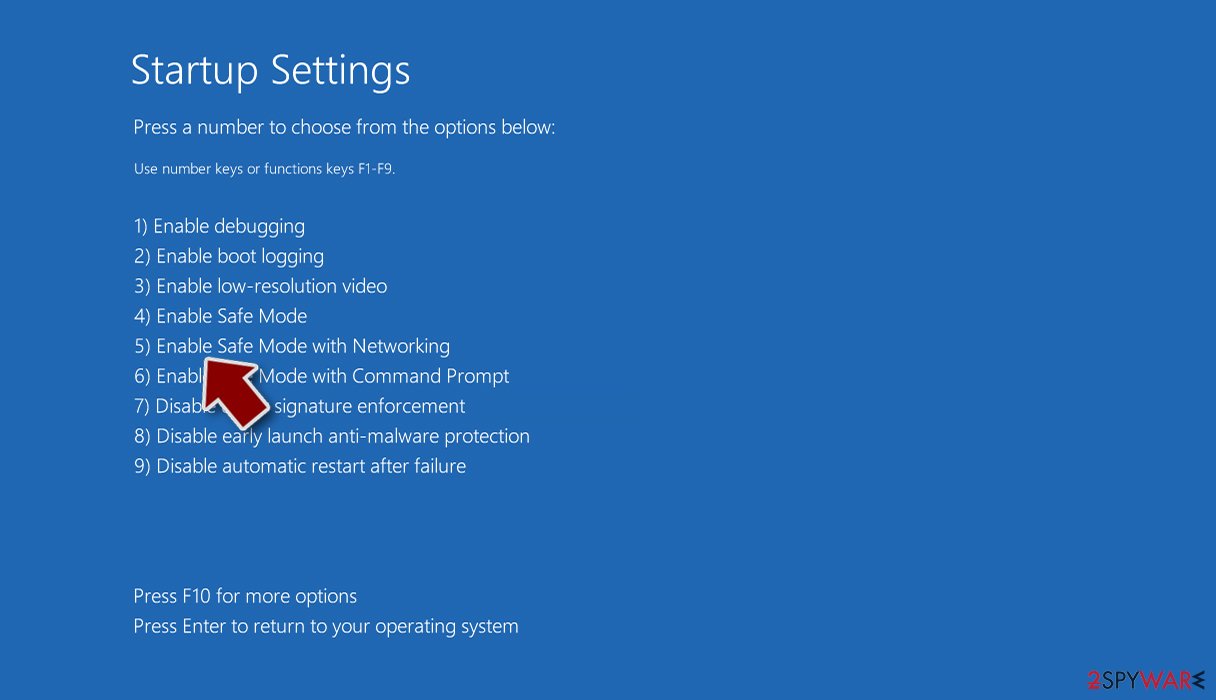


After you remove all malicious files from your system, do not rush to leave it just yet and proceed with the next step.
2. Make backups
If you have backups for your files ready, you can skip this step. The unfortunate truth is that most ransomware victims do not back up their data, ending up losing it after the infection has occurred. This scenario is very unfortunate, especially when files are important – precious photos or work/school documents.
If you are one of those people who do not have backups, you should use an external storage device to copy all the encrypted files over. This would guarantee that the locked data would not get corrupted when trying to restore it using the methods provided below.
Note: to avoid this scenario in the future, make sure you backup your files regularly. You can find more information on how to do that below.
3. Recover your files without paying
As we already mentioned, this ransomware is relatively new, so there has been no proof yet that the attackers can actually provide a working decryptor. Therefore, the risk of losing not only files but also money is quite high. Instead, we recommend using alternative ways to recover files.
One of the most effective things you can try is third-party recovery software.
- Download Data Recovery Pro.
- Double-click the installer to launch it.

- Follow on-screen instructions to install the software.

- As soon as you press Finish, you can use the app.
- Select Everything or pick individual folders where you want the files to be recovered from.
- Press Next.
- At the bottom, enable Deep scan and pick which Disks you want to be scanned.

- Press Scan and wait till it is complete.
- You can now pick which folders/files to recover – don't forget you also have the option to search by the file name!
- Press Recover to retrieve your files.



Another way to restore .JANELLE files is to wait for a free decryptor from security experts. There are plenty of examples where researchers managed to find bugs[3] within the ransomware code, which allowed them to create a free decryption tool. Alternatively, law enforcement agencies might capture the remote servers controlled by the attackers, which would make all the unique keys available to victims. Here are a few links you can use to look for a decryptor:
- No More Ransom Project
- Free Ransomware Decryptors by Kaspersky
- Free Ransomware Decryption Tools from Emsisoft
- Avast decryptors
Unfortunately, there is also a chance that none of these methods might work for you currently.
4. Repair damaged system
Finally, you should not forget your Windows system, which could be damaged after a malware infection. Once a computer is infected with malware, its system is changed to operate differently. For example, an infection can alter the Windows registry database, damage vital bootup, and other sections, delete or corrupt DLL files, etc. Once a system file is damaged by malware, antivirus software cannot do anything about it, leaving it just the way it is. Consequently, users might experience performance, stability, and usability issues, to the point where a full Windows reinstallation is required.
Therefore, we highly recommend using a one-of-a-kind, patented technology of FortectIntego repair. Not only can it fix virus damage after the infection, but it can also remove malware that has already broken into the system thanks to several engines used by the program. Besides, the application can also fix various Windows-related issues that are not caused by malware infections, for example, Blue Screen errors, freezes, registry errors, damaged DLLs, etc.
- Download the application by clicking on the link above
- Click on the ReimageRepair.exe

- If User Account Control (UAC) shows up, select Yes
- Press Install and wait till the program finishes the installation process

- The analysis of your machine will begin immediately

- Once complete, check the results – they will be listed in the Summary
- You can now click on each of the issues and fix them manually
- If you see many problems that you find difficult to fix, we recommend you purchase the license and fix them automatically.



Did this guide help?
Be the first to comment