

CryptoJoker 2021 ransomware is a type of malware that could result in loss of files and money

Upon accessing a Windows computer without giving prior warning, CryptoJoker 2021 ransomware locks all personal files and then demands a ransom to be paid for their recovery. This variant of malware showed up in late October and seems to be infecting home users around the world.
As evident, ransomware does not provide any warning before it breaches the PC, and by the time users notice changes it is already too late. Upon entry, the virus performs a variety of changes to the system before it proceeds with its main goal, as otherwise, the built-in Windows defenses would not let the infection spread.
Using a combination of sophisticated algorithms AES and RSA,[1] ransomware encrypts documents, pictures, videos, and all other data on the computer (note that the virus excludes several locations and file types on the system in order to allow it to run). During this time, each of the files receives an extension “.partially.[encrypter@tuta.io].encrypted” and also loses the original icon.
Suchlike data can no longer be accessed or modified and requires a decryption key to be operatable once again. Of course, the attackers are not willing to provide a decryption tool for free, but they are willing to sell it for an unspecified amount of money to be paid in Bitcoin cryptocurrency. The attackers ask victims to send an email to encrypter@tuta.io to negotiate the precise sum to be paid.
We don't recommend contacting malware authors and paying the ransom, as they could simply never send you the needed decryption tool. In fact, there is a free decryptor that worked for some victims of the CryptoJoker 2021 virus. Likewise, there are several alternative methods you could try – we list them all below.
| Name | CryptoJoker 2021 ransomware |
|---|---|
| Type | Cryptovirus, ransomware, data-locking malware |
| Malware family | CryptoJoker |
| Encryption method | A combination of AES and RSA encryption algorithms used to lock files |
| File extension | Each of the affected files is appended with the .partially.[encrypter@tuta.io].encrypted extension |
| Ransom note | how to decrypt my files.txt |
| Contact | encrypter@tuta.io |
| File Recovery | If no backups are available, recovering data is almost impossible. Nonetheless, we suggest you try the alternative methods that could help you in some cases – we list them below |
| Malware removal | To remove malware automatically, use SpyHunterCombo Cleaner security software |
| System fix | Malware can seriously tamper with Windows systems, causing errors, crashes, lag, and other stability issues after it is terminated. To remediate the OS and avoid its reinstallation, we recommend scanning it with the FortectIntego repair tool |
Malware has been created at a more rapid pace the further the technologies evolve. The illegal business of ransomware, in particular, has been on the rise for the past few years, even though we did see the shut down of very prominent malware families such as Clop.[2]
Likewise, the attacks against home users are also rising. With ransomware strains such as Djvu, which infects hundreds of users daily, it became more and more lucrative for the attackers to evolve their attacks and infect more users with every malware version. Luckily, security experts create more advanced solutions for users and try to spread awareness of ransomware infections.
The original version of CryptoJoker was released back in December 2015, when ransomware began to be a more widespread phenomenon, as crooks saw its potential in making easy money. The ransom note used to be written in English and Russian, although more recent versions of malware use the former only. In this case, the message reads as follows:
hello !!! all your data is encrypted..
and for decrypt it you need a key..
if you want to return your data :
contact us whit this email :encrypter@tuta.io
warning : please be careful if you try decrypt it
yourself or change windows or every things
you may damage it and damage the some hidden
necessary decryption files
As per usual, the attackers give several warnings about not removing malware or trying to decrypt files – which is in their best interest, as they are trying to sell victims the keys. Security experts recommend ignoring these requests (we provide alternative methods for data recovery below).

Seeing how the threat evolved over the years, it does not seem that its operators will stop any time soon. If you have been a victim of ransomware, proceed with the steps in order to delete it from your system, attempt to recover files, and remediate your system effectively.
Use anti-malware software
The first thing to do is not to panic, as it won't bring anything positive to the situation. In fact, the incorrect steps could make matters worse. The first step is to make sure that all malware and its traces are eliminated from the infected computer with the help of security software such as SpyHunterCombo Cleaner or MalwarebytesMalwarebytes.
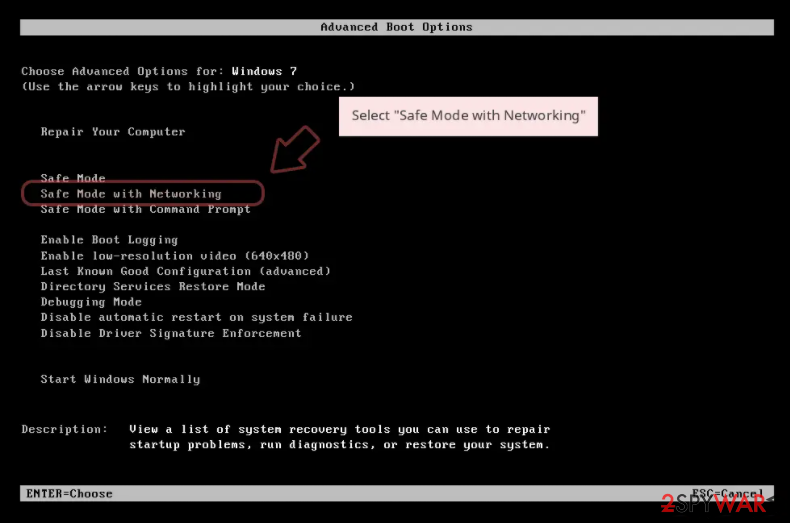
Since the CryptoJoker 2021 virus might tamper with your anti-malware software, it might be difficult to get rid of it in the normal mode. In such a case, you should access Safe Mode and perform a full system scan from there:
Windows 7 / Vista / XP
- Click Start > Shutdown > Restart > OK.
- When your computer becomes active, start pressing the F8 button (if that does not work, try F2, F12, Del, etc. – it all depends on your motherboard model) multiple times until you see the Advanced Boot Options window.
- Select Safe Mode with Networking from the list.

Windows 10 / Windows 8
- Right-click on the Start button and select Settings.
- Scroll down to pick Update & Security.
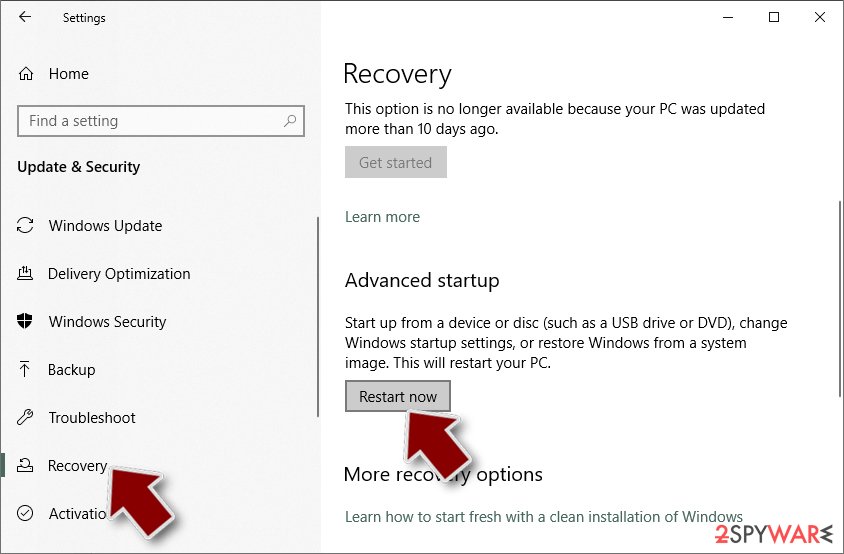
- On the left side of the window, pick Recovery.
- Now scroll down to find the Advanced Startup section.
- Click Restart now.
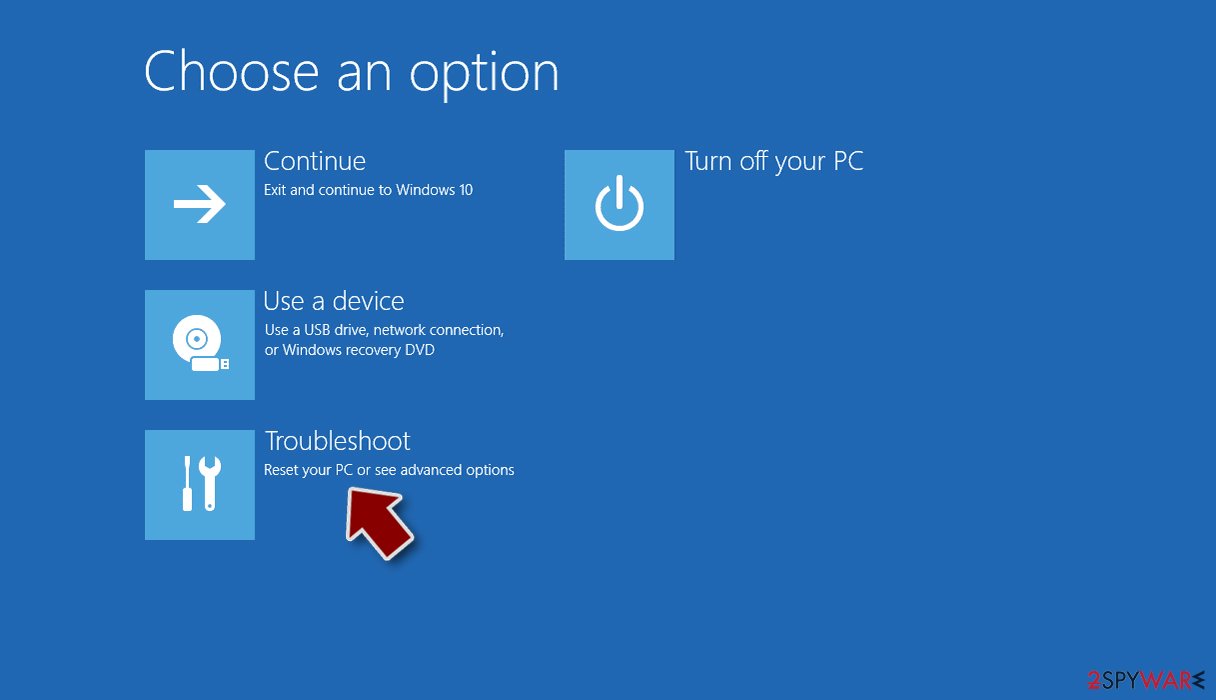
- Select Troubleshoot.
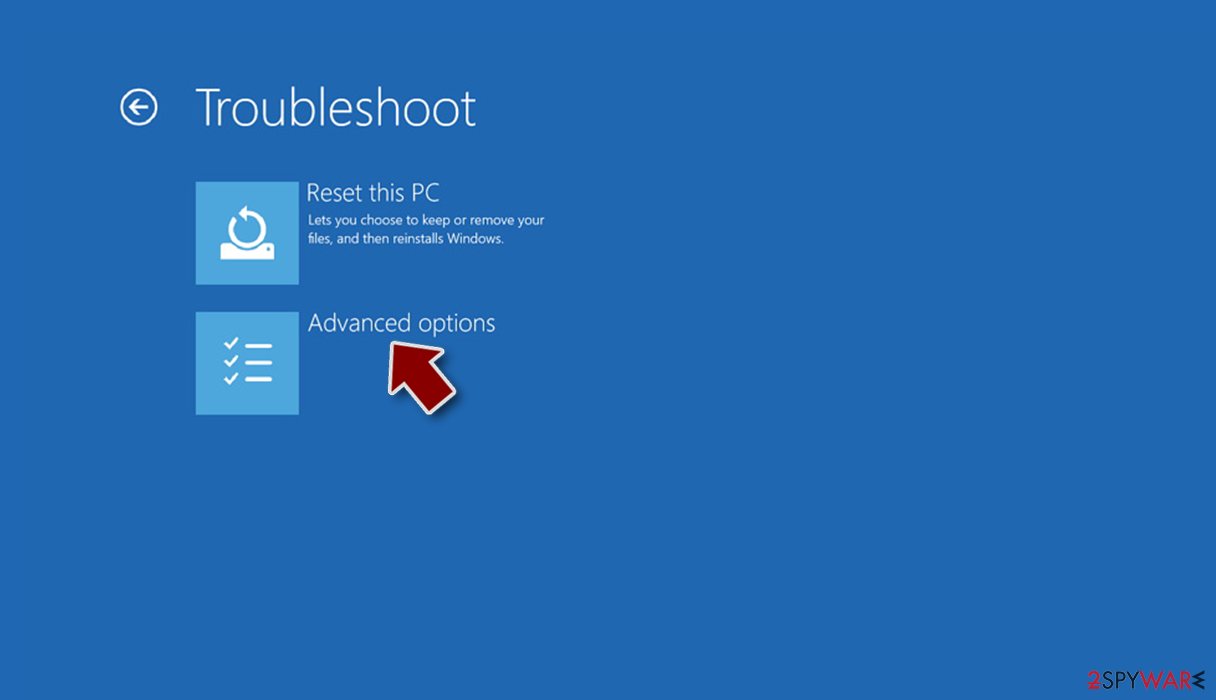
- Go to Advanced options.
- Select Startup Settings.
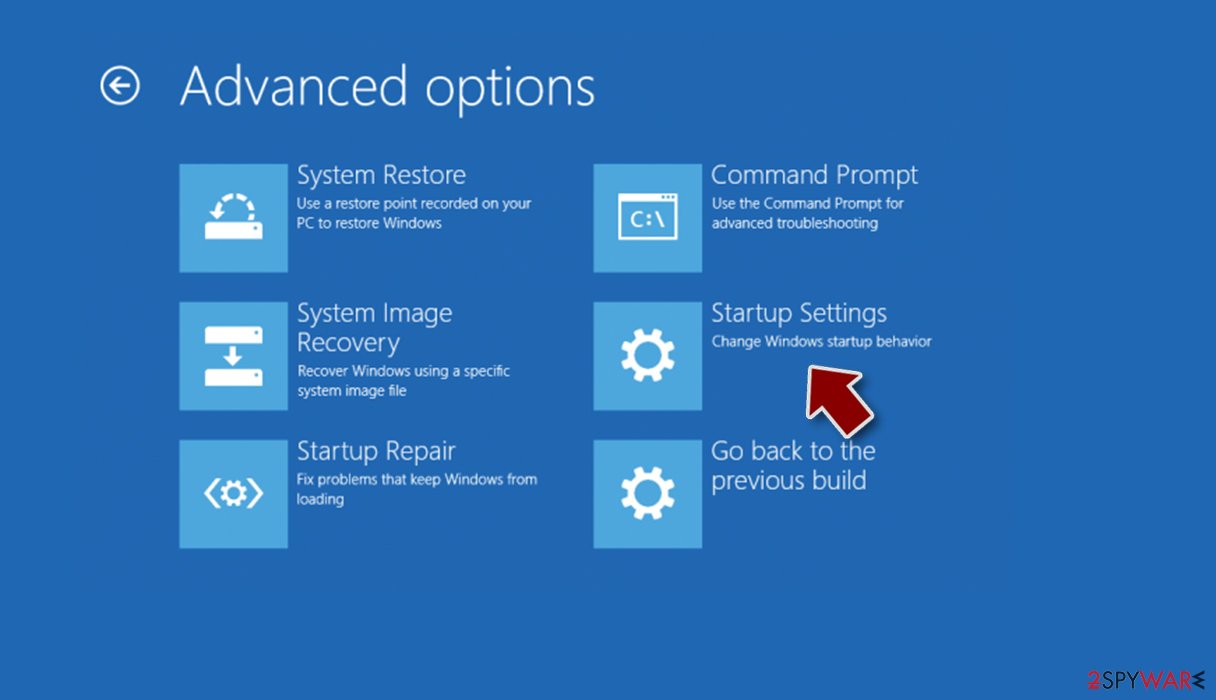
- Click Restart.
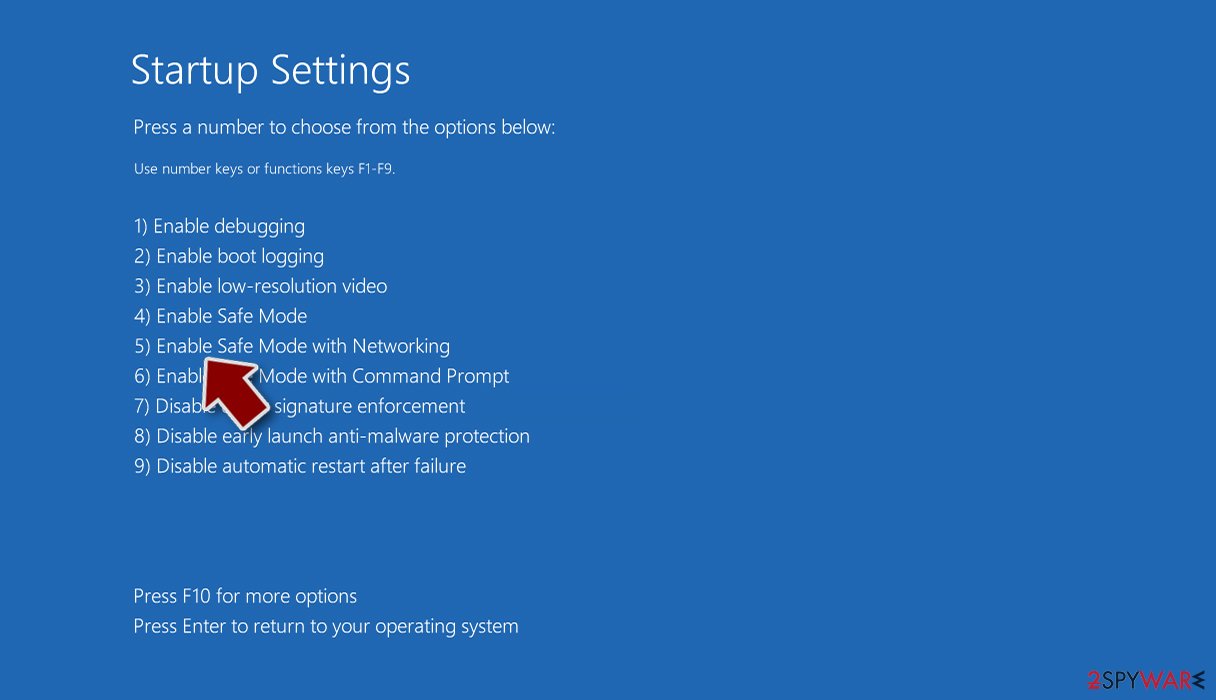
- Press 5 or click 5) Enable Safe Mode with Networking.


Make data backups
There are two situations you might find yourself in – you either have working backups for your files, or you don't. If you do have copies of the working files, you can skip this and the next step. However, most users don't, and it is a problem. While it is too late to reverse anything, you should ensure that you copy all the important files onto a separate medium, such as USB flash; otherwise, files might be permanently corrupted during the recovery attempts. Locked data does not carry any malicious code within it, so it is safe to transfer.
If you wish to learn how to back up your files correctly on widely accessible platforms, you should check the instructions at the bottom of this post. Data backups are crucial for repelling any ransomware attack in the future, as it removes the need to hope that there's a working decryptor available or that the files can no longer be recovered at all.
File recovery options
Unfortunately, ransomware victims rarely know what this infection actually is and have plenty of misunderstandings about how it works. Some people believe that they can restore their files by simply scanning with anti-malware software, while others think that their files have been simply corrupted. None of these statements are actually true in this case.
Data encryption is a secure way of using complex passwords that are unique for each individual. The generated key is sent to the attackers as soon as ransomware is finished with the data-locking process. Thus, victims can't share the same decryptor and retrieve data for free. This is precisely why ransomware is so devastating.
Security software is designed to remove all the malicious files and modules from the system and ensure that the infection is no longer active on the device. It is simply not designed for the file decryption process, although there are other automatic solutions that could be useful in this case.
1. Try recovery software
Data recovery software might be able to help you in some situations (it highly depends on the encryption algorithm used, whether ransomware managed to complete the programmed tasks, etc.). Since there are thousands of different ransomware strains, it is immediately impossible to tell whether third-party software will work for you.
Therefore, we suggest trying regardless of which ransomware attacked your computer. Before you begin, several pointers are important while dealing with this situation:
- Since the encrypted data on your computer might permanently be damaged by security or data recovery software, you should first make backups of it – use a USB flash drive or another storage.
- Only attempt to recover your files using this method after you perform a scan with anti-malware software.
Install data recovery software
- Download Data Recovery Pro.
- Double-click the installer to launch it.

- Follow on-screen instructions to install the software.

- As soon as you press Finish, you can use the app.
- Select Everything or pick individual folders where you want the files to be recovered from.

- Press Next.
- At the bottom, enable Deep scan and pick which Disks you want to be scanned.

- Press Scan and wait till it is complete.
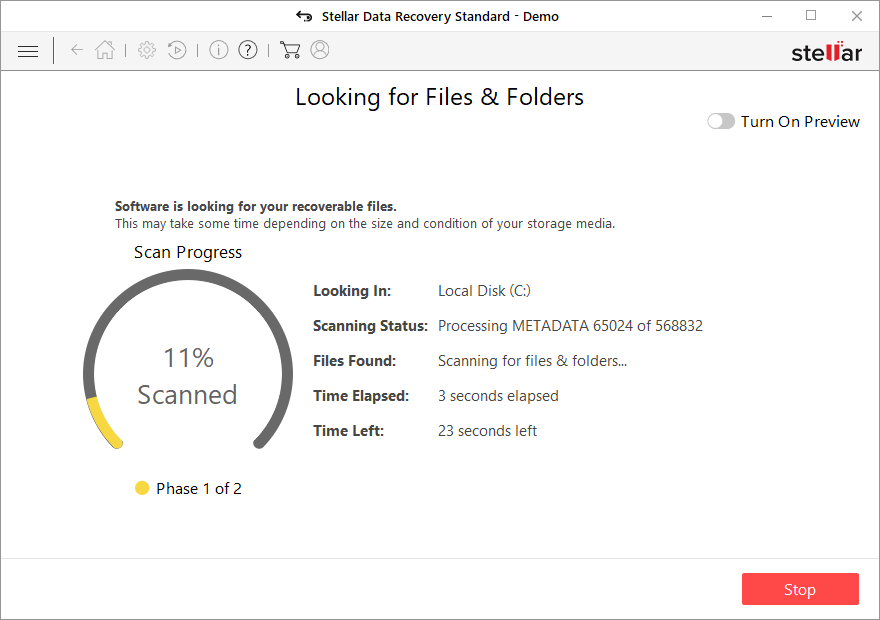
- You can now pick which folders/files to recover – don't forget you also have the option to search by the file name!
- Press Recover to retrieve your files.



2. Search for a free decryptor
A decryption tool for CryptoJoker exists, although its effects on the newest versions of malware are not fully clear yet. In order words, the decryption might or might not be successful when used on the encrypted files. You can download the decryptor [direct download link] and try running it on your machine.
Likewise, there are plenty of websites that could be useful when looking for a decryption tool. Security researchers from various IT companies are working hard to battle ransomware and sometimes manage to create working decryption tools, letting victims recover files for free. Thus, use the following places to check for new tools that could be available in the future:
- No More Ransom Project
- Free Ransomware Decryptors by Kaspersky
- Free Ransomware Decryption Tools from Emsisoft
- Avast decryptors

3. Pay cybercriminals [not recommended]
This option is very controversial and is discouraged by security researchers and agencies. We also advise you to avoid this option unless absolutely necessary. Keep in mind that crooks might ask for further payments, send you a fake or broken decryptor, or never contact you after you transfer money. Remember, they are not your friends – even if they might try acting friendly – and you can never trust them.
Remediate Windows
Malware can cause tremendous damage to Windows systems to the point where a full reinstallation could be required. For example, an infection can alter the Windows registry[3] database, damage vital bootup, and other sections, delete or corrupt DLL files, etc. Antivirus software can't repair damaged files, and a specialized app should be used instead.
- Download FortectIntego
- Click on the ReimageRepair.exe

- If User Account Control (UAC) shows up, select Yes
- Press Install and wait till the program finishes the installation process

- The analysis of your machine will begin immediately

- Once complete, check the results – they will be listed in the Summary
- You can now click on each of the issues and fix them manually
- If you see many problems that you find difficult to fix, we recommend you purchase the license and fix them automatically.



Did this guide help?
Be the first to comment