

Luez ransomware is a cryptovirus that attacks machines with the purpose of getting money directly from victims

Luez virus is used to create havoc on the machine, so users are eager to pay when criminals claim about the issues with the machine and data on the computer. Encryption algorithms allow the attacker to change the original coding of the document, image, audio, or video files and cause issues this way. Once files get marked using the .luez appendix, the victim is presented with a ransom note that indicates the next steps. The demand for $490 is the starting sum, but it gets doubled after 72 hours, so people should be tricked into paying as soon as possible.[1] This is the goal of criminals who released the initial Djvu ransomware a few years ago, which this particular virus is deriving from.
There are many issues that should concern people without file encryption because Luez ransomware is capable of affecting the system and controlling various processes. It aims to get money from victims, so there are no reasons to trust people behind this threat since they only care for the cash and will not release your files unless you pay up. Sometimes even when the payment is transferred the decryption tool is not sent out.
This infection changes files can make them unreadable unless decryption is possible or the ransom is paid. However, we recommend avoiding these types of threats and keeping away from interacting with criminals if possible. It is because once you start communicating with the people behind the infection you might get malicious files instead of the promised decryption app.
When the _readme.txt file is delivered to your screen and placed on the desktop, in other folders you can be sure that the Luez files virus has already affected other parts of the system too. The infection affects preferences and settings like security options or functions which control access for users with different privileges levels – even if they were running at a low privilege level before this happened.
| Name | Luez virus |
|---|---|
| Type | Ransomware, file-locker |
| Extension | .luez |
| Family | Stop/Djvu ransomware |
| Distribution | Files attached to emails or delivered via links, pirating services |
| Contact info | manager@mailtemp.ch and helprestoremanager@airmail.cc |
| Ransom note | _readme.txt |
| Ransom amount | $980/$490 |
| Removal | The best option for any threat like this – antivirus applications |
| Repair | Machine is affected more than you think when the infection is present, so run FortectIntego to fix any issues |
Step 1. Remove the threat
The best way to fight intruders like these would probably involve using anti-malware tools but make sure to double-check even if you rely on trustworthy tools. Apps like SpyHunterCombo Cleaner or MalwarebytesMalwarebytes can help you find and remove the threat since these apps detect[2] pieces of malicious files and related to other malware programs.
You also need scans done periodically since no one knows when something might come up again. Keep the program designed to act as a system security application on the computer, so it is possible to avoid other infections in the future. The removal in this case of ransomware is crucial because the system can run malicious processes and cause issues while the virus is active.
Experts[3] recommend cleaning the machine before any attempts to restore affected data. The Luezvirus is a version of the STOP/DJVU family of ransomware-type infection. This malicious coder will lock up all your files with an impossible to crack encryption method that can be tracked by its extension .luez.

Step 2. Options for different Djvu variants
It uses strong algorithms making it near impossible to calculate any sort of key. It also relies on an online key formation method that makes the threat more persistent and less likely decryptable. Luez ransomware relies on the C&C server and makes the connection every time the encryption process is initiated, so unique IDs get newly created on every device.
Other versions like the previously discovered Iisa virus or Futm virus also use this method of encryption and a more advanced algorithm. The offline key formation could allow the decryption to happen more often and recover files for many victims with one universal decryption key. This is no longer possible, unfortunately, but you can try to check this option still.
If your computer got infected with one of the Djvu variants, you should try using Emsisoft decryptor for Djvu/STOP. It is important to mention that this tool will not work for everyone – it only works if data was locked with an offline ID due to malware failing to communicate with its remote servers.
Even if your case meets this condition, somebody from the victims has to pay criminals, retrieve an offline key, and then share it with security researchers at Emsisoft. As a result, you might not be able to restore the encrypted files immediately. Thus, if the decryptor says your data was locked with an offline ID but cannot be recovered currently, you should try later. You also need to upload a set of files – one encrypted and a healthy one to the company's servers before you proceed.
- Download the app from the official Emsisoft website.
- After pressing Download button, a small pop-up at the bottom, titled decrypt_STOPDjvu.exe should show up – click it.

- If User Account Control (UAC) message shows up, press Yes.
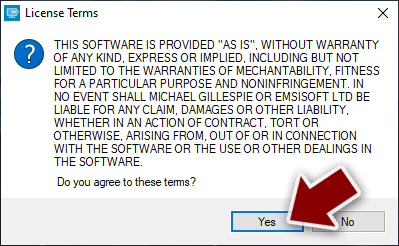
- Agree to License Terms by pressing Yes.
- After Disclaimer shows up, press OK.
- The tool should automatically populate the affected folders, although you can also do it by pressing Add folder at the bottom.

- Press Decrypt.



Step 3. System recovery
It should be clear that removing the Luez virus from your machine is not the same as file decryption or restore because the threat is terminated, deleted, no longer active, but the consequences of the infection remain there. Cryptocurrency extortion viruses can be considered a highly dangerous cyber threat.
It can affect many procedures on machines and cause persistent infections, inject other files, apps, gather data, damage the machine permanently. The difficulty in removing these types of malware makes them profitable for hackers who want to make money off people’s ignorance about cybersecurity practices. Luez virus achieves the goals of developers by extorting victims' cryptocurrency payments but there are additional issues related to the infection.

Once a computer is infected with malware, its system is changed to operate differently. For example, an infection can alter the Windows registry database, damage vital bootup, and other sections, delete or corrupt DLL files, etc. Once a system file is damaged by malware, antivirus software is not capable of doing anything about it, leaving it just the way it is. Consequently, users might experience performance, stability, and usability issues, to the point where a full Windows reinstallation is required.
Therefore, we highly recommend using a one-of-a-kind, patented technology of FortectIntego repair. Not only can it fix virus damage after the infection, but it is also capable of removing malware that has already broken into the system thanks to several engines used by the program. Besides, the application is also capable of fixing various Windows-related issues that are not caused by malware infections, for example, Blue Screen errors, freezes, registry errors, damaged DLLs, etc.
- Download the application by clicking on the link above.
- Click on the ReimageRepair.exe.
- If User Account Control (UAC) shows up, select Yes
- Press Install and wait till the program finishes the installation process.
- The analysis of your machine will begin immediately.

- Once complete, check the results – they will be listed in the Summary
- You can now click on each of the issues and fix them manually
- If you see many problems that you find difficult to fix, we recommend you purchase the license and fix them automatically.



Further actions after the termination
The best way to clean your machine is by using tools capable of finding the Luez ransomware virus. Once you find the threat files and associated programs, you can stop the malicious activities properly. These tools like SpyHunterCombo Cleaner or MalwarebytesMalwarebytes can help in getting rid of any infection on it quickly and efficiently so that everything runs smoothly again.
With the help of anti-malware tools, you can get rid of any virus-related files and programs that are running on your machine. It's important not only for safety but also because it is unnecessary to add new pieces before making sure ransomware has been terminated.
It is always unfortunate when you lose data due to ransomware. However, recovering your Luez virus encrypted files will not be an easy task for most people. This is the reason why the process requires hiring professional tools. You may also want to rely on the proper program that can help with system damage like the mentioned FortectIntego. When it comes to data recovery, people without reliable backups might try the tips and tools listed below.
Did this guide help?
Be the first to comment