

Loov ransomware is the product of scammers and criminals who try to get your money

Loov virus is the cryptovirus that finds files on the machine and locks them with the help of encryption. Army-grade algorithms help to change the original code of the picture, image, document, audio, or video file. This is how the ransomware manages to affect the system and then demands money from victims directly.
The infection can happen silently, and the only symptom is this file marker .loov that appears at the end of the original file name. However, this appendix is added to files once encryption is done already. It means that the infection cannot be stopped or noticed before these changes.[1]
Fortunately, it is possible to recover your files after the encryption, but difficult. The process of recovering encrypted data often involves using an algorithm that was created by the criminals. Decryption is difficult and cannot happen without a particular tool. The official program is not developed yet, and a previously useful tool for the Djvu ransomware family, that this piece is deriving from, cannot help.
This virus will encrypt your files with a particular extension, making it impossible to calculate the key in any way. This makes recovery by oneself very difficult, and the best way to fight the malware is to remove it from the machine before you use your backups to restore affected data.
| Name | Loov file virus |
|---|---|
| Type | Ransomware, file-locker, encryption virus |
| Family | Djvu ransomware |
| Marker | .loov appears at the end of the filename and indicates which piece is locked |
| Distribution | File with the payload of this threat can be sent via emails as attachments or included in pirating packages |
| Ransom note | _readme.txt |
| Ransom amount | The first 72 hours are the tome for 50% discount to $490. After that, the sum is $980 |
| Contact information | manager@mailtemp.ch, helprestoremanager@airmail.cc |
| Elimination | The worst thing is to allow the infection to affect the machine further, so make sure to remove the virus with anti-malware tools capable of detecting[2] the malicious files |
| Repair | Make sure to rely on FortectIntego for the system data repair |
The Loov ransomware virus is currently taking over computer systems and demanding payment from users in order for them to be able to access their files again. Unfortunately, this ransom paying is not worth the hassle because criminals could just make up any key or tool they want.
While criminals are only after your money instead of giving you back control over these important assets, you need to ignore any of these messages. Files were compromised as a result of malware infection on personal devices. Loov file virus is dangerous and capable of much more than only file-locking.
Eliminating the threat and helping the system
In a world where we are all connected and constantly browsing the web, it is important to understand how ransomware works. Loov ransomware targets files on your machine, and it is system-wide. The virus changes various settings and relies on encryption for creating fear among users.
The detection from antivirus programs or other security measures can help to fight the infection. You must use a powerful program and run the full system check to find the malicious programs and remove them before the machine is damaged. You can remove the infection fully and delete any other applications indicated as possibly malicious. Try to run SpyHunterCombo Cleaner or MalwarebytesMalwarebytes, and make sure to double-check before you do anything else on the computer.
This Loov file virus appends a unique appendix onto filenames during its locking cycle after encrypting each file, so you can recognize infected content. It is not affecting system files by encrypting them, but settings can be changed and damaged. Once a computer is infected with malware, its system is changed to operate differently.

For example, an infection can alter the Windows registry database, damage vital bootup, and other sections, delete or corrupt DLL files, etc. Once a system file is damaged by malware, antivirus software is not capable of doing anything about it, leaving it just the way it is. Consequently, users might experience performance, stability, and usability issues, to the point where a full Windows reinstallation is required.
Therefore, we highly recommend using a one-of-a-kind, patented technology of FortectIntego repair. Not only can it fix virus damage after the infection, but it is also capable of removing malware that has already broken into the system thanks to several engines used by the program. Besides, the application is also capable of fixing various Windows-related issues that are not caused by malware infections, for example, Blue Screen errors, freezes, registry errors, damaged DLLs, etc.
- Download the application by clicking on the link above
- Click on the ReimageRepair.exe
- If User Account Control (UAC) shows up, select Yes
- Press Install and wait till the program finishes the installation process
- The analysis of your machine will begin immediately

- Once complete, check the results – they will be listed in the Summary
- You can now click on each of the issues and fix them manually
- If you see many problems that you find difficult to fix, we recommend you purchase the license and fix them automatically.



More about the infection and possible options
The Loov ransomware is a kind of threat that encrypted your documents and then forces you to pay in order for them not to be lost. Note the similarities with other representatives from the DJVU family, this virus also encrypts all popular file types including pictures.
The extortionists demand a ransom of $490 in exchange for the decryption tool or key, but it is only a trick. The ransom note _readme.txt lists options and contains contact and payment information for the user, as well instructions on how to purchase a decryption tool at $490 instead of 980 dollars.
This Loov file virus discount should help victims be more eager in paying but shouldn't consider an option since it's not worth their time or money! The author stresses they will release personal details if no one contacts them within three days after releasing this note. These are scare tactics.
The note reads:
ATTENTION!
Don't worry, you can return all your files!
All your files like pictures, databases, documents and other important are encrypted with strongest encryption and unique key.
The only method of recovering files is to purchase decrypt tool and unique key for you.
This software will decrypt all your encrypted files.
What guarantees you have?
You can send one of your encrypted file from your PC and we decrypt it for free.
But we can decrypt only 1 file for free. File must not contain valuable information.
You can get and look video overview decrypt tool:
hxxps://we.tl/t-ZYodHvPkHI
Price of private key and decrypt software is $980.
Discount 50% available if you contact us first 72 hours, that's price for you is $490.
Please note that you'll never restore your data without payment.
Check your e-mail “Spam” or “Junk” folder if you don't get answer more than 6 hours.To get this software you need write on our e-mail:
manager@mailtemp.chReserve e-mail address to contact us:
helprestoremanager@airmail.cc
If your computer got infected with one of the Djvu variants, you should try using Emsisoft decryptor for Djvu/STOP. It is important to mention that this tool will not work for everyone – it only works if data was locked with an offline ID due to malware failing to communicate with its remote servers.
Even if your case meets this condition, somebody from the victims has to pay criminals, retrieve an offline key, and then share it with security researchers at Emsisoft. As a result, you might not be able to restore the encrypted files immediately. Thus, if the decryptor says your data was locked with an offline ID but cannot be recovered currently, you should try later. You also need to upload a set of files – one encrypted and a healthy one to the company's servers before you proceed.
- Download the app from the official Emsisoft website.
- After pressing Download button, a small pop-up at the bottom, titled decrypt_STOPDjvu.exe should show up – click it.
- If User Account Control (UAC) message shows up, press Yes.
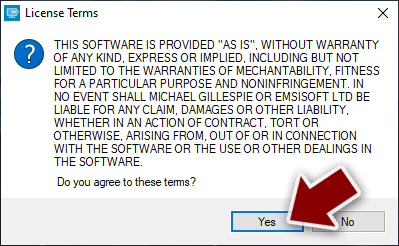
- Agree to License Terms by pressing Yes.
- After Disclaimer shows up, press OK.
- The tool should automatically populate the affected folders, although you can also do it by pressing Add folder at the bottom.

- Press Decrypt.


From here, there are three available outcomes:
- “Decrypted!” will be shown under files that were decrypted successfully – they are now usable again.
- “Error: Unable to decrypt file with ID:” means that the keys for this version of the virus have not yet been retrieved, so you should try later.
- “This ID appears to be an online ID, decryption is impossible” – you are unable to decrypt files with this tool.
Options for recovery are limited
There are many ways to recover encrypted files, and we will explore them all. First off you must read through the entire instructions manual carefully before starting so that no steps are left out, or ignored-it could save your files! Make sure not just understand what is happening but also remember every detail as it may be crucial later on down this difficult road of recovery.
If at any point during the infection and encryption Loov ransomware cannot establish a connection with its C&C server the decryption can be easier because of the offline ID forming method. This is fortunate for the victims. The connection failure determines a lot – which would happen due to either an internet outage/traffic issue. Online IDs mean that every device gets a unique ID that is needed for the decryption.

Malware like this typically would not allow you to restore access without interference from cybercriminals, but there are some precautions that users can take. First off- don't pay them! They might never give up the decryption tool even if offered at their price or just wait until it is too late for you and then demand payment in order to recover your data later on.
Your antivirus program is there to protect you from malware and other vulnerabilities. It is important that they have the latest updates, so make sure you are covered, and all potential threats can be avoided before infecting your system with a virus! Try using SpyHunterCombo Cleaner or MalwarebytesMalwarebytes again to double-check before any other recovery steps.
The cryptovirus is no joke. It can be difficult to remove, and even if you do get rid of it Loov ransomware with anti-malware tools, the virus avoidance will always remain important because trojans are still potential gateways for this kind of malware in general – which means that hackers could use them as vectors too! Repair checks are important, so FortectIntego is the tool you should trust and use more often. This is what experts[3] recommend.
Did this guide help?
Be the first to comment