

Ckae ransomware is an infection that is based on money extortion

These threats that focus on file-locking have a lot more symptoms and issues than it seems. The infiltration is silent and quick, so you can suffer Ckae file virus infiltration and not notice any changes until the machine is affected significantly. Ransomware infection is a serious issue that can be spread around worldwide because threat actors trigger the distribution by releasing various files with the malware payload.
The infection starts with infiltration, and people can trigger this unknowingly until it locks all your commonly used files. Then creators demand money from victims after claiming they'll recover deleted files if paid enough, even though there have been cases where this doesn't work at all either way. Criminals are scammers that only care about their own gains.
Cryptocurrency extortion has been around for quite some time now, and it's used by malware to not only lock down computers but also get money from their victims with lies. Ckae file virus creates an encrypted file that typically has a unique extension .ckae which can only be unlocked with cryptocurrency payment exchanged for the decryption tool.
| Name | Ckae file virus |
|---|---|
| Type | Ransomware, file-locker, cryptovirus |
| File marker | .ckae |
| Family | Djvu ransomware |
| Distribution | Files get pre-packed with pirated software, distributed via spam email attachments |
| Ransom note | _readme.txt |
| Ransom amount | $490/$980 |
| Contact details | support@sysmail.ch, helprestoremanager@airmail.cc |
| Removal | Anti-malware tools are needed for the proper system cleaning because detection rates determine the fact that AV programs are the ones that can find and eliminate the infection fully |
| System fix | A program like FortectIntego can find altered or damaged files for you and help with performance improvements |
Creators of the threat list these solutions in the ransom note _readme.txt. Some people might not even notice any other symptoms besides seeing a weird message on their screen every now again. Try to ignore them, and if you experience speed or performance issues, always run the proper anti-malware check to remove the infection as soon as possible.
This is a serious threat that can create many other issues on the machine. This is why experts[1] always note how important it is to react quickly and easily with decryption options unavailable, so we provide alternatives here for your consideration, but remember-removing infections will always be most critical in any response plan!
Dealing with the ransomware infections
The Ckae virus is a particularly diabolical type of malware that will encrypt all your files and give you an intimidating message demanding money in return for decryption. With the note, the creator tries to convince victims only criminals have access, which could be used as justification for extorting funds from them.
File-locking processes are just one way that criminals can wreak havoc on your system. If you're unfortunate enough to get hit by this ransomware attack, then not only are all those valuable pictures locked away from editing, but even accessing them could trigger an array of failures, including deletion or secondary encryption.
It is crucial to remove the Ckae ransomware virus before anything else. The direct message from criminals should be ignored and threats fully removed from the machine if you want to restore any of the processes and possibly files. When you think about the fact that the file virus can damage your files and make them less valuable, it's no surprise why people would pay ransom for their stolen data. However, stay away from contact with these criminals by avoiding any interactions or unnecessary expenses.

1. Remove the virus properly
According to the criminals, you have until three days to pay the smaller ransom. You are promised to get files recovered after the payment, but they are dangerous. It is better to remove this threat, or else data might be lost forever and damage permanently. This infection will also execute file corruption as well- not just during the encryption process but with additional programs running in the background.
Removal of the Ckae file virus is a delicate process and should only be done when you are sure that you have file backups and a proper tool for the virus termination purpose. Make sure that your antivirus program has been updated and can possibly find recent threats before proceeding. You can rely on tools like SpyHunterCombo Cleaner or MalwarebytesMalwarebytes that have been confirmed to remove threats like this. You can base the selection of the AV tool on the detection rate[2] of this particular threat variant.
Fully scanning using anti-malware tools will indicate whether there are any possible malicious programs installed onto your system. Ckae ransomware virus can be quite destructive and should not go unchecked, but there's no need to pay anything since the family of threats that this particular one is deriving from has been known as dangerous for a few years now.
Once a computer is infected with malware, its system is changed to operate differently. For example, an infection can alter the Windows registry database, damage vital bootup, and other sections, delete or corrupt DLL files, etc. Once a system file is damaged by malware, antivirus software is not capable of doing anything about it, leaving it just the way it is. Consequently, users might experience performance, stability, and usability issues, to the point where a full Windows reinstallation is required.
Therefore, we highly recommend using a one-of-a-kind, patented technology of FortectIntego repair. Not only can it fix virus damage after the infection, but it is also capable of removing malware that has already broken into the system thanks to several engines used by the program. Besides, the application is also capable of fixing various Windows-related issues that are not caused by malware infections, for example, Blue Screen errors, freezes, registry errors, damaged DLLs, etc.
- Download the application by clicking on the link above
- Click on the ReimageRepair.exe

- If User Account Control (UAC) shows up, select Yes
- Press Install and wait till the program finishes the installation process.
- The analysis of your machine will begin immediately

- Once complete, check the results – they will be listed in the Summary
- You can now click on each of the issues and fix them manually
- If you see many problems that you find difficult to fix, we recommend you purchase the license and fix them automatically.


2. Try decryption options
The Djvu ransomware previously was decryptable because it had been created based on online or offline ID usage. These keys determine if the version you get to encounter is decryptable fully or not at all. There are many types of malware out there that use online ids to identify devices they affect. It is a more advanced technique particularly implemented in 2019. Since then this family releases non-decryptable versions every week or even more often.
The offline key method allowed researchers to help many victims, but those aren't often used by criminals. Online IDs are unique for each separate device affected by the same or different versions. Offline keys do not require connection to the C&C server[3] to help criminals work faster. However, Ckae file virus keys are all the same if such a method is used, so decryption is possible for all victims with one obtained key.
The latest threats like Iips, Ccps, and Qnty rely on online keys that are unique for each particular machine affected by the same virus. The offline id can be indicated with t1 at the end of the ID listed in the ransom note. So if you want to check this opportunity yourself – try using the explained instructions for the Ckae ransomware decryption.
If your computer got infected with one of the Djvu variants, you should try using Emsisoft decryptor for Djvu/STOP. It is important to mention that this tool will not work for everyone – it only works if data was locked with an offline ID due to malware failing to communicate with its remote servers.
Even if your case meets this condition, somebody from the victims has to pay criminals, retrieve an offline key, and then share it with security researchers at Emsisoft. As a result, you might not be able to restore the encrypted files immediately. Thus, if the decryptor says your data was locked with an offline ID but cannot be recovered currently, you should try later. You also need to upload a set of files – one encrypted and a healthy one to the company's servers before you proceed.
- Download the app from the official Emsisoft website.
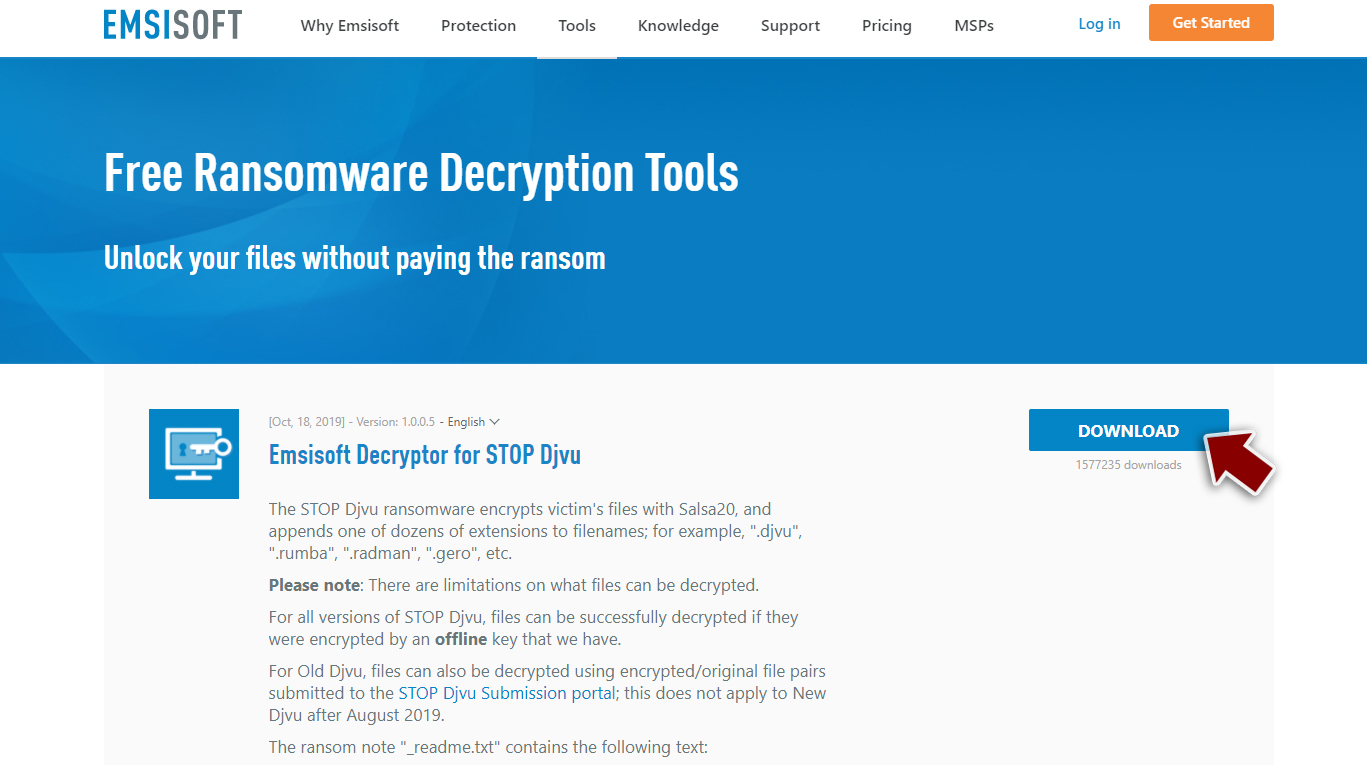
- After pressing Download button, a small pop-up at the bottom, titled decrypt_STOPDjvu.exe should show up – click it.

- If User Account Control (UAC) message shows up, press Yes.
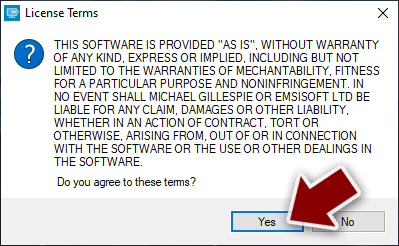
- Agree to License Terms by pressing Yes.
- After Disclaimer shows up, press OK.
- The tool should automatically populate the affected folders, although you can also do it by pressing Add folder at the bottom.

- Press Decrypt.



From here, there are three available outcomes:
- “Decrypted!” will be shown under files that were decrypted successfully – they are now usable again.
- “Error: Unable to decrypt file with ID:” means that the keys for this version of the virus have not yet been retrieved, so you should try later.
- “This ID appears to be an online ID, decryption is impossible” – you are unable to decrypt files with this tool.
Did this guide help?
Be the first to comment