

Session ransomware is a dangerous data-locking virus that asks for Bitcoin payments
Session ransomware is a malicious program designed for money extortion purposes. It was first spotted in the middle of April 2022 – it belongs to a relatively broad family Makop with hundreds of variants under its belt. While cybercriminals behind it mainly target businesses and small companies, regular computer users might also be affected by it in some cases.
Once installed, the malware immediately drops thousands of malicious files on the Windows system to perform its main goal – encrypt all vulnerable files. With the help of a powerful encryption algorithm, all non-system data gets encrypted. All the affected files are appended .[ID].[].session extension and stripped of their regular icons during this process, making data inaccessible.
The ransom note +README-WARNING+.txt, which is dropped on victims' desktops, explains the situation to users and urges them to contact cybercriminals to restore all files back to normal. Of course, the decryption service is not free – crooks demand Bitcoin in return for a decryptor.
| Name | Session ransomware |
|---|---|
| Type | Ransomware, data locking malware, cryptovirus |
| Malware family | Makop |
| File extension | .[ID][].session. Example of an encrypted file: picture.jpg.[62E37A94].session |
| Ransom note | +README-WARNING+.txt |
| Contact | ICQ @Ransomware_Decrypt / Session messenger 0569a7c0949434c9c4464cf2423f66d046e3e08654e4164404b1dc23783096d313 |
| File Recovery | If no backups are available, recovering data is almost impossible. Nonetheless, we suggest you try the alternative methods listed below |
| Malware removal | Perform a full system scan with powerful security software, such as SpyHunterCombo Cleaner, MalwarebytesMalwarebytes |
| System fix | Malware can seriously tamper with Windows systems, causing errors, crashes, lag, and other stability issues after it is terminated. To remediate the OS and avoid its reinstallation, we recommend scanning it with the FortectIntego repair tool |
Ransom note
All cybercriminals whose main goal is to extort money from their victims make sure that their malware would drop a ransom note upon infiltration. It serves as the main communication method and provides identification IDs to each of the victims, as decryption keys are all unique, and crooks would otherwise not be able to distinguish which key belongs to which victim.
Malware delivers a ransom note in a TXT format to make sure that all victims would be able to open it via Notepad or any similar text reader. Hackers' demands are as follows:
Your data is encrypted!
Unfortunately for you, a major IT security weakness left you open to attack, your files have been encrypted
If you want to restore them install ICQ software on your PC here hxxps://icq.com/windows/ or on smartphone from Appstore / Google Play Market search for “ICQ”
Write to our ICQ @Ransomware_Decrypt hxxps://icq.im/Ransomware_Decrypt/
Or download the (Session) messenger (hxxps://getsession.org) in messenger: 0569a7c0949434c9c4464cf2423f66d046e3e08654e4164404b1dc23783096d313 You have to add this Id and we will complete our converstion
Tell us your file IDAttention!
Do not rename encrypted files.
Do not try to decrypt your data using third party software – it may cause permanent data loss.
We are always ready to cooperate and find the best way to solve your problem.
The faster you write – the more favorable conditions will be for you.
Our company values its reputation. We give all guarantees of your files decryption.
IF WE DON'T SEE MESSAGES FROM YOU IN 72 HOURS – WE WILL SELL YOUR DATABASES AND IMPORTANT INFORMATION TO YOUR COMPETITORS AND OTHER HACKERS IN THE DARKNET.
Malware authors use a now established double-extortion technique, where they promise to disclose the company's secrets to competitors or sell them on the dark web. Most businesses use reliable backup systems, so data recovery drastically diminishes the impact of a ransomware attack.
To counter this, a new trend among criminals was established back in 2019, when malicious actors started threatening their victims by disclosing sensitive information to interested parties. This forces some of the victims to pay the ransom; this practice has also made ransomware attacks be treated as data breaches.[1]

However, there is no guarantee that cybercriminals would keep these promises, even if the ransom is paid on time. It is ultimately a decision each of the victims has to make; we do not recommend paying or even communicating with the attackers, as it would only prove that the malware scheme works. Instead, start from Session ransomware removal.
Malware removal explained
To start the remediation process, it is important to proceed with the correct steps, or the whole process might be jeopardized. Disconnecting the affected from the network and only then removing the infection, for example, is really important. Only then should you proceed with data recovery.
Disconnect from the network
Malware can be controlled by hackers if the internet connection is established – it can be sent commands via Command & Control servers, resulting in additional payload delivery or improved functions of already installed ransomware. Therefore, before you proceed with Session ransomware removal, you should disconnect all the affected Windows machines from the network as follows:
- Type in Control Panel in Windows search and press Enter
- Go to Network and Internet
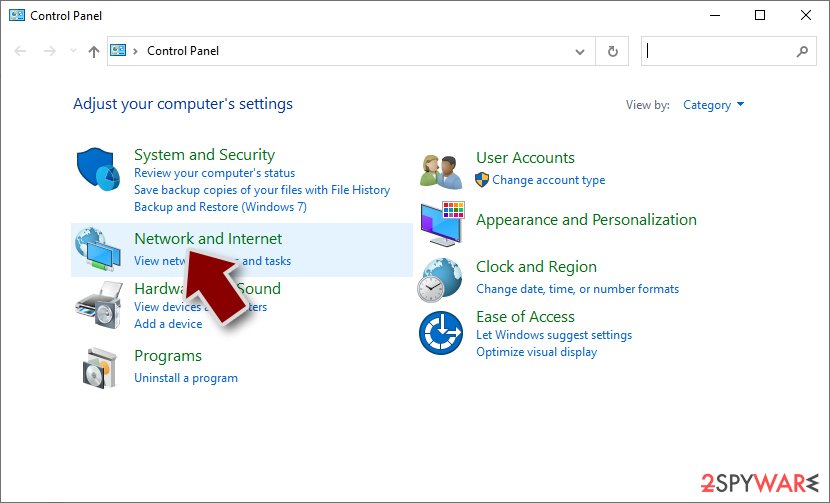
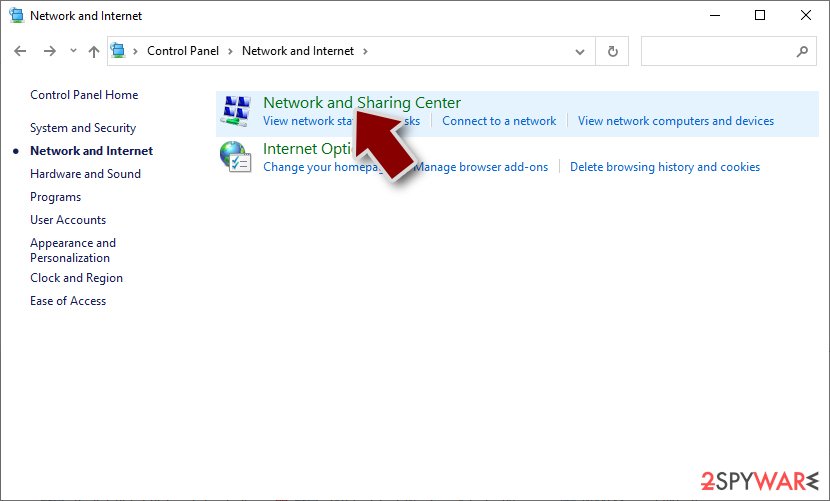
- Click Network and Sharing Center
- On the left, pick Change adapter settings
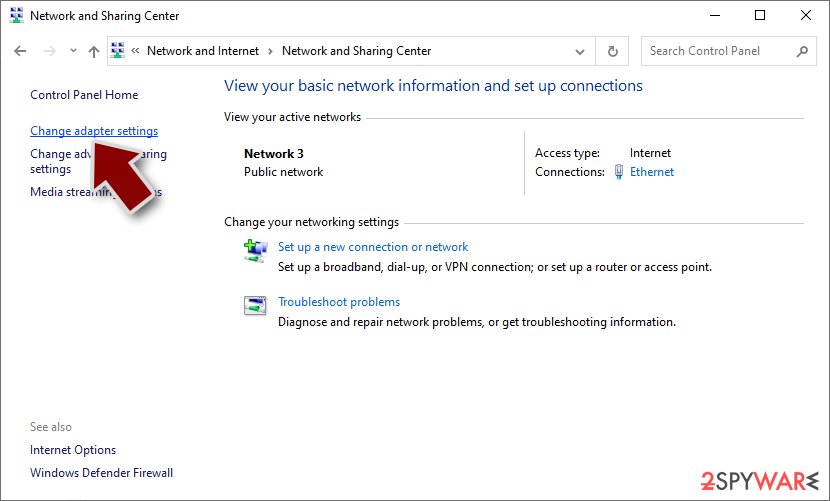
- Right-click on your connection (for example, Ethernet), and select Disable
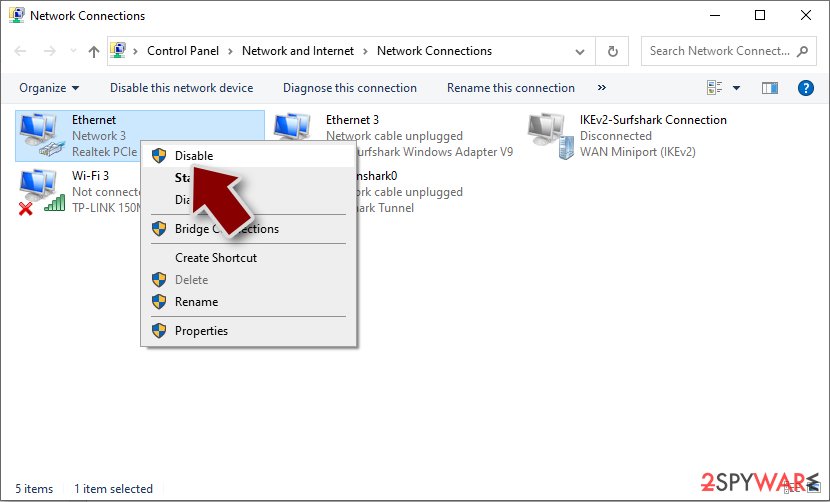
- Confirm with Yes.


Perform a full system scan
Once you are sure that the system is not connected to the network, you should use powerful anti-malware software and perform a full system scan with it. Security software, such as SpyHunterCombo Cleaner or MalwarebytesMalwarebytes, can find and remove all the malicious components from the system at once, along with any secondary payloads that might be present on the system.
File recovery and system fix
Data encryption is a relatively complex process that ensures that victims would not be able to decipher it using simple methods. This is why each of the decryption keys is unique and uses a long string of alphanumeric characters. The longer the string, the more difficult it is to decipher, and once it reaches certain requirements, it becomes impossible to do. With the help of this scheme, crooks can sell decryption keys for large sums of money to victims.
If you choose not to pay the ransom (which we highly recommend), there are a few alternative methods that might help you restore your files. Currently, there is no working decryptor available for the newest Makop variants, which makes the data recovery rather difficult. Nonetheless, you check the suggestions below.
Attempt file recovery
Try using third-party recovery software to attempt restoring at least some of your lost files:
Make sure you make backups of locked files before you proceed, or you might corrupt them beyond repair
- Download Data Recovery Pro.
- Double-click the installer to launch it.

- Follow on-screen instructions to install the software.
- As soon as you press Finish, you can use the app.
- Select Everything or pick individual folders where you want the files to be recovered from.

- Press Next.
- At the bottom, enable Deep scan and pick which Disks you want to be scanned.

- Press Scan and wait till it is complete.
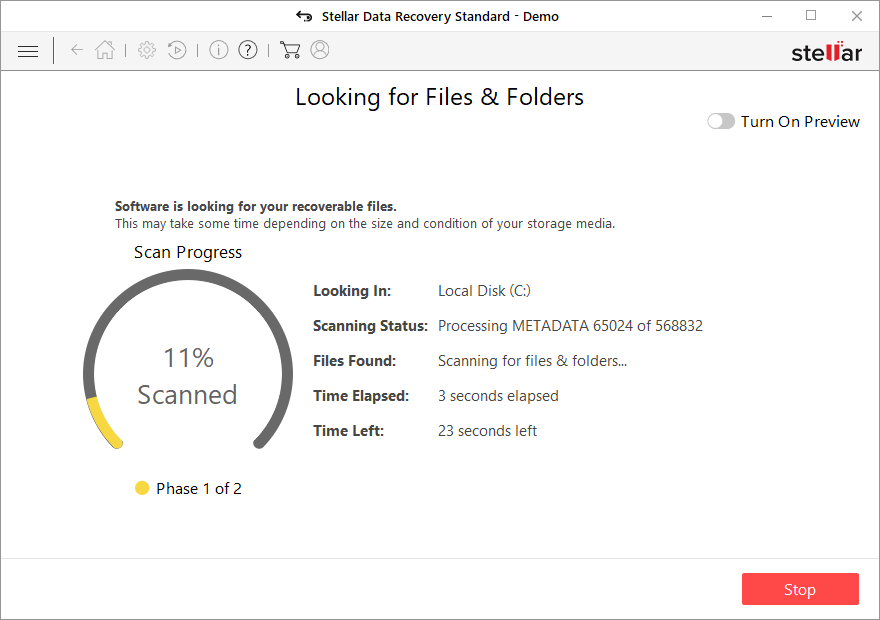
- You can now pick which folders/files to recover – don't forget you also have the option to search by the file name!
- Press Recover to retrieve your files.


Decryption tools might also be created for certain ransomware strains thanks to the efforts of security researchers. In some cases, law authorities seize the servers of malicious actors,[2] which allows the keys to be released by the public – reputable security vendors usually do this. Here are a few links you might find helpful:
- No More Ransom Project
- Free Ransomware Decryptors by Kaspersky
- Free Ransomware Decryption Tools from Emsisoft
- Avast decryptors

Fix damaged system files
Malware can cause tremendous damage to Windows systems to the point where a full reinstallation could be required. For example, an infection can alter the Windows registry[3] database, damage bootup, and other sections, delete or corrupt DLL files, etc. Antivirus software can't repair damaged files, and a specialized app should be used instead.
- Download FortectIntego
- Click on the ReimageRepair.exe

- If User Account Control (UAC) shows up, select Yes
- Press Install and wait till the program finishes the installation process

- The analysis of your machine will begin immediately

- Once complete, check the results – they will be listed in the Summary
- You can now click on each of the issues and fix them manually
- If you see many problems that you find difficult to fix, we recommend you purchase the license and fix them automatically.



Did this guide help?
Be the first to comment