

LockData ransomware is a malicious computer program that asks for payment after locking all personal files on the system
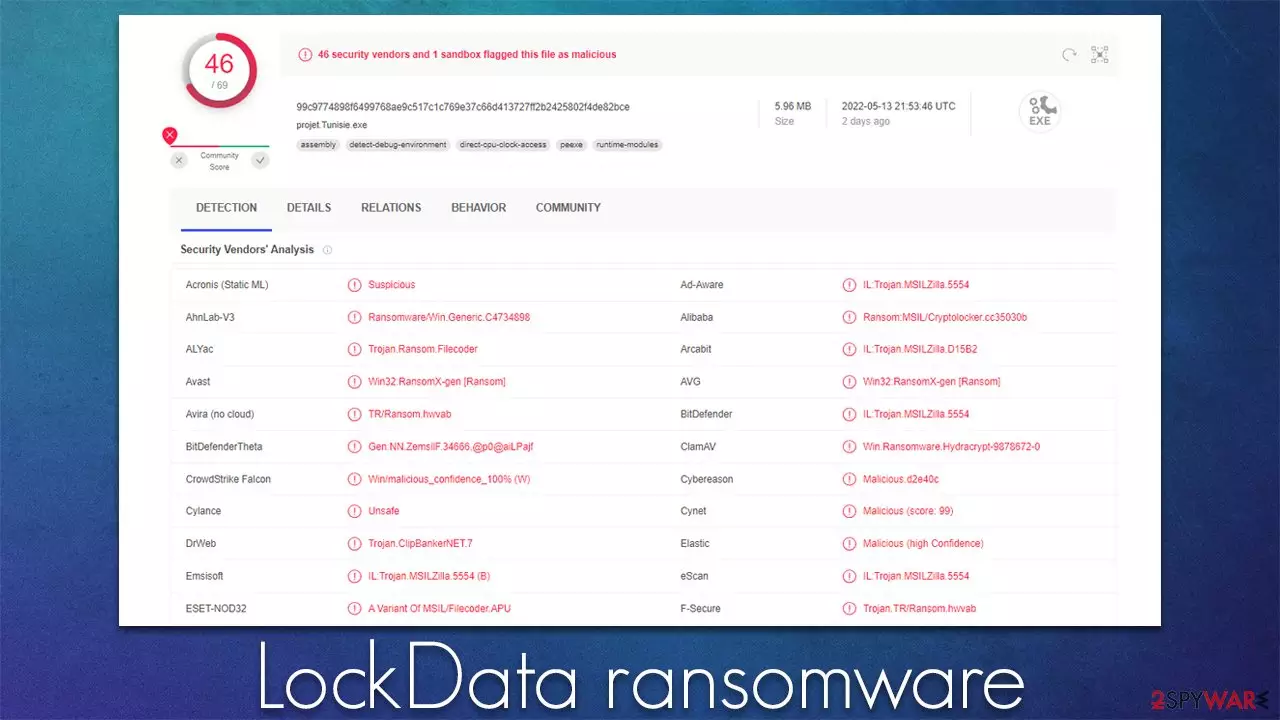
LockData ransomware is a computer virus that attacks Windows operating systems. First spotted in the middle of May 2022, it was found to be a variant of Chaos ransomware – we have covered some of its variants (Odaku or LokiLok) previously. While there are some differences between the versions, the encryption and malware's operation are unsurprisingly similar.
Upon infection, the LockData virus scans the system for files to encrypt: it targets most commonly used files, including pictures, documents, databases, and other valuable data. These files are then appended with a randomly-generated file extension, for example, .ybne, which would convert a “picture.jpg” file into a “picture.jpg.ybne.” Suchlike data immediately becomes unusable due to a strong encryption algorithm used by malware.
Once the data locking process is finished, the LockData ransomware would drop a note for communications purposes – read_it.txt. In it, the attackers explain that victims have to transfer 5 BTC into the Bitcoin wallet bc1q7g29t9pyf87z20w4ym8zmkh50dl37ma9pjyhg. We do not recommend paying, as there is no guarantee that crooks would keep their word. The attackers also threaten to release stolen information on the Dark Web.[1]
| Name | LockData virus |
|---|---|
| Type | Ransomware, file-locking malware |
| File extension | A combination of random four characters is appended to each of the files, for example, a picture.jpg is turned into picture.jpg.ybne |
| Contact | @odaku in Telegram |
| Ransom note | read_it.txt |
| File Recovery | The only secure way to restore files is by using data backups. If such is not available or were encrypted as well, options for recovery are very limited – we provide all possible solutions below |
| Malware removal | Disconnect the computer from the network and internet and then perform a full system scan with SpyHunterCombo Cleaner security software |
| System fix | Once installed on the system, malware might seriously damage some system files, resulting in crashes, errors, and other stability issues. You can employ FortectIntego PC repair to fix any of such damage automatically by replacing system corruption |
High ransom demands
A ransom note essentially serves as a message from the attackers to the affected users. Some people have not even heard of ransomware before, and cybercriminals' goal is to make users aware of what has happened to their files and how they could restore them. Evidently, they want to make sure that all users know how and where to transfer the requested funds, as they do in the read_it.txt file:
—-> LockData is multi language ransomware. Translate your note to any language <—-
All of your files have been encrypted
Your computer was infected with a ransomware virus. Your files have been encrypted and you won't
be able to decrypt them without our help.What can I do to get my files back?
Only if you pay the rasnom. Payment can be made in Bitcoin only.
How do I pay, where do I get Bitcoin?
Purchasing Bitcoin varies from country to country, you are best advised to do a quick google search
yourself to find out how to buy Bitcoin.
Many of our customers have reported these sites to be fast and reliable:
Coinmama – https://www.coinmama.com Bitpanda – https://www.bitpanda.com – https://www.coinbase.com/Payment informationAmount: 5 BTC
Bitcoin Address: bc1q7g29t9pyf87z20w4ym8zmkh50dl37ma9pjyhg
The ransom size is particularly large, although this can greatly vary from person to person. Likewise, ransom demands tend to increase quite a bit when the target is a company rather than a home user.

Regardless of how large or small, the ransom is, paying it is always risky. While there are some “fair” criminals who do keep their promises, there is simply never a guarantee. Thus, those who pay may risk losing not only files but also money. While it is true that recovering files without the decryption key is almost impossible, we will provide a few methods that might work for some users.
Removal explained
It is important to perform remediation actions in the correct order, or you might risk losing your files forever. As we already explained, trusting cybercriminals is not advisable, as it might cause even more losses. Your first task is to ensure that the connection between malware and attackers is no longer active.
Step 1. Disconnect from the network
Ransomware often establishes a connection with a remote server, known as Command & Control.[2] With the help of these connections, the attackers can send various commands to be executed remotely. Thus, before you do anything else, make sure you disconnect your PC from the internet and network.
- Type in Control Panel in Windows search and press Enter
- Go to Network and Internet
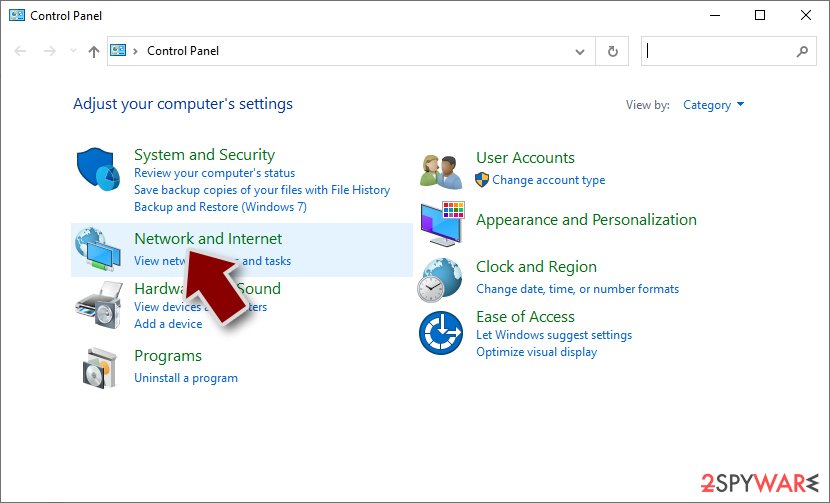
- Click Network and Sharing Center
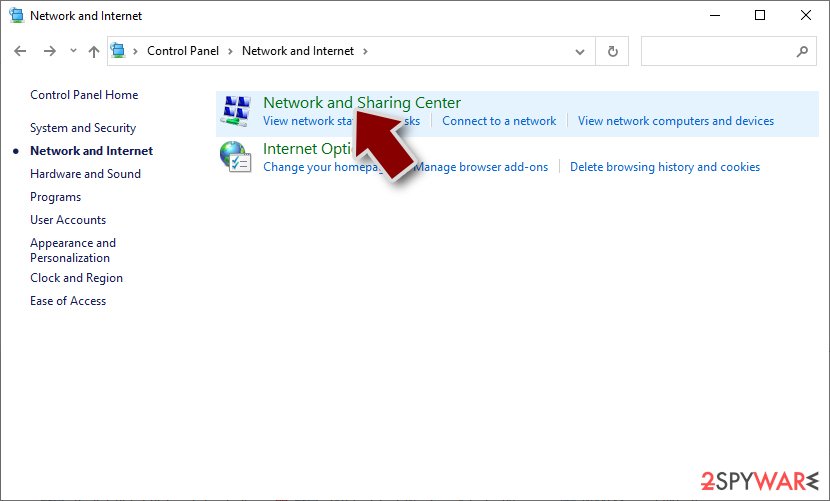
- On the left, pick Change adapter settings
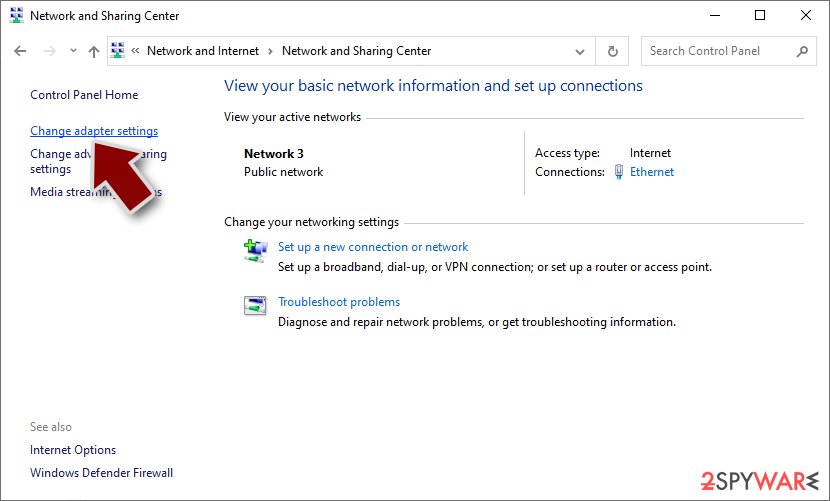
- Right-click on your connection (for example, Ethernet), and select Disable
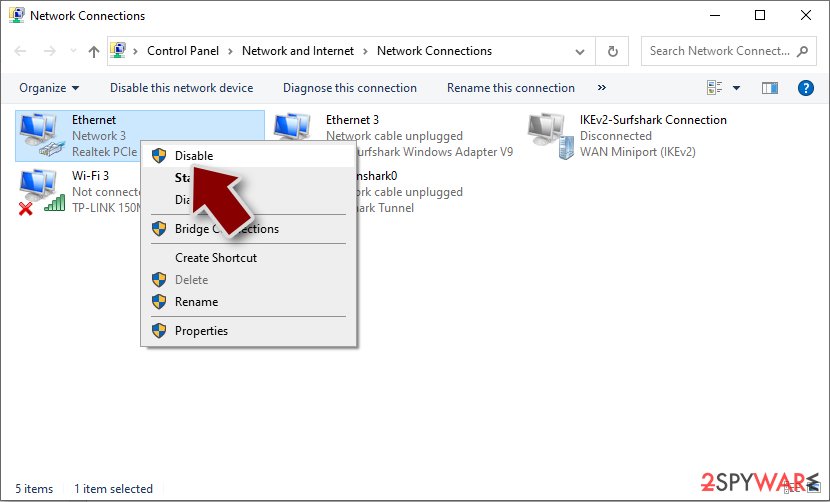
- Confirm with Yes.


Step 2. Scan with anti-malware
As soon as all network connections are terminated, ransomware authors can no longer send commands, which is a perfect opportunity to begin the LockData virus removal process. There is only one way this can be done – by employing anti-malware software, as manual elimination isn't always even possible (and should be left to professionals).
Security software can quickly and easily find and remove malicious files at once, ultimately deleting any secondary payloads that could be located on the system, as ransomware is known to be spread along with other malware.
Step 3. Attempt to restore your files without paying
Once ransomware gains access to the machine, it encrypts all personal files with a sophisticated encryption algorithm. The key to unlocking it uses a long alphanumeric string which is randomized to each of the individual users. This means that the same key can't be applied to two different machines. It is similar to a password, although it is always unique, which is what makes LockData ransomware so devastating.
If you had backups available, it would already negate most of the damaging traits of malware, i.e., you would be able to restore all files without any issues. However, if you do not have backups, the chances of restoring files without paying are rather slim. Nevertheless, we recommend trying anyways.
Before proceeding, it is important to make backups of encrypted files, as the recovery process might corrupt them.
- Download Data Recovery Pro.
- Double-click the installer to launch it.

- Follow on-screen instructions to install the software.

- As soon as you press Finish, you can use the app.
- Select Everything or pick individual folders where you want the files to be recovered from.
- Press Next.
- At the bottom, enable Deep scan and pick which Disks you want to be scanned.

- Press Scan and wait till it is complete.
- You can now pick which folders/files to recover – don't forget you also have the option to search by the file name!
- Press Recover to retrieve your files.



Security experts are known to work on decryption tools for major ransomware strains. In some cases, flaws within the encryption process can be found or criminals' servers seized by the lay authority agencies. In any case, you could look for decryptors on the following pages, although keep in mind it might take a while until there's a working one made.
- No More Ransom Project
- Free Ransomware Decryptors by Kaspersky
- Free Ransomware Decryption Tools from Emsisoft
- Avast decryptors

Prevention tips and system fix
After malware infection, Windows is no longer the same, as some system files might get damaged or even destroyed. This can result in system instability – crashes, failure to launch programs, BSODs, and many other issues. If you are suffering from these problems after eliminating the infection, use data recovery software such as FortectIntego.
The best way to battle ransomware is to make sure you don't get infected with it in the first place. Likewise, even in an unfortunate event, there are many things you can do to reduce the negative impact it can cause. Here are a few tips from security experts[3] that should help you avoid getting infected and reduce the damage:
- Install powerful security software and keep it updated at all times;
- Backup all your files on a separate medium (for example, virtual cloud storage or external HDD);
- Do not open email attachments that ask you to enable macro function;
- Protect all your accounts with strong passwords;
- Make sure all software installed on your device is updated;
- Do not visit and download files from the pirated program and crack websites.
Below we provide instructions on how to make effective data backups to mitigate ransomware infection damage. Likewise, we recommend reporting the attack to authorities, as it could help catch the culprits in the future.
Did this guide help?
Be the first to comment