

Syncnewestintenselythefile.vip shows misleading messages to make people download unwanted software
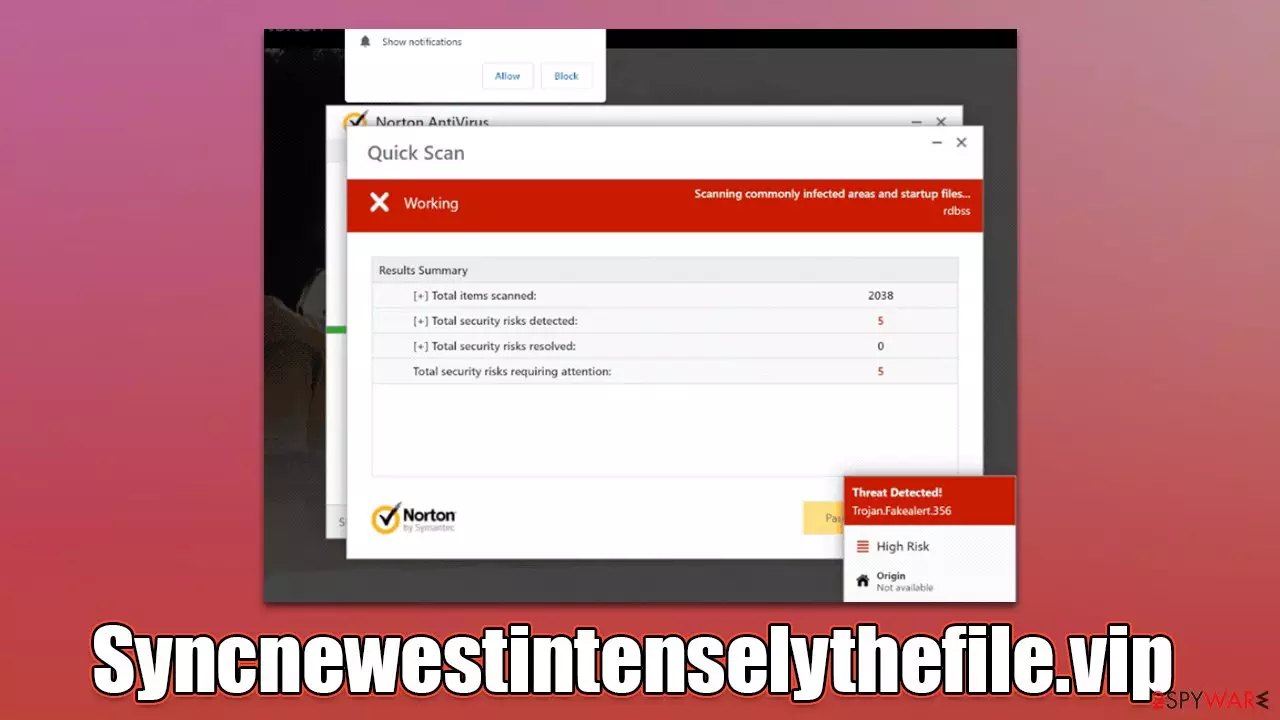
Syncnewestintenselythefile.vip is a website that shows fake virus scans allegedly from Norton, only to trick people into purchasing software via affiliated links. The truth is that the website and all its components, including the logos of the prominent security software maker, are all fake, and should never be trusted.
The main goal of scammers is to frighten people by claiming that the system is infected and then directing them to the security software download page, earning pay-per-install[1] revenue in the process.
While the software these links could bring users might be legitimate, we recommend not interacting with anything related to the Syncnewestintenselythefile.vip scam. Since malicious techniques are used to promote software there, links might also lead to download pages of fake Norton software or even malware.
Even though the messages shown on the scam site are all fake, we still recommend checking the system for adware infections, as those affected can often be exposed to various phishing[2] material online, including fake virus scans.
| Name | Syncnewestintenselythefile.vip |
| Type | Scam, ads, redirect |
| Infiltration | Compromised websites, pop-up ads, potentially unwanted applications |
| Scam content | Claims that the subscription for security software has expired and that it needs to be renewed immediately. Asks to download malicious software and enable push notifications |
| Dangers | Those who have malicious software installed on their systems are more likely to encounter dangerous websites, resulting in financial losses, malware infections |
| Removal | If you have interacted with the scam site, make sure you scan your system for infections with SpyHunterCombo Cleaner |
| Other tips | Cleaning web browsers is one of the secondary things you should do after PUP/malware removal to secure your privacy. You can use FortectIntego to do it quicker |
The scam operation
The main reason for the creation of fake messages online is to profit from ads, software downloads, or subscriptions to random services. In this case, crooks run an affiliate program, which is fully legal. However, the advertising of the product is not, which is an extremely important point here.
Frightened users are more likely to act and purchase the software license for security software if they think that their personal safety and computer security are jeopardized. Therefore, a rather believable but fake scam scheme is created.
Right after users enter the Syncnewestintenselythefile.vip site, they are presented with something that looks like legitimate Norton security software, which immediately begins a scan, during which several “detection” windows are shown to the visitors. Right after that, they are presented with fake results, which claim:
Your PC is infected with 5 viruses!
ACTION REQUIRED
Your Norton Subscription Has Expired!
Renew now to keep your PC protected.
If your PC is unprotected, it is at risk for viruses and other malware.
All users who encounter the site are shown the same results because they are fabricated and do not represent the real state of one's computer. It claims that five viruses have been found and the security software license has expired, which then leads people to the download page. Please be aware that all claims about virus infections online are fake, as only a reputable anti-malware installed on the system can detect threats installed on the computer.

How do you end up on Syncnewestintenselythefile.vip?
One of the main reasons online fraud and fake virus infection scams are so successful is their prevalence and distribution. Users are typically redirected to phishing websites whenever they click a booby-trapped link somewhere else.
To be more specific, dubious sites such as peer-to-peer networks or those that host copyrighted video streaming services are likely to hold links or malicious scripts that would automatically reroute visitors to various dangerous places, including the Syncnewestintenselythefile.vip scam page.
On some rarer occasions, users affected by adware could also face redirects to malicious websites and suffer from many ads while browsing the web. To check the system for undiagnosed infections, we recommend scanning it with SpyHunterCombo Cleaner, MalwarebytesMalwarebytes, or another reputable security tool. After that, employ FortectIntego to remediate the system and clean browser caches[3] automatically.
Besides, scam pages are quickly recreated if one of them gets shut down. In the case of Syncnewestintenselythefile.vip, it is just one of the thousands of websites created by crooks to impersonate a scan of a reputable security vendor. We recently covered identical scams like Myeternalprotection.com, Protectionsrequired.com, or Scanoclean.com. Thus, if you encounter similar messages in the future, please ignore them.
Check the system for infections
As we already mentioned, the easiest way to check the computer for adware and malware is by scanning it with antivirus software – all the threats would be eliminated automatically. Nonetheless, you can check for potentially unwanted programs yourself if you want to do that manually instead. First, start with apps installed on the system level:
Windows
- Enter Control Panel into Windows search box and hit Enter or click on the search result.
- Under Programs, select Uninstall a program.

- From the list, find the entry of the suspicious program.
- Right-click on the application and select Uninstall.
- If User Account Control shows up, click Yes.
- Wait till uninstallation process is complete and click OK.



Mac
While moving apps into Trash is how you delete most normal applications, adware tends to create additional files for persistence. Thus, you should look for .plist and other files that could be related to the virus. If you are not sure, skip this step entirely.
- From the menu bar, select Go > Applications.
- In the Applications folder, look for all related entries.
- Click on the app and drag it to Trash (or right-click and pick Move to Trash)


To fully remove an unwanted app, you need to access Application Support, LaunchAgents, and LaunchDaemons folders and delete relevant files:
- Select Go > Go to Folder.
- Enter /Library/Application Support and click Go or press Enter.
- In the Application Support folder, look for any dubious entries and then delete them.
- Now enter /Library/LaunchAgents and /Library/LaunchDaemons folders the same way and terminate all the related .plist files.
Next, you should check your browser for unwanted extensions, which you can do by clicking the “Extensions” button next to the settings menu. Alternatively, you can follow the steps below:
Google Chrome
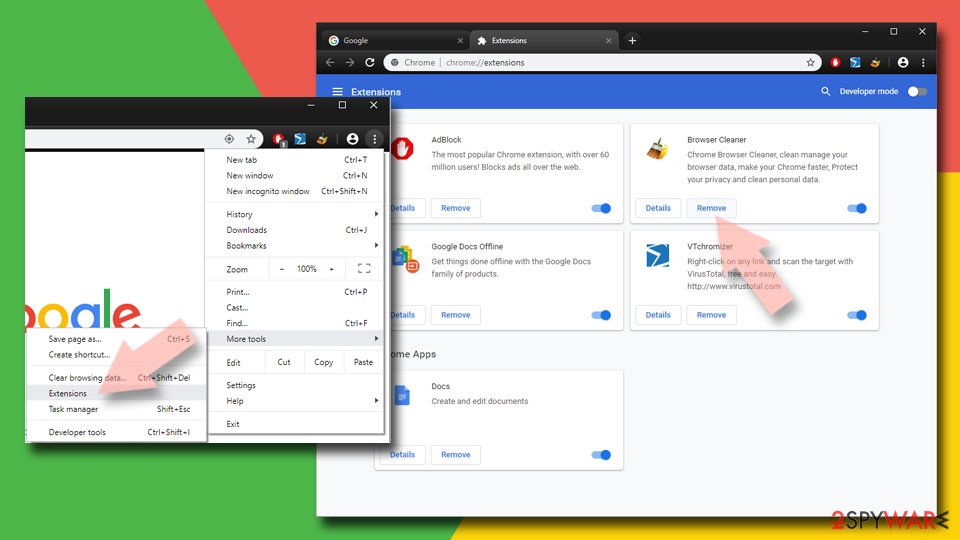
- Open Google Chrome, click on the Menu (three vertical dots at the top-right corner) and select More tools > Extensions.
- In the newly opened window, you will see all the installed extensions. Uninstall all the suspicious plugins that might be related to the unwanted program by clicking Remove.

Mozilla Firefox
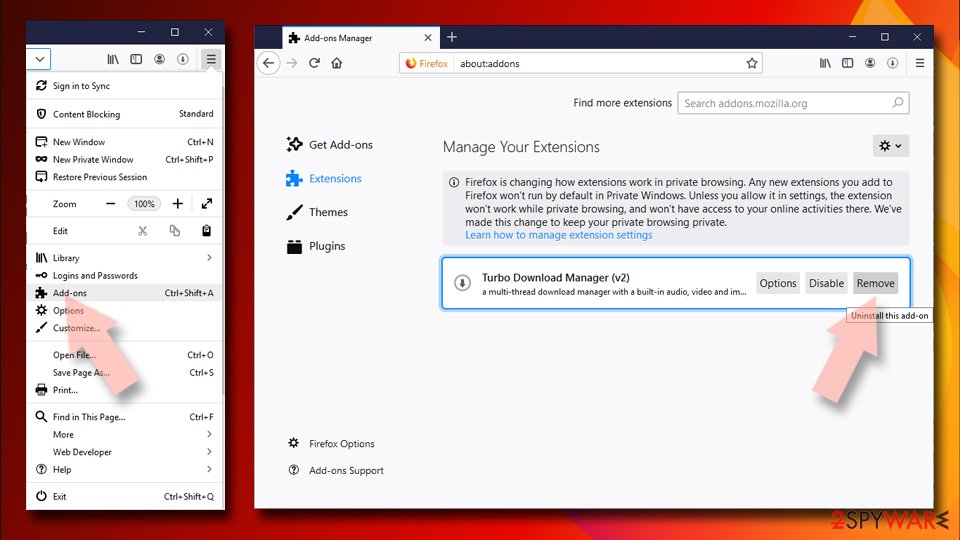
- Open Mozilla Firefox browser and click on the Menu (three horizontal lines at the top-right of the window).
- Select Add-ons.
- In here, select the unwanted plugin and click Remove.

MS Edge
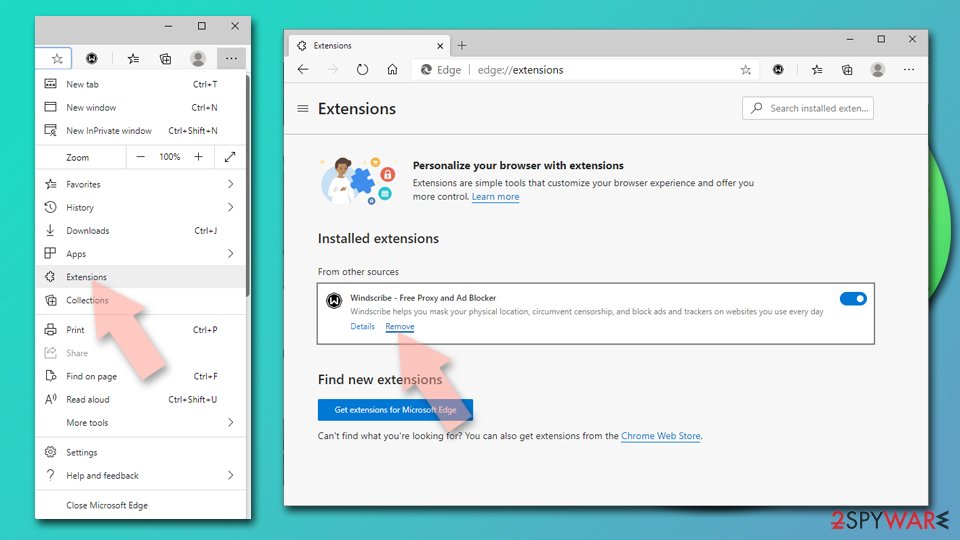
- Open Edge and click select Settings > Extensions.
- Delete unwanted extensions by clicking Remove.

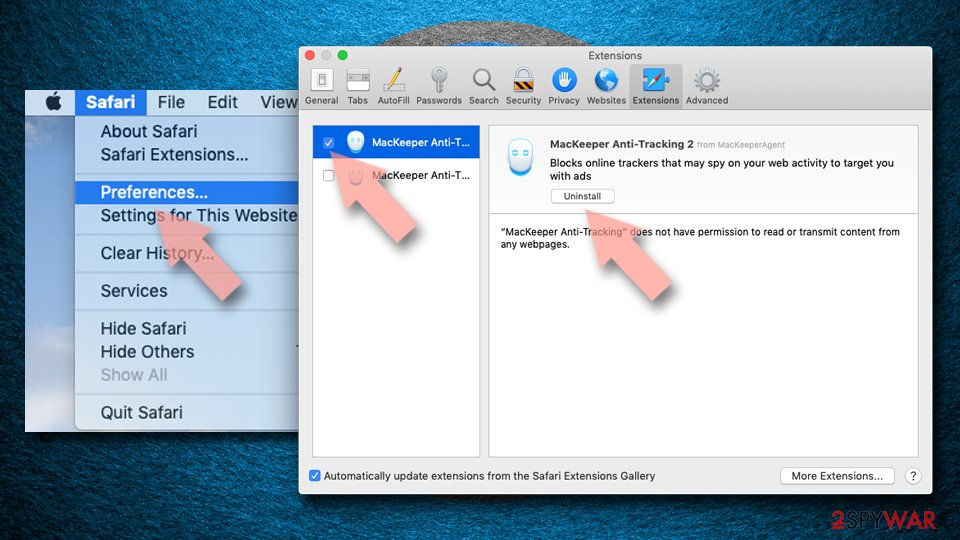
Safari
- Click Safari > Preferences…
- In the new window, pick Extensions.
- Select the unwanted extension and select Uninstall.

Remove annoying push notifications from Syncnewestintenselythefile.vip
Upon entry to the site, they are not only presented with a misleading message that claims virus infections but also offers to enable push notifications. Even if you have clicked the “Allow” button within the notification prompt by accident, it would result in unwanted push notifications being shown at random times, which would bring unwanted and malicious links.
If you are suffering from this problem and you have already checked and removed all adware and other unwanted software from your system, you should block the website's URL in the accepted list within your browser settings.
Did this guide help?
Be the first to comment