

Aamv ransomware is the version of the major file-locking virus family

Aamv file virus is a threat that uses an encryption algorithm for file locking and makes data useless by altering the original code of the document, image, audio, or video file. The threat can affect archives or databases, but it is not altering data in system folders or directories. The ransomware is very damaging and needs to be terminated.
Aamv ransomware virus is a silent threat, and it shows no symptoms when it locks files on the machine. It manages to lock files and mark them using .aamv extension once the procedure is done. The encoding process can even get masked when fake Windows update pop-ups appear on the screen.
The infection places the ransom note _readme.txt file on the machine in various folders on the desktop. This file is the particular message from the virus creators of the infection. Aamv virus operators demand money payments by claiming that they have the only option for file recovery.
| Name | Aamv file virus |
|---|---|
| Type | Ransomware, cryptovirus, file-locker |
| File extension | .aamv |
| Family | Djvu ransomware |
| Ransom amount | $490/$980 |
| Ransom note | _readme.txt |
| Elimination | Threat removal tools can help with all types of infections |
| Repair | These programs can trigger changes to the settings of the machine, so running FortectIntego can help with virus damage |
What can be done now?
If you have been infected with the Aamv ransomware virus, your personal files have likely been encrypted, and you are being demanded to pay a ransom in order to decrypt them. However, no guarantee paying the ransom will actually decrypt your files.[1]
In fact, it is often advised against paying ransomware demands as this only serves to encourage these criminals to continue their illegal activities. There are other ways to try and decrypt your files, such as using data recovery software, but unfortunately, there is no guaranteed way to get your files back.
The official Aamv file virus decryption tool does not exist, and the test decryption that criminals offer can be false, so your files may be permanently damaged if you do not have backups. This is the threat coming from a major threat family that released this virus with other variants in bulk. Aayu, Aawt, Aabn are all not decryptable.
There is no guaranteed way to decrypt your files if they have been encrypted by the file virus. However, there are some tools and methods that may be able to help you recover your data. Note that while the threat is running on the computer, the virus can damage all files again. Therefore, it is important to have backups of your files in case they are lost or damaged.
Removing the threat
Aamv ransomware virus is a serious virus that experts[2] always note. The threat can be removed from the machine with anti-malware tools. This is the best solution for the program that infiltrates the machine and can damage the system significantly. You need to terminate the infection properly to have a safe PC.
The threat can damage the machine further when it is still running on the computer. If you leave the Aamv file virus active but recover files on the system, those pieces can get damaged, and you lose your files permanently. When the payment is made and files get lost, it is unfortunate, so remove the virus as soon as possible.
You can eliminate the infection with anti-malware tools that work on proper AV detection[3] engines, and then the threat can be removed from the machine. Aamv ransomware virus removal can be quick if you run a proper tool like MalwarebytesMalwarebytes or SpyHunterCombo Cleaner.
A full system scan indicates all potential threats and makes huge changes to the system when the virus files and all potentially malicious programs get listed. You can remove all threats, malware, and damaging data and terminate the ransomware. Do this to eliminate the Aamv ransomware virus as soon as possible and double-check before recovering any files.

Repairing the system data
Once a computer is infected with malware, its system is changed to operate differently. For example, an infection can alter the Windows registry database, damage vital bootup and other sections, delete or corrupt DLL files, etc. Once a system file is damaged by malware, antivirus software is not capable of doing anything about it, leaving it just the way it is. Consequently, users might experience performance, stability, and usability issues, to the point where a full Windows reinstall is required.
Therefore, we highly recommend using a one-of-a-kind, patented technology of FortectIntego repair. Not only can it fix virus damage after the infection, but it is also capable of removing malware that has already broken into the system thanks to several engines used by the program. Besides, the application is also capable of fixing various Windows-related issues that are not caused by malware infections, for example, Blue Screen errors, freezes, registry errors, damaged DLLs, etc.
- Download the application by clicking on the link above
- Click on the ReimageRepair.exe

- If User Account Control (UAC) shows up, select Yes
- Press Install and wait till the program finishes the installation process

- The analysis of your machine will begin immediately

- Once complete, check the results – they will be listed in the Summary
- You can now click on each of the issues and fix them manually
- If you see many problems that you find difficult to fix, we recommend you purchase the license and fix them automatically.


Data recovery option
If you have been infected with the Aamv file virus, the first thing you should do is disconnect your computer from the internet to prevent the virus from spreading further. These criminals release instructions via the _readme.txt ransom note and encourage people to contact them or pay the ransom.
However, there is no guarantee that either of the listed methods will work. As such, it is important to make sure that you have backups of all important files in case they are lost permanently. This is the best option for file recovery in any incident. Even if you are attacked by ransomware, it is important not to contact the attackers.
Instead, focus on removing the virus from your system. Anti-malware software can scan your system for all files associated with the Aamv ransomware virus and delete them, as well as any malicious registry entries. Once the virus is gone, you can then proceed to restore your files from a backup.
Since many users do not prepare proper data backups prior to being attacked by ransomware, they might often lose access to their files permanently. Paying criminals is also very risky, as they might not fulfill the promises and never send back the required decryption tool.
While this might sound terrible, not all is lost – data recovery software might be able to help you in some situations (it highly depends on the encryption algorithm used, whether ransomware managed to complete the programmed tasks, etc.). Since there are thousands of different ransomware strains, it is immediately impossible to tell whether third-party software will work for you.
Therefore, we suggest trying regardless of which ransomware attacked your computer. Before you begin, several pointers are important while dealing with this situation:
- Since the encrypted data on your computer might permanently be damaged by security or data recovery software, you should first make backups of it – use a USB flash drive or another storage.
- Only attempt to recover your files using this method after you perform a scan with anti-malware software.
Install data recovery software
- Download Data Recovery Pro.
- Double-click the installer to launch it.

- Follow on-screen instructions to install the software.

- As soon as you press Finish, you can use the app.
- Select Everything or pick individual folders where you want the files to be recovered from.

- Press Next.
- At the bottom, enable Deep scan and pick which Disks you want to be scanned.

- Press Scan and wait till it is complete.
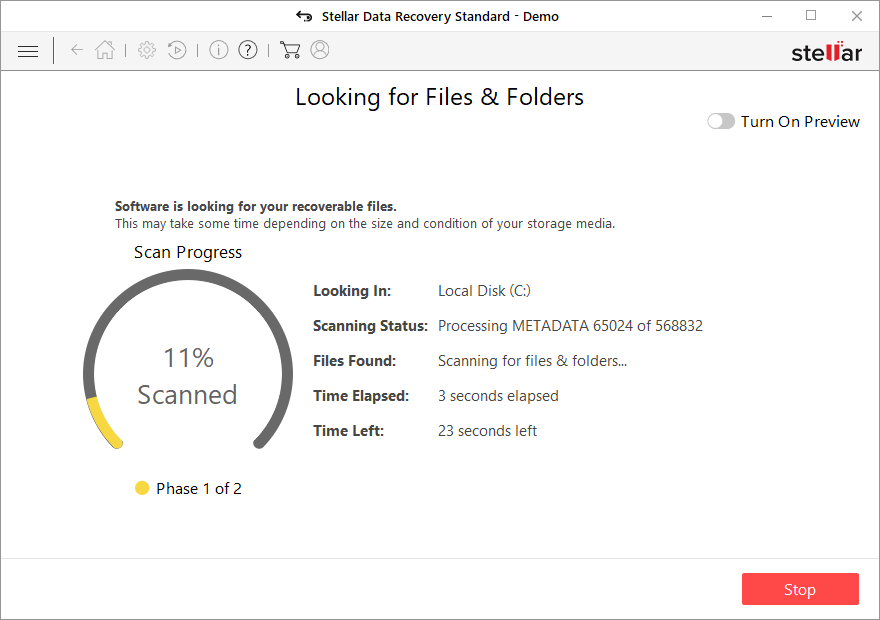
- You can now pick which folders/files to recover – don't forget you also have the option to search by the file name!
- Press Recover to retrieve your files.



Did this guide help?
Be the first to comment