

Flash ransomware is a type of malware that may result in personal file loss

Flash is a ransomware-like malware that preys on unsuspecting individuals and demands money. The moment it gets inside, it infects the systems and eventually gets ready to lock data using a complex encryption mechanism. The .flash extension is added to all photos, documents, databases, videos, and other types of files (cybercriminals' email is also added). These files can then no longer be modified or even opened, essentially rendering them useless.
Cybercriminals are quick to offer a solution for this terrible situation – pay the ransom, and you can recover all your files. The ransom sum is not provided, as is typical for other ransomware. In the ransom note ReadMe_Decryptor.txt and Decryptor.hta, users are informed that they can write an email to ashtray@outlookpro.net, servicemanager@yahooweb.co, servicemanager2020@protonmail.com, or contact servicemanager@jabb.im on Jabber to negotiate the money and decryptor exchange. We recommend staying away from attackers, as they may never keep their promises.
| Name | Flash virus |
|---|---|
| Type | Ransomware, file-locking malware |
| Malware family | Dcrtr |
| File extension | .flash, appended to each file along with the cybercriminals' email address |
| Ransom note | ReadMe_Decryptor.txt and Decryptor.hta |
| Contact | ashtray@outlookpro.net, servicemanager@yahooweb.co, servicemanager2020@protonmail.com, or servicemanager@jabb.im (Jabber) |
| File Recovery | The only secure way to restore files is by using data backups. If such is not available or were encrypted as well, options for recovery are very limited – we provide all possible solutions below |
| Malware removal | After disconnecting the computer from the network and the internet, do a complete system scan using the SpyHunterCombo Cleaner security program. |
| System fix | As soon as it is installed, malware has the potential to severely harm some system files, causing instability problems, including crashes and errors. Any such damage can be automatically repaired by using FortectIntego PC repair |
Ransom note analysis
Flash ransomware belongs to a ransomware strain known as Dcrtr, known to be operating for at least five years, with previously released variants such as T_TEN, Termit, Colorit, and many others. It uses different encryption algorithms or a combination of AES, SHA, and RSA[1] to encrypt data on the affected systems, depending on the version.
Ransomware is rather useless for cybercriminals without users being able to contact them. That's why crooks make sure that malware delivers a ransom note as soon as the data encryption job is finished. As a precautionary measure, attackers deliver two ransom notes to ensure that contact can be made, increasing the chances of a successful payment.
Soon after the virus finishes data encryption, it delivers the following ransom note, which is essentially a message from malicious actors. There are two files delivered for this purpose, with the HTA file offering a much bigger explanation of the situation that users found themselves in:
To recover data, write here:
1) servicemanager@yahooweb.co
2) servicemanager2020@protonmail.com (if you are Russian, then you need to register on the site www.protonmail.com through the TOR browser https://www.torproject.org/ru/download/ , since the proton is prohibited in your country)
3) Jabber client – servicemanager@jabb.im (registration can be done on the website – www.xmpp.jp. web client is located on the site – https://web.xabber.com/)Do not modify files – this will damage them.
Test decryption – 1 file < 500 Kb.
In the text file, victims are provided a shortened message, which includes one contact email and test decryption note:
To recover data, write here:
ashtray@outlookpro.netDo not modify files – this will damage them.
Test decryption – 1 file < 500 Kb.
Both of these files convey the main information that should direct users on what to do next. As is typical, cybercriminals are suggesting performing test decryption of a file that is no larger than half of a megabyte so that no valuable data could be recovered. This is usually done as proof that the decrytpion tool actually exists and would restore files.

However, Flash ransomware authors may never reply to you after receiving your money or send you a tool that simply does not work. There are simply no guarantees with these people, as they are running illegal money extortion businesses. Instead, we recommend you attempt restoring files in alternative ways, even if the chances of success are low. But first, you need to remove malware from the system.
Flash virus removal
A PC can no longer be regarded as safe to use once malware has been installed on it. If a network is available, the infection may spread through it and possibly start the installation of further malicious code. Under specific conditions, hackers may even access users' PCs remotely by using a remote connection over the internet. Removing this link is, therefore, essential before continuing with ransomware removal.
- Type in Control Panel in Windows search and press Enter
- Go to Network and Internet
- Click Network and Sharing Center
- On the left, pick Change adapter settings
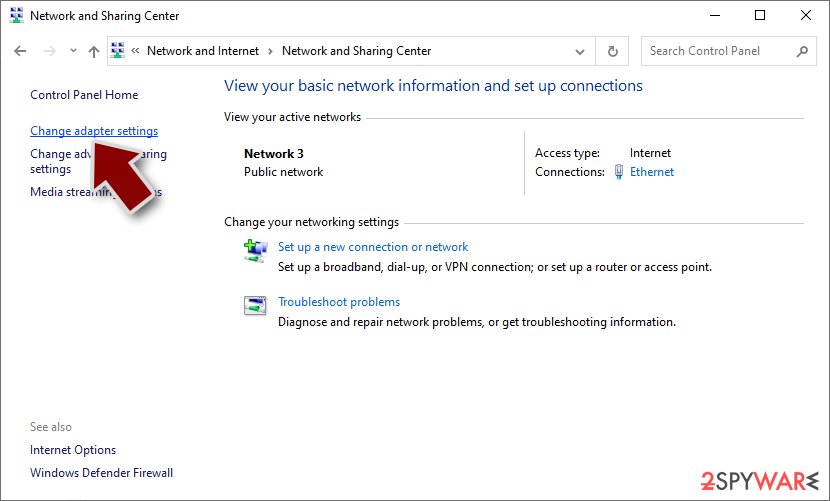
- Right-click on your connection (for example, Ethernet), and select Disable
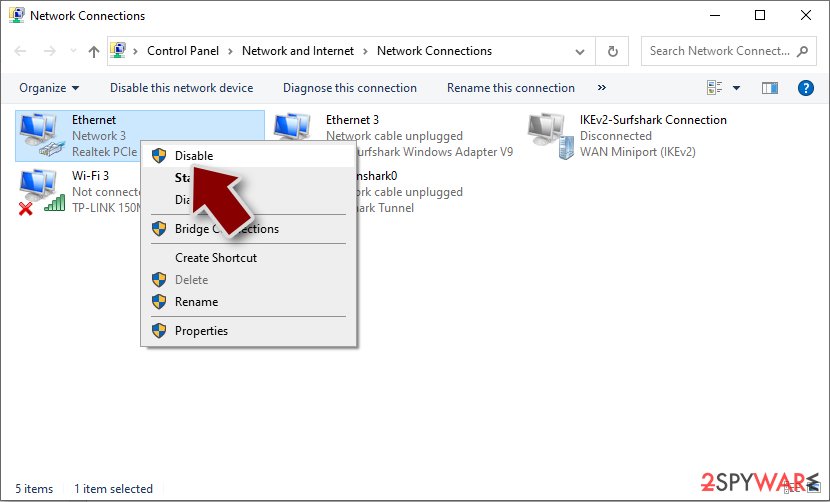
- Confirm with Yes.


When your computer is unable to access the internet anymore, it is time to clean up the infection from your system. For this, we advise utilizing reliable security software like SpyHunterCombo Cleaner or MalwarebytesMalwarebytes. You can be certain that your system is free of ransomware since security software can quickly find and eliminate all the dangerous files.
Remember that certain ransomware may self-destruct after encrypting files, so anti-malware programs might not detect anything. But before moving on to the next step, it's crucial to ensure that the infection is entirely contained and eliminated.
Take care of Windows damage
Windows changes after a virus attack – some system files may even be destroyed or corrupted. System instability can result from this, which can cause crashes, improper program starts, BSODs[2], and other issues. After uninstalling malware, if you're still having trouble starting apps or suffering other problems, use the recovery software as follows:
- Download FortectIntego
- Click on the ReimageRepair.exe

- If User Account Control (UAC) shows up, select Yes
- Press Install and wait till the program finishes the installation process

- The analysis of your machine will begin immediately

- Once complete, check the results – they will be listed in the Summary
- You can now click on each of the issues and fix them manually
- If you see many problems that you find difficult to fix, we recommend you purchase the license and fix them automatically.



Recover .flash files without paying
The encrypted data won't be restored to its original state once the malware has been removed from a system and the network it has affected. This is because decryption requires the usage of a special key that is kept by ransomware operators on a distant server called Command & Control.[3]
Having backups of all your crucial files is the best defense against having your personal data held hostage during a ransomware attack. It might be impossible to restore your ransomware-encrypted data if you don't have any backups ready; however, there's always a chance that it could, so we recommend taking your chances since you don't lose anything.
If you don't have backups, you have two options: utilize data recovery software or wait for a decryptor tool to become released. Remember that it's best to create backup copies of any encrypted data that you value if you don't already have them in order to avoid accidentally corrupting them.
- Download Data Recovery Pro.
- Double-click the installer to launch it.

- Follow on-screen instructions to install the software.

- As soon as you press Finish, you can use the app.
- Select Everything or pick individual folders where you want the files to be recovered from.
- Press Next.
- At the bottom, enable Deep scan and pick which Disks you want to be scanned.

- Press Scan and wait till it is complete.
- You can now pick which folders/files to recover – don't forget you also have the option to search by the file name!
- Press Recover to retrieve your files.



Numerous security companies and groups are tackling the illegal activities of ransomware developers. Decryption keys have occasionally been made public after servers containing them have been seized by law enforcement agencies. The most well-known organizations providing free data decryption services are listed below; these services have already helped millions of victims worldwide. Please be aware that it can take some time to develop a substitute decryption tool (if at all possible).
- No More Ransom Project
- Free Ransomware Decryptors by Kaspersky
- Free Ransomware Decryption Tools from Emsisoft
- Avast decryptors

Did this guide help?
Be the first to comment