

Aawt ransomware is the infection relying on malware spreading for money demands

Aawt ransomware virus is a malicious program that can affect your computer silently by encrypting all of your personal files. The virus then demands payment in order to decrypt the files and make them accessible again. These criminals claim that infected machines can be made fully functional again by paying the requested cryptocurrency sum.[1]
However, it is important to note that there is no guarantee that paying the ransom will actually decrypt your files. In fact, it is often advised against paying ransomware demands as this only serves to encourage these criminals to continue their illegal activities, and those tools might not even exist.
There are other ways to try and decrypt your files, such as using data recovery software, but unfortunately, there is no guaranteed way to get your files back. The official Aawt file virus decryption tool is not existing, and the test decryption that criminals offer can be false, so your files are possibly damaged if you have no backups.
| Name | Aawt file virus |
|---|---|
| Type | Ransomware, cryptovirus |
| Family | STOP/Djvu ransomware |
| Extension | .aawt |
| Ransom note | _readme.txt |
| Ransom amount | $490/$980 |
| Contacts | support@bestyourmail.ch, datarestorehelp@airmail.cc |
| Removal | The system scan using anti-malware tools can help with the termination of these threats like ransomware |
| Repair | Run FortectIntego to keep the machine properly running and repair damaged files |
What is this ransomware?
If you have been infected with the Aawt file virus, the first thing you should do is disconnect your computer from the internet to prevent the virus from spreading further. These criminals release instructions via the _readme.txt ransom note and encourage people to contact them or pay the ransom. As there is no guarantee that either of the listed methods will work, it is important to make sure that you have backups of all important files in case they are lost permanently.
Even if you are attacked by ransomware, do not contact the attackers. Instead, focus on removing the virus from your system. Anti-malware software can scan your system for all files associated with the virus and delete them, as well as any malicious registry entries. Once the virus is gone, you can then proceed to restore your files from a backup.
Your machine can get affected by the Aawt ransomware virus if you don't pay enough attention to details like red flags on emails or additional files in pirating packages, or the general security of sites you visit. Keep your operating system and software up to date, as this can help close security vulnerabilities that malicious actors could exploit.
If your images, documents, or files have a .aawt extension and you can't open them, your computer has been infected with the Aawt ransomware. This ransomware encrypts your personal documents and displays a message asking you to pay a ransom in Bitcoin to decrypt the data. The instructions are in the _readme.txt file placed on your desktop.
The amount of the ransom can vary, but it is typically around 1-2 Bitcoins. This threat may demand a payment of $980 and even offer a discount if paid within the first 72 hours. Once you have paid the ransom, you will receive a key that supposedly will allow you to decrypt your files. However, that is rarely happening like this. Malware creators do not care about your belongings.

Recovering files after the encryption
Aawt ransomware virus is demanding payment in Bitcoin worth $980 in order to provide the decryption key. However, experts[2] in the field of malware research do not recommend giving in to these demands and instead recommend removing the virus.
There are a few different methods that the ransomware may use to encode your files, so it is difficult to say without further analysis whether or not your files can be decrypted. The Djvu ransomware family has been affecting machines for years, and the newest releases like Eemv or Eewt cannot be decrypted due to the usage of online keys. However, you should still check if the decryption is possible.
If your computer got infected with one of the Djvu variants, you should try using Emsisoft decryptor for Djvu/STOP. It is important to mention that this tool will not work for everyone – it only works if data is locked with an offline ID due to malware failing to communicate with its remote servers.
- Download the app from the official Emsisoft website.
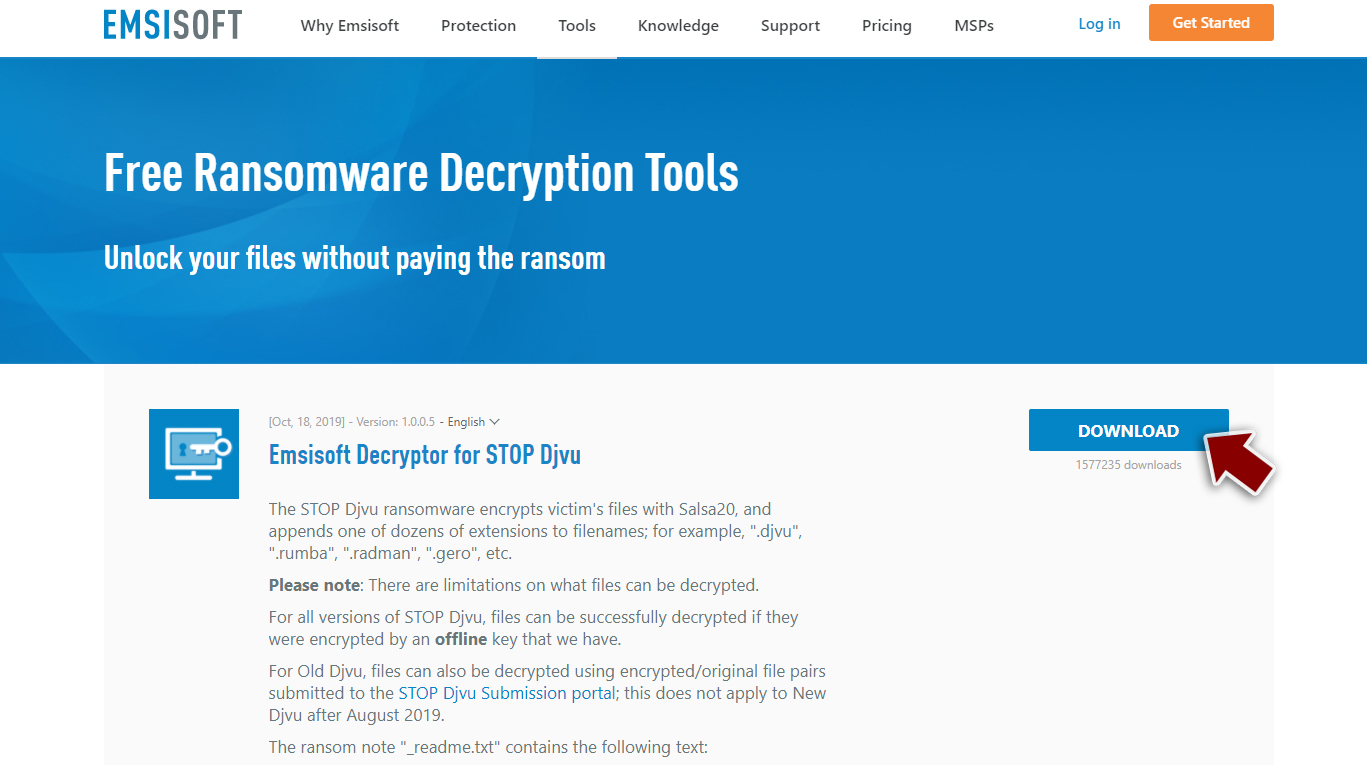
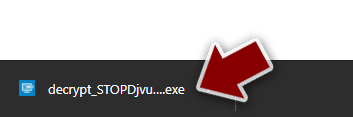
- After pressing Download button, a small pop-up at the bottom, titled decrypt_STOPDjvu.exe should show up – click it.
- If User Account Control (UAC) message shows up, press Yes.
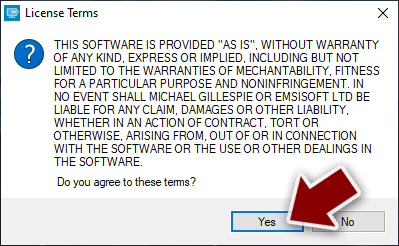
- Agree to License Terms by pressing Yes.
- After Disclaimer shows up, press OK.
- The tool should automatically populate the affected folders, although you can also do it by pressing Add folder at the bottom.

- Press Decrypt.



From here, there are three available outcomes:
- “Decrypted!” will be shown under files that were decrypted successfully – they are now usable again.
- “Error: Unable to decrypt file with ID:” means that the keys for this version of the virus have not yet been retrieved, so you should try later.
- “This ID appears to be an online ID, decryption is impossible” – you are unable to decrypt files with this tool.
Elimination of any active threats
If your computer has been infected with malware, it can be difficult to remove the infection. However, there are many programs available that can remove any threat and keep your system clean. With these tools, you will never have to worry about threats like the Aawt file virus again.
The best way to protect your computer against malicious files like file viruses is to run a full system scan with reliable security software. This will help ensure that any threats are quickly and successfully removed from your system. However, the choice of AV tool you use can affect how long the process takes. Selecting a high-quality option with good detection[3] rates will help minimize the risk of infection.
The easiest way to keep your machine virus-free is to use software like SpyHunterCombo Cleaner or MalwarebytesMalwarebytes. These solutions can identify the particular threats and list all malware pieces that are affecting the performance or security state of the PC. A proper system check will allow you to remove the Aawt ransomware. Be sure to double-check before moving on to file recovery.
Recover the machine
Once a computer is infected with malware, its system is changed to operate differently. For example, an infection can alter the Windows registry database, damage vital bootup and other sections, delete or corrupt DLL files, etc. Once a system file is damaged by malware, antivirus software is not capable of doing anything about it, leaving it just the way it is. Consequently, users might experience performance, stability, and usability issues, to the point where a full Windows reinstall is required.
Therefore, we highly recommend using a one-of-a-kind, patented technology of FortectIntego repair. Not only can it fix virus damage after the infection, but it is also capable of removing malware that has already broken into the system thanks to several engines used by the program. Besides, the application is also capable of fixing various Windows-related issues that are not caused by malware infections, for example, Blue Screen errors, freezes, registry errors, damaged DLLs, etc.
- Download the application by clicking on the link above
- Click on the ReimageRepair.exe

- If User Account Control (UAC) shows up, select Yes
- Press Install and wait till the program finishes the installation process

- The analysis of your machine will begin immediately

- Once complete, check the results – they will be listed in the Summary
- You can now click on each of the issues and fix them manually
- If you see many problems that you find difficult to fix, we recommend you purchase the license and fix them automatically.


Did this guide help?
Be the first to comment