

.Access_denied ransomware: how damaging is it?
Unfortunately, .Access_denied virus is another file-encrypting malware. There have been a couple of viruses with amusing titles lately which did not threaten to inflict significant damage on the system and were regarded as more scareware rather a threat. However, in the case with this virus, you should not take it too lightly. This threat follows the operation manner of highly severe threats such as Locky, Crysis, Apocalypse, etc. After the infection, users might not suspect that their computers have been targeted by file-encrypting malware until they notice the inaccessibility to their files which now all are marked with .access_denied extensions. Nonetheless, there is no need to panic. Remove .access_denied virus as soon as possible. For that purpose, FortectIntego comes in handy.
As common for the viruses of this kind, this cyber infection sneaks into your device disguised in a trojan or .exe file. Depending on the processing speed of your PC, the virus may take from several up to 15 minutes to encrypt all your files with an elaborate AES-256 algorithm key. Unfortunately, this usually employed technique still causes trouble for virus researchers. The data is encrypted with a public key, and one of the viable ways to decrypt the files is to obtain the private key. If you backed up your files in advance, your data could be easily restored. We do not recommend paying the money as the crooks demand enormously high ransom – 10 bitcoins (≈6000 USD). Therefore, there are no guarantees of data return.
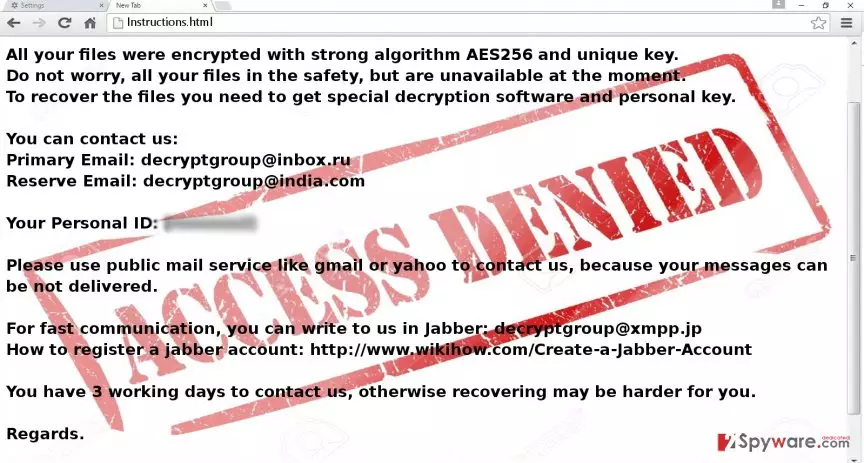
All your files were encrypted with strong algorithm AES256 and unique key.
Do not worry, all your files in the safety, but are unavailable at the moment.
To recover the files, you need to get special decryption software and personal key.
You can contact us:
Primary Email: decryptgroup@inbox.ru
Reserve Email: decryptgroup@india.com
Please use public mail service like gmail or yahoo to contact us, because your messages can be not delivered.
For fast communication, you can write to us in Jabber: decryptgroup@xmpp.jp
How to register a jabber account: http://www.wikihow.com/Create-a-Jabber-Account
You have 3 working days to contact us, otherwise recovering may be harder for you.
Regards.
Soon afterward, the virus opens the intsructions.txt or instructions.html file with the requirements for the data recovery. Unlike other samples of ransomware category, it provides even three email addresses for the communication purposes: decryptgroup@inbox.ru, decryptgroup@india.com, and decryptgroup@xmpp.jp. Interestingly, that the virus does not encrypt all files but only those which are located in the folders with non-admin access. This encourages users to use passwords on their computers for precaution purposes. Needless to say, that if several computers are linked to one servers, they will be all infected with .access_denied ransomware. In any case, we recommend you to hurry up with the elimination before the virus dos not inflict more damage. FortectIntego speeds up .Access_denied removal process.
The transmission peculiarities of the malware
Since it operates quite in a traditional way, .Access_denied hijack might have occurred when you recklessly opened a scam email with the malicious attachment. Usually, crooks try to deceive victims with false notifications from local institutions and business companies. The email asks to review the contents of the attached file which contain the binary with .Access_denied malware. As a result, clicking the attachment accelerates the infection process. In order to avoid possible cyber infections, we recommend restraining from opening similar emails. Even if they pretend to be the messages sent from official institutions, verify the sender before taking any action. Keep out of illegal file-sharing domains as they might contain malicious links as well.
Access denied termination process
You can easily remove .Access_denied virus with the assistance of anti-spyware application, such as FortectIntego or MalwarebytesMalwarebytes. These utilities will do all the important preparations and complete the elimination process. They might be a better solution since they are apt in detecting all malevolent files and registry files quickly and more efficiently. If certain .Access_denied removal problems occur, such as forcefully shut-down anti-virus app or inability to download any content, feel free to use our guidelines. In addition, you will find alternative data recovery methods. Keep in mind that precision and cautiousness are significant factors in lowering the risk of a virus assault.
Did this guide help?
4 comments
betV
Theyre quite crafty when it comes to ransomware naming.
carlisle55
Need decrypter!!!
MarkTrest
And they still continue making viruses..it cant be helped after all.
Dorris
I got no mail from hackers.