

AdamLocker – ransomware virus that keeps evolving in 2018
AdamLocker ransomware is also known as RW.adm_64 virus. The developers of the ransomware[1] viruses are rarely known; however, this time we know that puff69 is responsible for creating this cyber infection. Usually, it is distributed via spam email, which contains a Word file, which once opened, launches the AdamLocker virus executable file named run.exe. After successfull infiltration to %ALLUSERSPROFILE%, the virus locks the .txt, .jpg, .png, .bmp, .zip, .rar, .7z, .sql, .pdf, .tar, .mp3, .mp4, .flv, and many others file types by appening the .adam file extension to each of them.
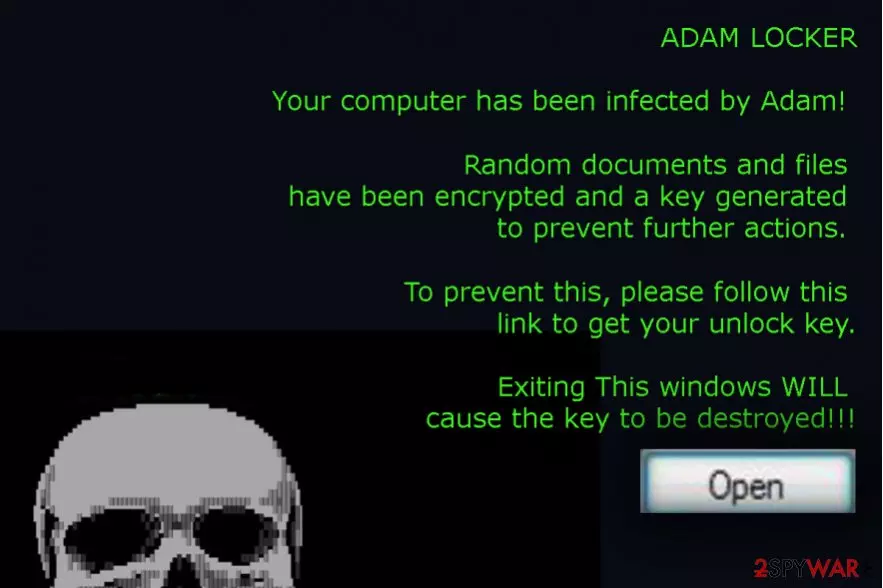
To inform the victim what has happened, the virus generates a ransom note, which says:
ADAM LOCKER
Your computer has been infected by Adam! Random documents and files have been encrypted and a key generated to prevent further actions. To prevent this, please follow this link to get your unlock key.
Exiting This windows WILL cause the key to be destroyed!!!'
Victims are asked to pay a particular amount of money. According to ransomware researchers, the size of the ransom depends of the amount of encrypted files. Usually, the extortionists ask to transfer from 1 to 3 Bitcoins; however, there are some cases where victims were demanded to pay even more.
AdamLocker virus is circulating on the Internet since 2016. Up until now, there were no updates regarding this pest. However, at the beginning of February 2018, a new version of AdamLocker has been found. It's very similar to the ancestor, except that it's available in Korean language only. The newcomer is currently under investigation, so the information about it is rather limited. What is clear that it uses exploit kits and spam email to infiltrate PCs and attaches .adam extensions to render the files useless.
If you got infected with aby AdamLocker virus version, we do not recommend following hacker’s instructions. No one can guarantee that after transferring the Bitcoins hackers will send you a unique decryption key. Everything might turn out not like you are expecting[2]. The hacker might disappear, provide you inactive decryption tool or infect your PC with even more malware.
To prevent unwanted consequences, you should remove AdamLocker from your PC. Although it's not yet clear whether the files encrypted by this ransomware are decryptable, there's a handful of methods, including the usage of professional data recovery tool, Windows Previous Version, Volume Shadow Copies, etc. that can help you unlock at least the most important files.
Keep in mind that every received Bitcoin motivates cyber-criminals for future crimes. Therefore, your money might be necessary for developing and spreading other ransomware viruses, and you will definitely be on the target list. If you paid once, you are probably going to pay twice. To prevent this from happening, execute AdamLocker removal with the help of professional antivirus. FortectIntego, SpyHunterCombo Cleaner or FortectIntego are the tools that can help you.

Do not open Word files attached to suspicious emails
This ransomware usually spreads via spam. Extortionists send emails that pretend to be generated by authorities or other reliable sources to millions or randomly chosen email addresses. These email messages always contain a Word file, which supposedly contains some important pieces of information. In some of the cases, instead of Microsoft Word document, criminals may spread photo, audio or video attachments. Nevertheless, all of them usually demands the victim to enable macros to read its content.
If the user enables macros, the run.exe file, which is an executable of the ransomware, is enabled. After that, the script installs the virus. Consequently, it modified registry entries, locks files, disables Task Manager and initiates a bunch of other system's modifications that prevents the user both from accessing files and detecting the virus easily.
Ransomware viruses are tricky ones and might seem to be hard to avoid[3]. Indeed, no one can be fully protected from this cyber infection, but everyone can minimize the risk of the attack. The most important tips for malware prevention[4] are to stay away from spam emails, avoid clicking suspicious URLs and ads. Malicious advertisements[5] might be displayed even on legitimate websites, so stay vigilant and do not trust offers that seem too good to be true, suggest updating or downloading programs. For software installation always choose trustful and legitimate sources, and monitor the installation process carefully. Lastly, keeping programs updated and using professional, up-to-date antivirus program help to protect the computer.
AdamLocker removal instructions
Many computer users start panicking that they have lost important personal files permanently. However, it should not be the main concern. AdamLocker removal should be the priority because while malware is inside, data recovery might be a Sisyphus work. During ransomware elimination, you have to scan the computer with the updated antivirus or anti-malware program (e.g. FortectIntego, SpyHunterCombo Cleaner). Malware might not be willing to give up and prevent you from accessing security tools. In this case, follow our instructions below that will help to remove AdamLocker.
Did this guide help?
Be the first to comment