

Additional Guard is a misleading anti-spyware application, fake spyware removal tool
AdditionalGuard uses false scan results and fake security alerts/notifications to scare you into thinking that your computer is infected and that you should purchase the program to remove supposed infections/security threats. Obviously, this is nothing more but a scam. Do not buy this bogus software and uninstall the program from your computer upon detection. Basically, it is just a rename of the rogue anti-spyware application called Windows Additional Guard.
Additional Guard infection may cause serious problems to the system. The rogue application is promoted via fake online scanners and misleading websites. It enters a computer with the help of Trojans that usually come from those fake online scanners. Trojans then download and install the rogue application.
| Name | Additional Guard |
|---|---|
| Type | Fake antivirus tool/ PUP |
| Issues | The program tricks users into using and even purchasing applications that are useless |
| Distribution | PUP can be spread around with the help of freeware bundles, torrent sites, and even promotional advertisements |
| Eliminatiom | You can remove threats with anti-malware tools |
| System repair | The system should be repaired using FortectIntego and similar tools |
Once installed, the app imitates several computer scans and states that your computer is badly infected with spyware, adware, worms, Trojans, and other malware. This parasite then claims that you must purchase AdditionalGuard in order to remove those infections, but the problem is that those infections do not actually exist.
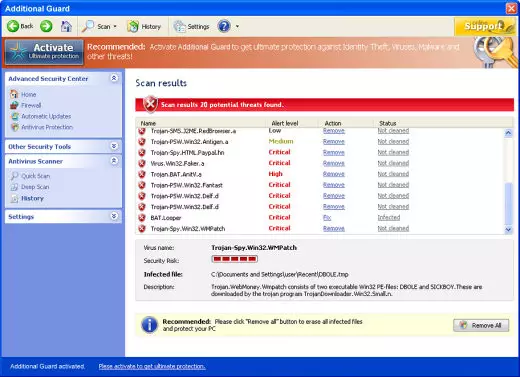
These tools like false anti-malware tools, system optimizers, or different apps rely on the deceiving aspect of these indications and system scans. You as a user see the scan and process that results in a list with issues displayed. However, there are real tools like FortectIntego that show real issues with the machine. And tools like SpyHunterCombo Cleaner or MalwarebytesMalwarebytes can remove any PUPs like this false anti-malware app.
PUP distribution requires a lack of attention from users
Making sure that your machine is free of any malware is a job and a habit that people should rely on. Downloading applications from random sites or torrent platforms, promotional websites is not advised. There are software bundling and other methods used for the distribution of the PUPs.
Users should rely on Advanced or Custom options when installing any programs, application, tools. Do not fall for the promotional advertisements and commercial sites that push various system apps. Going for the quick options leads to risks related to additional installations and silent PUP infections.
Get rid of the false tool and avoid system damage
The home page of this malicious software is additionalguard.net (can be other similar domains too). The website is potentially harmful because there are many false statements and fake reviews as well as the payment page of this bogus application. Do not visit this website. If you are constantly redirected to this website, your computer is likely infected.
As we have already said, do not purchase it! First of all, please use the removal guide below and remove suspicious files from your PC. Then scan your computer with a legitimate anti-spyware application to remove the remains or additionally downloaded malware.
Uninstall from Windows
Uninstall from Windows 10/8:
- Type Control Panel into the Windows search box and open the result.
- Under Programs, select Uninstall a program.


Uninstall from Windows 7/XP:
- Click on Windows Start > Control Panel (Windows XP users should click on Add/Remove Programs).
- In Control Panel, select Programs > Uninstall a program.


Remove the unwanted program:
- In the Programs and Features window, look for any recently installed suspicious entries, select them, and click Uninstall.
- If User Account Control appears, click Yes to confirm, then complete the removal.


Did this guide help?
Be the first to comment