

AlldataLocker – a file-encrypting virus which can be recognized from the “how to unlock your files.txt” ransom note
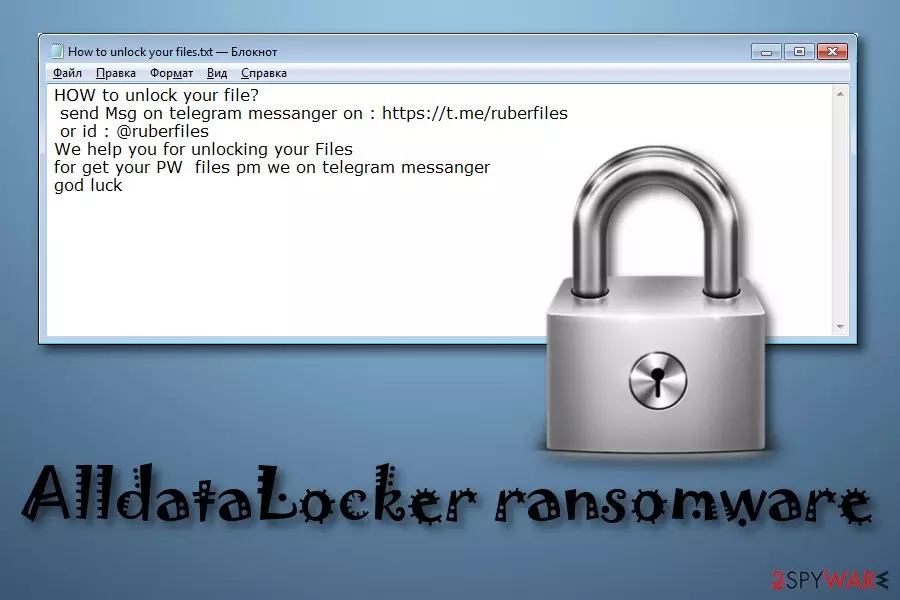
AlldataLocker is another ransomware virus which uses AES-256 encryption algorithm[1] to lock important files on the infected computer. This dangerous virus encrypts documents and adds the .lock appendix to each locked file. After that, a ransom message named “how to unlock your files.txt” is displayed. Crooks give their contacts which are https://t.me/ruberfiles or @ruberfiles. Victims are urged to contact the cybercriminals and discuss all matters that are related to the ransom price. Usually, criminals urge for a particular ransom in Bitcoin in exchange for a file decryption tool.
| Name | AlldataLocker |
|---|---|
| Category | Ransomware |
| Extension | .lock |
| Ransom note | “how to unlock your files.txt” |
| Contacts | https://t.me/ruberfiles, @ruberfiles |
| Cipher used | AES-256 |
| Original decryptor | Not available yet |
| Removal | Install FortectIntego to detect the threat |
AlldataLocker virus infiltrates the system through phishing messages which are dropped straightly to victims' email boxes by cybercriminals. If the victim opens the attachment that is clipped to such email, he/she gets the computer system infected by ransomware. However, you can take some precautionary measures that might help you to avoid ransomware infections, and we are going to discuss them in this article a little bit later.
Once installed, AlldataLocker ransomware starts modifying the Windows Registry section by creating fake registry entries that allow the virus to perform its own damaging activity. When files are encrypted, there is almost no chance to restore them by yourself as crooks use different algorithms each time they infect a different computer. Nevertheless, they store encryption and decryption keys on remote servers which are kept in reach only for the owners.
However, we still do not recommend paying the crooks. According to malware researchers from NoVirus.uk[2], users are very likely to get scammed if they fall for believing the fake promises that were made by the cybercriminals. Usually, all they do is wait for the money, and then run leaving the victim hopeless. Moreover, you can not track such transfers as they are done in cryptocurrency which allows the entire process to remain secret. Better perform the AlldataLocker removal ASAP to avoid further damaging consequences.
One of the main reasons to remove AlldataLocker virus is that it is necessary if wanted to get encrypted files back. You cannot restore encrypted data if the threat is still active, otherwise, the process will give no results as the encryption will be performed all over again. We suggest installing a reliable program such as FortectIntego to detect the cyber infection and carry on with the elimination.

Stay away from ransomware viruses
Ransomware is most commonly spread through phishing email messages. Such emails come with hazardous attachments that are related to the cyber infection. If you step on the attached component and open it, you are very likely to get your computer system infected with a dangerous virus. So, if you ever encounter a dubious-looking email message, better eliminate it and do not open any added attachments for your own and your computer's safety.
It is advisable to think about your valuable files too. We recommend storing copies of important documents on external devices, e.g. iCloud[3] or USB flash drive. This way the criminals will not be able to reach the data that is stored on another device, not the infected machine. Additionally, all users should invest in a reliable and expert-tested computer security software. If you do so, your PC system will be protected automatically from various computer infections.
Get rid of AlldataLocker ransomware
If you have spot files with the .lock extension and are wondering how to delete the infection that caused such damage, we recommend performing the AlldataLocker removal by using reliable anti-malware tools. Try installing FortectIntego, SpyHunterCombo Cleaner, or MalwarebytesMalwarebytes. After the process is finished, perform some system backups to fully disable the ransomware-type virus.
Moreover, it is important to know that you first need to remove AlldataLocker virus and then think about data recovery techniques. If you complete the process as required, take a look at some file restoring methods that we have provided below this text. We cannot fully guarantee that this third-party software will completely recover lost data but it is still worth a try.
Did this guide help?
Be the first to comment