

Alphabet ransomware virus: is it a real threat?
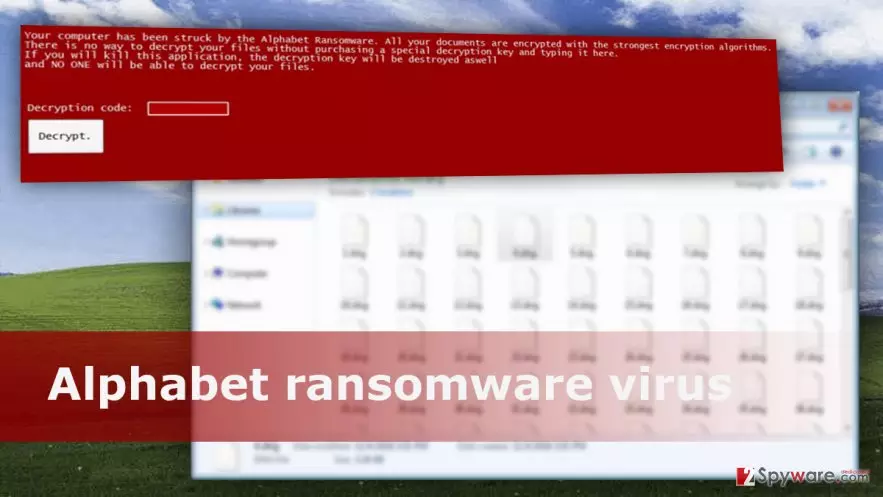
Computer users who tend to open any received spam email risk to encounter Alphabet virus. Ransomware-type[1] viruses are known as the most dangerous cyber threats nowadays; however, this piece of malware is still under development and cannot encrypt any files. After infiltration, it only locks affected computer’s screen and delivers a ransom-demanding message. Due to the lock screen, victims might be shocked or scared because they cannot access their PCs. Alphabet ransomware virus also informs about encrypted files and claims that decryption[2] is only possible with special decryption key. However, the same message includes the necessary key, so after ransomware attack victims only have to copy and paste it. It seems that it’s only a test version and hackers are just observing. Sooner or later they might strike again and launch a real and hazardous ransomware campaign. For this reason, you should remove Alphabet from the computer before it hasn’t caused any damage or encrypted your files. Scan your device with FortectIntego or other reputable anti-malware program and let it delete all malicious files.
Malware researchers started talking about this malware at the end of 2016. Even though there hasn’t been confirmed any cases when Alphabet malware encrypted files, the chances that it might happen soon are quite high. Hackers always create and spread crypto-malware[3] for some shady purposes[4], and, of course, the most important one is to swindle the money. However, on the affected computer this file-encrypting virus might change security settings and try to steal your personal data, such as credit card or bank account details if you decide to login or purchase something online using the infected device. Delaying Alphabet removal is not recommended because your computer’s system becomes vulnerable and other malware might use these flaws to hijack your device.
How can you get infected with ransomware?
Alphabet ransomware spreads like ordinary file-encrypting malware. It might infiltrate the system via malicious email attachment or infected link, exploit kits and bogus software downloads or updates. As you can see, there are many ways to get infected with ransomware. No one can be 100% secure from this cyber threat; however, taking some precautions[5] and minimizing the risk of the attack is a must. First of all, you should be careful with your emails. Never open spam emails and attached documents if you don’t know the sender or the message itself seems suspicious. Bear in mind that even safe-looking Word or PDF files might include malware. Secondly, never click on strange links or ads because they might be infected as well. If you receive a message from a friend that has strange link, before clicking it, ask him or her whether it’s safe or not. Thirdly, install and keep updated some security program. We recommend investing in the professional protection because your files are worth that. Lastly, you should backup files regularly and store them in the external devices. They will be valuable if you encounter Alphabet virus or other ransomware.
Alphabet removal instructions
Even though Alphabet Screenlocker virus is under development and cannot cause real damage, you should not let it stay inside. However, when hackers finish working on its updates and upgrades, malware can encrypt your files and ask for your money. So, you should not wait for this to happen. Remove Alphabet using one of these malware removal tools: FortectIntego, SpyHunterCombo Cleaner or MalwarebytesMalwarebytes. If your computer’s screen is locked and you cannot access any security tools, reboot your device to the Safe Mode with Networking and follow the instructions below. Once you can access your PC, install one of the previously mentioned programs, and run a full system scan. However, if some of your files are encrypted, try additional data recovery methods after Alphabet removal.
Did this guide help?
1 comment
Silvia
Such a strange ransomware project. Why do people create them? I dont understand